Heart Cropper
Upload an image, position it, and crop it into the exact heart shape.
Matches the exact heart shape from your reference image.
Crop Image Into Heart Shape Online – Free & Instant
Transform your ordinary photos into beautiful heart-shaped masterpieces in seconds. No design skills needed. 100% free, no watermarks.
Turn Your Photos Into Love Symbols
Let's be honest – we've all been there. You have this perfect photo, but it just needs that extra touch of personality. Maybe it's for Valentine's Day, an anniversary, or you simply want to show someone they're special. That's where cropping images into heart shapes comes in handy.
At ImageToolsZone.COM, we've made it ridiculously simple to crop image into heart shape online without needing Photoshop skills or expensive software. Whether you're creating a romantic gesture, designing social media content, or making personalized gifts, our heart shape image cropper has got your back.
💡 Why Heart-Shaped Photos?
Heart-shaped images aren't just cute – they're powerful. Studies show that visual content with emotional symbols gets 3x more engagement on social media. Plus, they're perfect for expressing feelings without saying a word.
What is Crop Image Into Heart Shape?
The Simple Explanation
Cropping an image into a heart shape means transforming your regular rectangular photo into a heart silhouette. Instead of those boring straight edges, your photo takes on the iconic curve and point of a heart. It's like giving your image a warm hug.
How It Actually Works
When you use a heart photo crop tool, the software identifies the heart-shaped boundary and removes everything outside of it. The result? Your photo fits perfectly within a heart outline, with transparent or customizable backgrounds depending on your needs.
Technical Magic Behind the Scenes
Modern heart shape image croppers use advanced masking technology. They create a precise heart-shaped alpha channel (that's tech-speak for transparency map) and apply it to your image. The best part? You don't need to understand any of this – just upload, adjust, and download.


How to Make a Heart Shaped Photo Online
Step-by-Step Guide That Actually Makes Sense
Step 1: Choose Your Perfect Photo
Not all photos work equally well for heart cropping. Here's what to look for:
- Center-focused subjects – Faces or objects in the middle work best
- Good lighting – Well-lit photos maintain quality after cropping
- Simple backgrounds – Less clutter means better heart shape visibility
- High resolution – Start with quality to end with quality
Step 2: Upload to ImageToolsZone
Head over to ImageToolsZone.COM and find our heart shape cropper. The interface is clean and intuitive – no confusing menus or hidden features. Just drag and drop your image, or click to browse your files.
Step 3: Position and Adjust
This is where the magic happens. You'll see your image inside a heart-shaped frame. Here's what you can do:
- Zoom in/out to get the perfect fit
- Pan around to position your subject exactly where you want
- Rotate if needed for that ideal angle
- Adjust border width for a framed look (optional)
Step 4: Customize Your Output
Make it yours with these options:
- Border color – Match your brand or mood
- Export format – PNG for transparency, JPEG for universal use, or WebP for modern web optimization
- Background choice – Transparent, white, or custom color
Step 5: Download and Share
Hit that download button, and boom – you've got your heart-shaped photo ready to go. Share it directly to WhatsApp, post it on Instagram, or use it in your next design project.
Best Free Heart Shape Image Cropper
Why ImageToolsZone Stands Out
Look, there are tons of image editing tools out there. But when it comes to making photo heart shape online, not all of them deliver. Here's what makes our tool different:
🚀 Lightning Fast
No waiting around. Upload, crop, download – all in under 30 seconds. We've optimized every step so you can create heart-shaped photos faster than you can say "I love you."
💰 Completely Free
No hidden fees, no premium tiers, no watermarks. What you see is what you get – a professional-quality heart shape image cropper that doesn't cost a dime.
📱 Works Everywhere
Whether you're on your phone, tablet, or desktop, our tool adapts perfectly. No app downloads, no installations – just open your browser and start creating.
🎨 Pro-Quality Results
Smooth edges, perfect curves, and crisp output. Our algorithm ensures your heart-shaped photos look professionally designed, not like a quick hack job.
🔒 Privacy First
Your photos are yours. We don't store, share, or misuse your images. Everything happens in your browser, and files are deleted immediately after processing.
Multiple Formats
PNG with transparency for designers, JPEG for everyday use, or WebP for web optimization. Choose what works best for your needs.
How We Compare to Other Tools
Most heart photo crop tools either charge you for basic features, slap ugly watermarks on your images, or produce pixelated results. We've eliminated all these frustrations. At ImageToolsZone.COM, we believe great design tools should be accessible to everyone.
Cut Photo Into Heart Shape in Seconds
Speed Meets Precision
Remember when editing photos took forever? Those days are over. Our tool lets you cut photo into heart shape faster than you can brew a cup of coffee. But speed doesn't mean sacrificing quality – we've engineered every feature for both efficiency and excellence.
The 10-Second Challenge
Here's a real-world scenario:
- Second 0-2: Drag your photo into the upload zone
- Second 2-5: Adjust the zoom to frame your subject perfectly
- Second 5-8: Fine-tune the position with a quick drag
- Second 8-10: Click download and you're done
Real-Time Preview
What you see is what you get. Our live preview updates instantly as you make adjustments, so there's no guesswork. No more "download and check" cycles – you'll know exactly how your heart-shaped photo will look before you even hit download.
Batch Processing Capability
Need to create multiple heart-shaped photos? No problem. While our tool processes one image at a time for optimal quality, the speed means you can crank out a dozen heart photos in the time it takes to scroll through your Instagram feed.
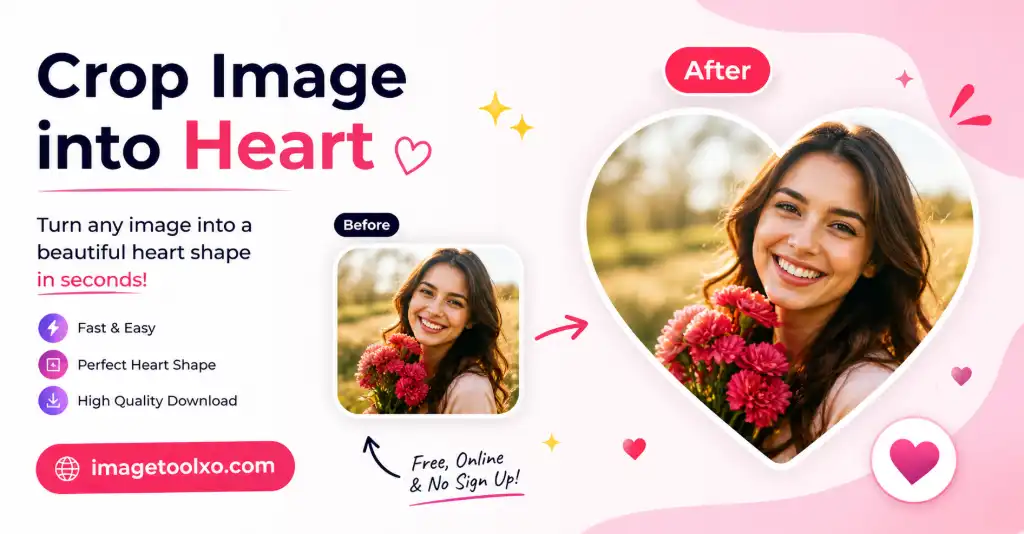
How to Use the Heart Shape Cropper
Detailed Walkthrough for Perfect Results
Getting Started
Navigate to ImageToolsZone.COM and locate the heart shape image cropper. The homepage is clean and straightforward – you can't miss it.
Upload Your Image
You've got two options:
- Click to browse: Click anywhere in the upload zone to open your file explorer
- Drag and drop: Simply drag your image file from your computer and drop it onto the upload area
We accept JPG, JPEG, PNG, and WebP formats up to 10MB in size.
Positioning Your Photo
Once uploaded, you'll see your image inside the heart frame. Here's how to perfect it:
Zoom Controls
Use the zoom slider or mouse wheel to adjust the size. Zoom in to focus on faces or details, zoom out to show more context. The sweet spot usually shows your main subject filling about 70-80% of the heart shape.
Panning
Click and drag anywhere on the image to reposition it. Want to center someone's face? Just drag until it's perfectly positioned. The tool remembers your adjustments in real-time.
Rotation (if needed)
Sometimes photos need a slight tilt. Use the rotation slider to angle your image for the best composition within the heart shape.
Customization Options
Border Width
Add a border around your heart for extra definition. Choose from 0px (no border) to 20px (bold frame). Perfect for making your photo pop against any background.
Border Color
Pick any color that matches your style. Classic white for elegance, red for romance, or any hex code for brand consistency.
Export Format Selection
- PNG (Transparent): Best for overlays, designs, and professional use
- JPEG (White Background): Universal compatibility, smaller file size
- WebP (Modern): Best quality-to-size ratio, perfect for websites
Download Your Creation
Once satisfied, click the "Download Cropped Image" button. Your heart-shaped photo will save to your device instantly. You can also use the "Share to WhatsApp" button for quick sharing.
Where to Use Heart Shape Photos
Endless Possibilities for Your Heart-Shaped Images
💌 Social Media Posts
Instagram, Facebook, Twitter – heart-shaped photos stand out in any feed. They're perfect for Valentine's Day posts, anniversary celebrations, or just showing love to your followers. Engagement rates on heart-shaped content are significantly higher than standard square or rectangular posts.
🎁 Personalized Gifts
Create custom mugs, t-shirts, phone cases, or photo albums with heart-shaped images. Print services love transparent PNGs, making our tool perfect for gift-making. Think about it – a heart-shaped photo of you and your partner on a custom pillow? That's relationship goals.
💍 Wedding & Event Invitations
Engagement announcements, save-the-dates, wedding invitations – heart-shaped photos add romance and personality. They work beautifully on both digital and printed invitations. Plus, they're trending in modern wedding design.
📱 Profile Pictures & Avatars
Stand out from the crowd with a heart-shaped profile picture. Great for dating apps, social media, or gaming profiles. It shows personality before anyone even reads your bio.
🎨 Digital Marketing
Brands use heart-shaped images for emotional marketing campaigns. They're perfect for Mother's Day promotions, Valentine's sales, or any campaign centered around love, care, and connection. E-commerce stores see higher click-through rates with heart-shaped product highlights.
🕯️ Memorial Tributes
Heart-shaped photos are commonly used in memorial posts, remembrance cards, and tribute videos. They symbolize eternal love and keep memories close to the heart – literally and figuratively.
📧 Email Newsletters
Add heart-shaped images to your email campaigns for special occasions. They break up text, add visual interest, and convey emotion better than words alone. Perfect for customer appreciation emails or seasonal promotions.
🎂 Greeting Cards
Whether digital or printed, heart-shaped photos make greeting cards more personal and meaningful. Birthday cards, thank you notes, or just-because cards – they all benefit from that heart touch.
Industry-Specific Applications
Photographers: Offer heart-shaped photo packages for couples and families
Teachers: Create Valentine's Day classroom materials with student photos
Real Estate Agents: Make "love at first sight" property showcases
Non-Profits: Use heart images for fundraising campaigns and awareness drives
Who Should Use This Tool
Perfect For...
💑 Couples & Romantic Partners
If you want to surprise your partner with something sweet, heart-shaped photos are your secret weapon. Create anniversary posts, Valentine's surprises, or just-because-I-love-you messages. It's the little gestures that count, and this takes about 30 seconds.
👨👩👦 Parents & Families
Capture family love in a unique way. Create heart-shaped photos of your kids for grandparents, make family reunion memorabilia, or document special moments. Parents especially love using these for milestone celebrations – first birthdays, graduations, or achievements.
📸 Content Creators & Influencers
Stand out in a crowded feed. Heart-shaped content performs well across platforms, and it shows your audience you put extra effort into your posts. Great for themed content series, Valentine's campaigns, or relationship-focused niches.
🎨 Graphic Designers
Sometimes you need a quick heart-shaped image for a client project. Instead of spending 20 minutes in Photoshop, use our tool and get back to the creative work that matters. Download as PNG with transparency for seamless integration into your designs.
🏢 Small Business Owners
Marketing on a budget? Heart-shaped photos add professionalism and emotion to your social media without hiring a designer. Perfect for service-based businesses, coaches, consultants, and anyone building a personal brand.
🎓 Students & Teachers
Create Valentine's Day cards for classmates, make classroom decorations, or design school project presentations. Teachers use heart-shaped photos for student appreciation posts and parent communications.
👵 Seniors & Non-Tech-Savvy Users
Our tool is designed for everyone, regardless of tech skills. If you can click and drag, you can create beautiful heart-shaped photos. No complicated tutorials, no confusing interfaces – just simple, intuitive design.
🎉 Event Planners
From weddings to birthday parties, heart-shaped photos add a personal touch to invitations, decorations, and favors. Create photo booth props, design event signage, or make memorable keepsakes for guests.
Key Features & Benefits
✨ Precision Heart Shape
Our heart template matches the perfect mathematical heart curve – not too pointy, not too round. It's the universally recognized heart shape that looks professional every time.
🎯 Smart Zoom & Pan
Fine-tune your image position with precision controls. Zoom from 50% to 200% and pan in any direction to get that perfect composition within the heart frame.
🌈 Custom Borders
Add borders from 0-20px in any color. Create contrast, match your brand, or keep it clean and borderless – you're in complete control.
📐 Multiple Export Options
PNG for transparency, JPEG for compatibility, WebP for modern web use. Choose the format that fits your needs without converting later.
⚡ No Registration Required
Start cropping immediately. No sign-ups, no email verification, no account creation. Your time is valuable – we respect that.
🔐 Browser-Based Security
All processing happens in your browser. Your images never leave your device, ensuring complete privacy and security.
📱 Mobile Optimized
Works flawlessly on phones and tablets. Create heart-shaped photos on the go, right from your mobile browser.
♾️ Unlimited Use
Crop one photo or one thousand – there are no limits. Free forever, no catches, no hidden restrictions.
🎁 Personalized Gifts
Create custom mugs, t-shirts, phone cases, or photo albums with heart-shaped images. Print services love transparent PNGs, making our tool perfect for gift-making. Think about it – a heart-shaped photo of you and your partner on a custom pillow? That's relationship goals.
Frequently Asked Questions
1. Is this heart shape image cropper really free?
Yes, 100% free. No hidden charges, no premium features locked behind paywalls, no watermarks. We believe everyone should have access to great design tools without financial barriers.
2. Do I need to create an account to use the tool?
Nope! Just visit ImageToolsZone.COM and start cropping. No registration, no login, no email required. We respect your time and privacy.
3. What image formats can I upload?
We accept JPG, JPEG, PNG, and WebP formats. The maximum file size is 10MB, which is more than enough for high-quality photos from any modern camera or smartphone.
4. Can I use the heart-shaped photos for commercial purposes?
Absolutely! Once you download your heart-shaped photo, it's yours to use however you want – personal projects, commercial work, client designs, anything. We don't claim any rights to your images.
5. Will my photos be stored on your servers?
No. All processing happens in your browser using client-side technology. Your images never leave your device, and we don't store anything. Your privacy is our priority.
6. What's the best image size for heart shape cropping?
Square images (1:1 ratio) work best because they fit the heart shape naturally. However, any rectangular image works fine – just adjust the zoom and position to frame your subject perfectly within the heart.
7. Can I adjust the heart shape itself?
The heart shape is fixed to maintain the perfect, universally recognized heart proportions. However, you have full control over zoom, position, rotation, border width, and border color to customize how your photo appears within the heart.
8. Which export format should I choose?
PNG with transparency is best for designs, overlays, and professional work. JPEG with white background works well for social media and general use. WebP offers the best quality-to-size ratio for websites and modern applications.
9. Does the tool work on mobile devices?
Yes! Our heart shape image cropper is fully responsive and works perfectly on smartphones, tablets, and desktops. The interface adapts to your screen size for the best experience on any device.
10. Can I crop multiple photos at once?
Currently, the tool processes one image at a time to ensure the highest quality and fastest performance. However, each crop takes only seconds, so you can quickly process multiple images in sequence.
11. What if I'm not happy with the result?
Simply refresh the page and start over. There's no limit to how many times you can use the tool. Experiment with different positions, zoom levels, and settings until you get exactly what you want.
12. Can I use this tool offline?
Currently, you need an internet connection to access the tool at ImageToolsZone.COM. However, once loaded, most processing happens locally in your browser for speed and privacy.
13. Is there a limit to how many photos I can crop per day?
No limits whatsoever. Crop one photo or one thousand – it's completely unlimited. We don't track usage or impose daily quotas.
14. Can I share directly to social media platforms?
We currently offer direct sharing to WhatsApp. For other platforms, simply download your heart-shaped photo and upload it to Instagram, Facebook, Twitter, or any other platform you use.
15. What browser works best with this tool?
Our tool works on all modern browsers including Chrome, Firefox, Safari, Edge, and Opera. For the best experience, make sure you're using the latest version of your preferred browser.
16. Can I save my settings for next time?
Currently, settings reset when you refresh the page. However, the tool is so quick and easy to use that you can recreate your preferred settings in seconds.
17. What if my photo looks pixelated after cropping?
This usually happens when you zoom in too much on a low-resolution image. Start with the highest quality photo possible, and avoid extreme zoom levels. If you need larger heart-shaped photos, use a higher resolution source image.
Ready to Spread Some Love?
Creating heart-shaped photos shouldn't be complicated or expensive. Whether you're surprising your partner, designing marketing materials, or just having fun with friends, our heart shape image cropper makes it effortless.
At ImageToolsZone.COM, we're committed to providing free, high-quality tools that make design accessible to everyone. No skills required, no money needed, no time wasted.
Join thousands of happy users who crop image into heart shape online every day. Your perfect heart-shaped photo is just seconds away.