
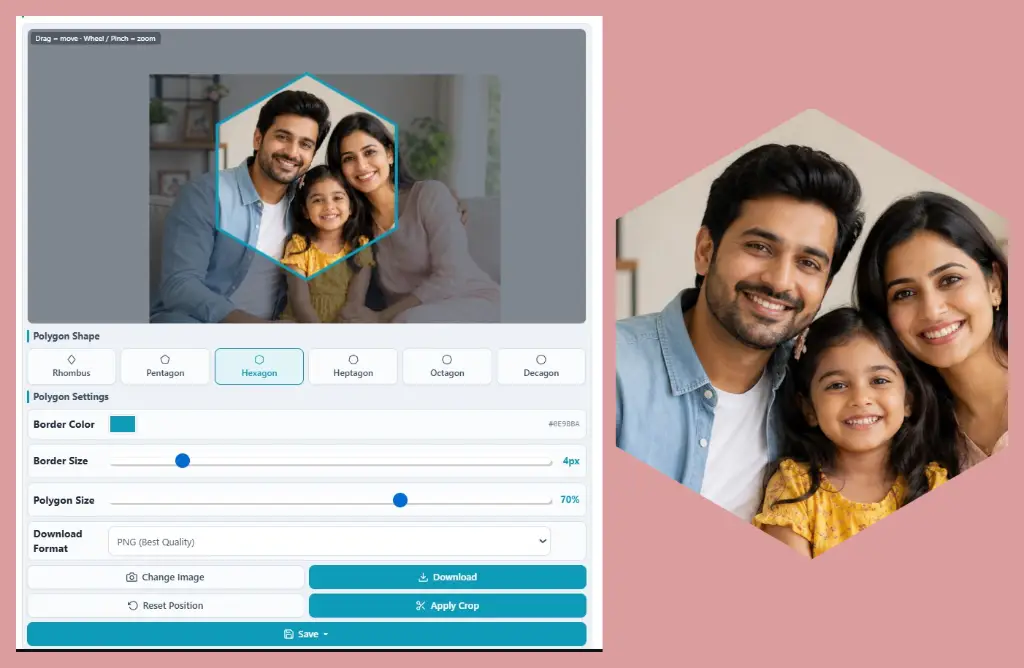
…or drag & drop an image here · panel auto-hides after selection
#0E9BBA1. Why Use a Polygon Shape Instead of a Rectangle?
Rectangles are safe. They're also everywhere — every photo card, every thumbnail, every banner. When your brain sees the same box a thousand times a day, it simply stops noticing. A pentagon or hexagon breaks that pattern instantly, which is why a geometric image crop feels fresh even though the photo underneath hasn't changed.
Polygon Image Crop Benefits That Actually Matter
Why Crop Image Into Polygon Shapes Works for Branding
Angles read as modern, precise and engineered — that's why tech and SaaS brands love them. A polygon image crop also trims distracting corners, pushing the eye toward the center of your subject. And unlike a basic free image cropper that only cuts straight edges, a polygon crop doubles as a design element, so one click does the job of two tools.
2. Best Uses of Polygon Crop Images
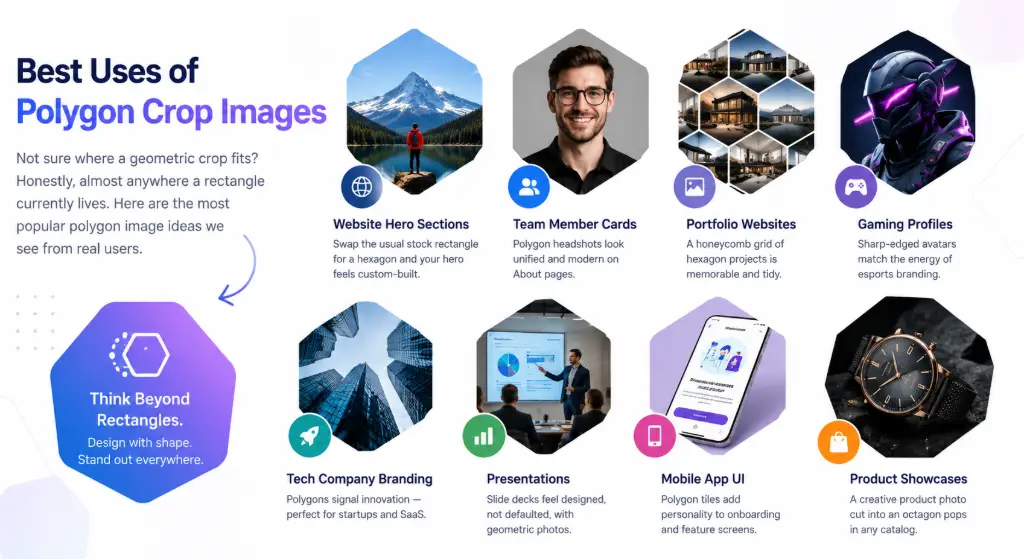
Not sure where a geometric crop fits? Honestly, almost anywhere a rectangle currently lives. Here are the most popular polygon image ideas we see from real users.
Where to Use Polygon Crop Designs
Website Hero Sections
Swap the usual stock rectangle for a hexagon and your hero feels custom-built.
Team Member Cards
Polygon headshots look unified and modern on About pages.
Portfolio Websites
A honeycomb grid of hexagon projects is memorable and tidy.
Gaming Profiles
Sharp-edged avatars match the energy of esports branding.
Tech Company Branding
Polygons signal innovation — perfect for startups and SaaS.
Presentations
Slide decks feel designed, not defaulted, with geometric photos.
Mobile App UI
Polygon tiles add personality to onboarding and feature screens.
Product Showcases
A creative product photo cut into an octagon pops in any catalog.
3. Polygon Crop for Social Media Graphics

Polygon Profile Picture & Post Ideas
Feeds are walls of circles and squares. Drop a polygon profile picture into that mix and people notice before they even know why. A polygon Instagram post works brilliantly for carousel covers, quote graphics and product teasers, while a polygon image for LinkedIn makes personal brands look sharp without feeling stiff.
Polygon Thumbnail Design for Every Platform
InstagramFacebookLinkedInPinterestX / Twitter
Use hexagons for profile-style graphics, pentagons for single hero images, and octagons for promo badges. If you also want soft, friendly vibes for the same campaign, pair polygon posts with a heart shape crop or a star shape crop — mixing shape languages keeps a feed lively.
4. Polygon Crop for Graphic Designers
Free Polygon Crop Tool & Geometric Image Editor Workflows
Designers rarely need a full raster suite just to mask a photo into a hexagon. A polygon crop for Photoshop alternative workflows saves the "open app → draw path → clip → export" loop. Use a free polygon crop tool for the quick mask, then drop the PNG straight into Figma, Canva or Illustrator as a ready-made asset.
Geometric Image Editor Use Cases
- Modern UI mockups
- Event posters
- Promotional flyers
- Business cards
- Magazine layouts
- Album & mixtape covers
5. Polygon Crop for Website Design
Polygon Images for Website & Modern Website Image Design
Open ten startup homepages and you'll spot the trend: geometric website images are everywhere. Honeycomb team grids, angled feature shots, octagon badges — polygon images for website layouts add rhythm that plain rectangles can't.
Where Modern Website Image Design Uses Polygons
- SaaS landing pages
- Tech startup heroes
- Agency portfolios
- Dashboard UI tiles
- Feature sections
- Pricing & badge graphics
Pair them with properly sized assets — our resize image to exact size guide helps keep layouts pixel-perfect and fast.
6. Polygon Crop for Product Photography
Polygon Product Image & Ecommerce Image Crop Ideas
Scroll any marketplace and every ecommerce image crop is the same white square. A polygon product image — a sneaker in an octagon, a watch in a hexagon — gives listings instant shelf presence. Use a bold border color that matches your brand, keep the background transparent, and reuse the same shape across your catalog so the whole range feels like one family. It's the cheapest creative product photo upgrade you'll ever make.
7. Best Polygon Shapes and Their Uses
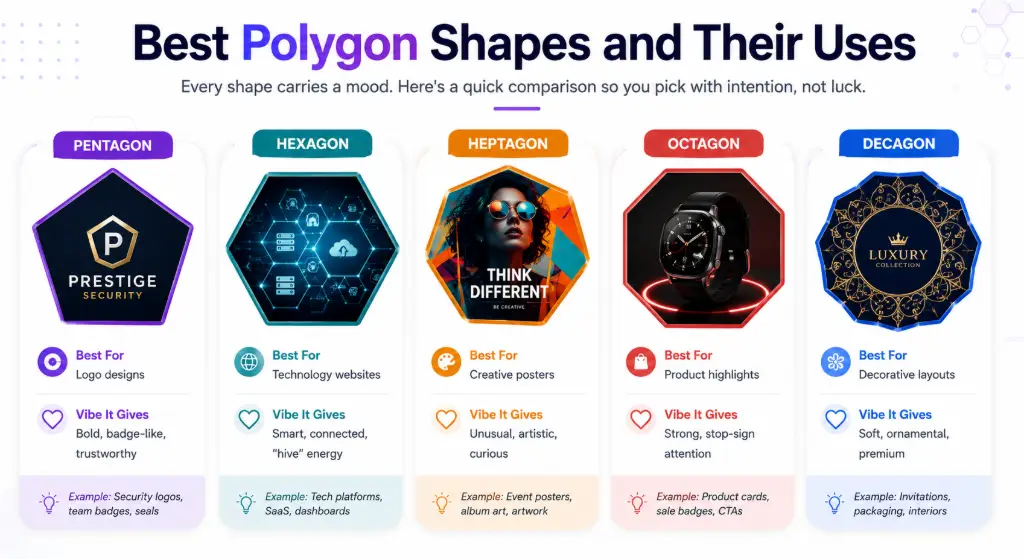
Every shape carries a mood. Here's a quick comparison so you pick with intention, not luck.
| Shape | Best For | Vibe It Gives |
|---|---|---|
| Pentagon | Logo designs | Bold, badge-like, trustworthy |
| Hexagon | Technology websites | Smart, connected, "hive" energy |
| Heptagon | Creative posters | Unusual, artistic, curious |
| Octagon | Product highlights | Strong, stop-sign attention |
| Decagon | Decorative layouts | Soft, ornamental, premium |
8. Polygon Crop vs Circle Crop vs Custom Shape Crop
Polygon vs Circle Crop — Which Is the Best Image Crop Shape?
Circles feel friendly and human — great for avatars. Polygons feel engineered and modern — great for brands. The best image crop shape simply depends on the message you're sending.
Custom Crop Comparison at a Glance
| Factor | Polygon Crop | Circle Crop | Custom Shape Crop |
|---|---|---|---|
| Visual appeal | Modern, edgy | Soft, classic | Playful, themed |
| Branding | Tech & SaaS | Personal brands | Seasonal campaigns |
| Social media | Posts & banners | Profile pictures | Story stickers |
| Posters, cards | Stickers, badges | Invitations | |
| Website UI | Honeycomb grids | Team avatars | Decorative accents |
| Transparency support | PNG / WebP ✔ | PNG / WebP ✔ | PNG / WebP ✔ |
Want something rounder but not a full circle? An oval shape crop is a lovely middle ground for portraits.
9. Polygon Crop for Students & Teachers
Polygon Images for Presentation & School Project Image Editing
A geometry lesson lands differently when the photos themselves are polygons. Teachers use polygon images for presentation slides to label sides and angles on real pictures, while students turn boring school project image editing into something that earns style points.
PowerPoint Image Crop Ideas by Subject
- Science projects (molecule-style hex grids)
- Geography (hex-map photo collages)
- Mathematics (shape & angle demos)
- Engineering (structure showcases)
- Architecture (design boards)
- History timelines (octagon markers)
10. Polygon Crop for Digital Marketing
Polygon Image Banner & Creative Ad Design
Ads live or die on the first glance. A polygon image banner breaks the rectangle monotony of ad feeds, and creative ad design with angled photo masks consistently feels more "designed" than flat banners. Marketers use marketing graphics like these across:
- Facebook Ads
- Google Display Ads
- Pinterest Pins
- LinkedIn banners
- Email newsletter headers
- Webinar promo cards
11. Polygon Crop for Logo Creation
Polygon Logo Image & Geometric Logo Design
Some of the world's most recognizable marks are basically polygons in disguise. A geometric logo design starts with a strong base shape: crop a texture, gradient or photo into a pentagon for a badge-style mark, or use a hexagon logo image for anything tech, crypto or community-driven. Every polygon logo image exports cleanly with a transparent background, so it drops straight into brand kits.
12. Transparent Polygon PNG
Transparent Polygon Image & Polygon PNG Creator Tips
Here's the part beginners miss: outside the polygon, your image should be empty, not white. A true transparent polygon image layers cleanly over any background color or photo. Use a polygon PNG creator workflow — crop, keep transparency, export PNG — whenever the image will sit on colored sections, gradients or overlays. Need the subject isolated first? Run it through a free background remover before cropping for a double-clean cut.
When to Export PNG vs JPG
PNG when you need transparency (logos, UI, overlays). JPG when the image stands alone on white (blogs, photos). WebP when page speed matters. More on formats below.
13. Polygon Crop for Gaming
Gaming Avatar Polygon & Esports Profile Picture Style
Gaming culture runs on sharp, aggressive geometry — just look at esports team logos. A gaming avatar polygon (hexagon or rhombus with a thick colored border) instantly reads as "player." An esports profile picture in a matching shape across your squad creates team unity, and a bold Discord profile design with polygon crops makes your server look professionally branded.
14. Polygon Crop for YouTube Creators
YouTube Thumbnail Design & Polygon Thumbnail Ideas
Thumbnails are billboards competing at 160 pixels wide. A polygon thumbnail element — your face in a tilted hexagon, a product in an octagon badge — adds contrast against YouTube's white/dark chrome. For creative thumbnail images, combine one polygon crop, one bold color and three words max. That's a YouTube thumbnail design formula that stays readable on mobile.
15. Polygon Crop for AI & Modern Design Trends
Geometric UI Design & Polygon Graphic Design in 2026
Look at any modern dashboard and you'll see geometric UI design everywhere: hex tiles, angled cards, faceted illustrations. Current modern design trends borrow from low-poly 3D and AI-generated art, and polygon graphic design fits SaaS interfaces, data dashboards and tech branding like a glove. Cropping real photos into polygons is the fastest way to join that visual language without touching a 3D tool.
Who Should Use a Polygon Crop Tool?
Designers
Quick masks without opening heavy software.
Marketers
Ad creatives and banners that break feed fatigue.
Students & Teachers
Slides and projects that look designed.
Ecommerce Sellers
Listings that stand out in a sea of white squares.
Content Creators
Thumbnails, avatars and channel art with edge.
Developers
Ready-made geometric assets for UI builds.
Top 25 Real-World Use Cases
Top 25 Real-World Use Cases for Polygon Images
Polygon Shape Selection Guide
| Your Goal | Pick This Shape |
|---|---|
| Friendly personal brand | Hexagon (soft symmetry) |
| Badge / shield feel | Pentagon |
| Maximum attention on a product | Octagon |
| Artistic, offbeat poster | Heptagon or Rhombus |
| Elegant decorative frame | Decagon |
| Honeycomb photo grid | Hexagon, always |
Best Export Format: PNG vs JPG vs WebP
PNG
Keeps transparency. Best for logos, UI, overlays. Larger files.
JPG
Smallest effort, universal support. Best for photos on solid backgrounds.
WebP
Modern & light. Best for fast-loading websites; supports transparency.
Whatever you choose, run heavy files through an image compressor before uploading, and use a lossless format converter when clients request a different format.
Design Tips for Professional-Looking Polygon Images
- Center the subject's focal point — eyes or product should sit mid-shape, not near a corner.
- Match border color to your palette — one brand color, used consistently, beats five random ones.
- Keep borders thin for elegance, thick for gaming/promos.
- Use one shape family per project — mixing hexagons and decagons randomly looks accidental.
- Start from a sharp source — an image enhancer pass rescues soft photos before cropping.
- Prefer transparent PNGs so shapes sit cleanly on any background.
Common Mistakes to Avoid
- Cropping tiny images, then stretching them (pixelation city).
- Placing faces right at a polygon corner — it feels like the shape is "cutting" them.
- Exporting JPG when you needed transparency (hello, white boxes).
- Using rainbow borders that fight the photo's colors.
- Ignoring page speed — huge PNGs slow websites; compress after export.
- Forgetting to reposition: drag the image so the story stays inside the shape.
How to Crop Image Into Polygon Shape Online Free – Step-by-Step Tutorial
Here's the full walkthrough using the free Polygon Crop Tool. No account, no upload waiting time — everything happens right in your browser.
Before / after check: the rectangle product shot feels like catalog filler; the octagon version (see the product image above) feels like an ad. Same photo — totally different weight.
Why Choose an Online Polygon Crop Tool Over Desktop Software?
- Nothing to install or update
- Works on phone, tablet & laptop
- No learning curve or layers panel
- Free, with no watermark
- Files never leave your device
- One-click shapes vs hand-drawn paths
Desktop apps are wonderful for deep editing — a professional image editor without watermark has its place. But for a single geometric crop, online wins on speed, every time.
Ready to Make Something Sharp?
Turn any ordinary photo into a scroll-stopping geometric asset in under a minute — free, instant, no watermark.
Try the Free Polygon Crop Tool →Frequently Asked Questions (FAQs)
What is a polygon image crop?
How do I crop an image into a hexagon?
Can I crop an image into a pentagon online?
Does polygon crop keep image quality?
Can I make a transparent polygon PNG?
Which polygon shape is best for logos?
Is polygon crop better than circle crop?
Can I crop JPG and PNG images into polygons?
Can I use polygon images on websites?
Is polygon cropping free?
Do my photos get uploaded to a server?
What's the difference between PNG, JPG and WebP exports?
Final Thoughts: Geometric Image Crop, Zero Hassle
Polygons are one of those rare design tricks that cost almost nothing and change almost everything. They sharpen your branding, tidy your layouts, and make ordinary photos feel intentional. And the best part? You can crop image into polygon shape online free whenever inspiration strikes — pick a shape, drag your subject into place, download, done. Start with one hexagon and watch how quickly rectangles start feeling boring.
Want more shape experiments? Try a rounded corners crop for a softer look, or explore the custom photo frame generator when your project needs extra flair.