What is an Oval Shape and Why Use It for Your Images?
Let's be honest – rectangular photos are everywhere. From social media profiles to professional portfolios, we're drowning in boxes. That's where oval-shaped images come in to save the day. An oval (or ellipse) is a smooth, curved shape that's wider than it is tall, creating a softer, more elegant look compared to harsh square or rectangular crops.
When you crop image to oval shape online free, you're not just changing the outline – you're adding sophistication, drawing focus to what matters most (usually faces), and giving your visuals that professional touch that makes people stop scrolling.
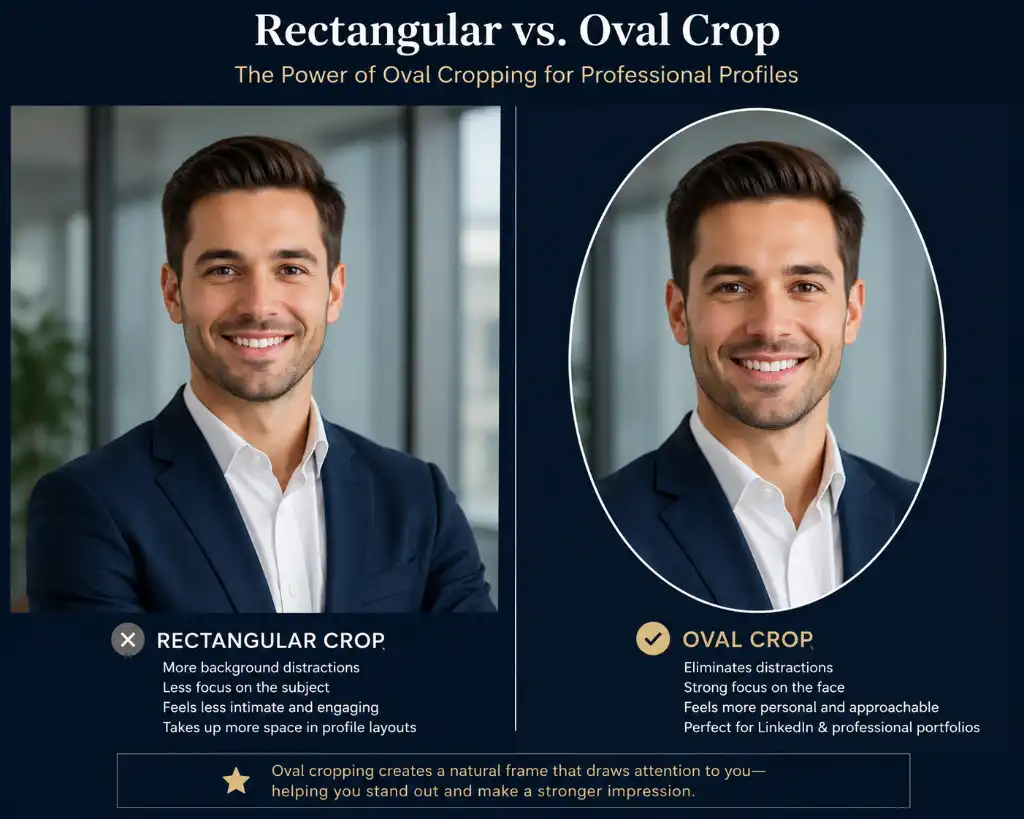
The Psychology Behind Oval Cropping
Here's something interesting: our brains naturally gravitate toward curved shapes. They feel more organic, friendly, and approachable. When you use an elliptical photo cropping tool online, you're tapping into this psychological preference. Oval frames soften edges, reduce visual tension, and create a natural focal point that guides the viewer's eye exactly where you want it.
Real-World Applications That Work
Think about the last time you updated your profile picture or created marketing materials. Chances are, you wanted to look polished without trying too hard. That's the magic of oval cropping – it does the heavy lifting for you. Whether you're a freelancer building your brand, a small business owner creating product showcases, or just someone who wants their Instagram feed to look cohesive, oval-shaped images add that extra layer of professionalism.
Related Tools You Might Need:
- Circle Crop Image Tool – Perfect for creating perfectly round profile pictures
- Free Background Remover – Remove backgrounds before oval cropping for clean results
- Round Image Corners – Alternative soft-edge cropping option
- Professional Image Editor – Advanced editing without watermarks
How to Crop Image to Oval Shape: Your Complete Guide
Ready to transform your photos? Here's the good news: cropping pictures into oval shapes doesn't require Photoshop skills or expensive software. Our crop picture to oval shape free no registration tool makes it stupidly simple. Let me walk you through exactly how it works.
Step-by-Step Process (Takes Less Than 60 Seconds)
Step 1: Upload Your Image
Drag and drop your photo or click to browse. We accept all major formats – JPG, PNG, WEBP, you name it. The tool instantly loads your image into the workspace.
Step 2: Adjust the Oval
Use the intuitive sliders to customize width (radius X) and height (radius Y). Want a perfect ellipse? Adjust both. Prefer something more circular? Make them equal. You're in complete control.
Step 3: Position & Rotate
Drag the oval anywhere on your image to frame the perfect shot. Need to tilt it? Use the rotation feature to match your composition. Choose whether to rotate just the oval or the entire image.
Step 4: Customize & Download
Add borders, shadows, or change the background. When you're happy, hit download. Choose PNG for transparency or JPG for smaller file sizes. That's it!
Pro Tips for Perfect Oval Crops
- Face positioning: Keep faces centered with eyes positioned in the upper third of the oval for the most flattering result
- Aspect ratio matters: For profile pictures, a slightly taller oval (like 4:5 ratio) often looks better than a perfect circle
- Leave breathing room: Don't crop too tight – give your subject some space around the edges
- Use shadows wisely: A subtle drop shadow (5-10px blur) adds depth when placing oval images on colored backgrounds
Advanced Features You'll Actually Use
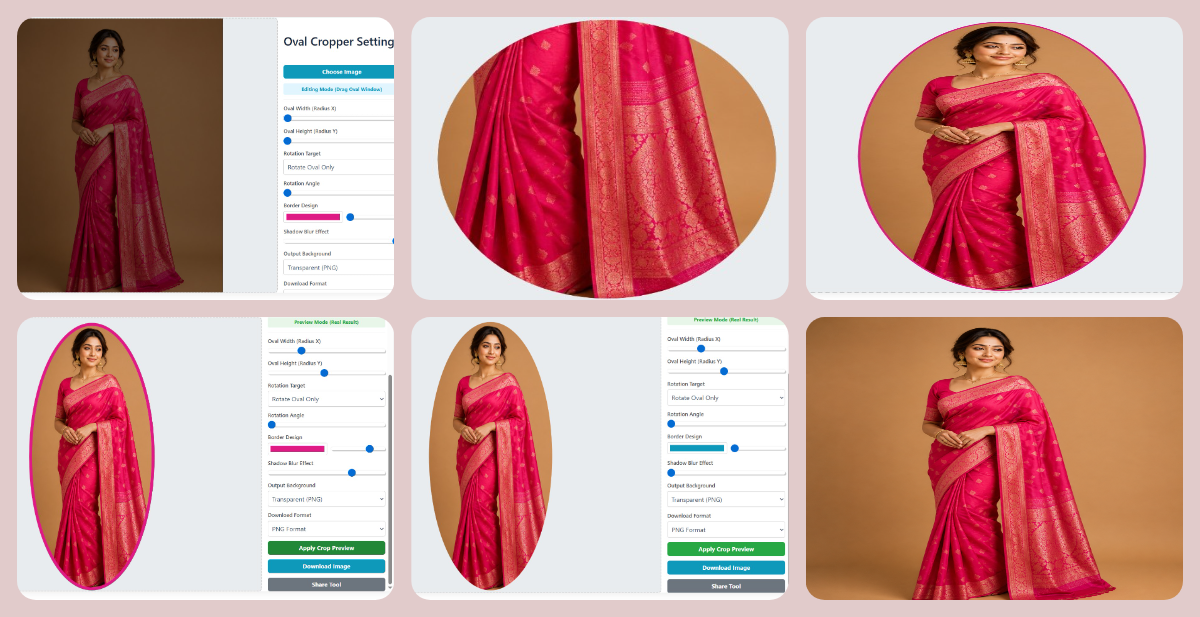
Most cropping tools give you basic functionality and call it a day. We went further. Here's what sets our circular image cut-out editor free apart:
Smart Rotation Options
Rotate just the oval frame while keeping your image straight, or rotate everything together. This is perfect for creating dynamic compositions or matching existing design elements.
Border Customization
Add colored borders (0-20px width) in any color. Want a white border for that classic framed look? Done. Prefer a bold color to match your brand? Easy.
Shadow Effects
Apply realistic drop shadows (0-30px blur) to make your oval images pop off the page. This is especially useful for creating product mockups or layered designs.
Background Control
Choose transparent backgrounds (PNG), solid white/black, or any custom color. This flexibility means your oval images work anywhere – websites, presentations, social media, you name it.
Enhance Your Workflow:
- Resize Image to Exact Size – Get perfect dimensions after cropping
- Image Compressor – Reduce file size without quality loss
- Convert Image Format – Switch between PNG, JPG, WEBP seamlessly
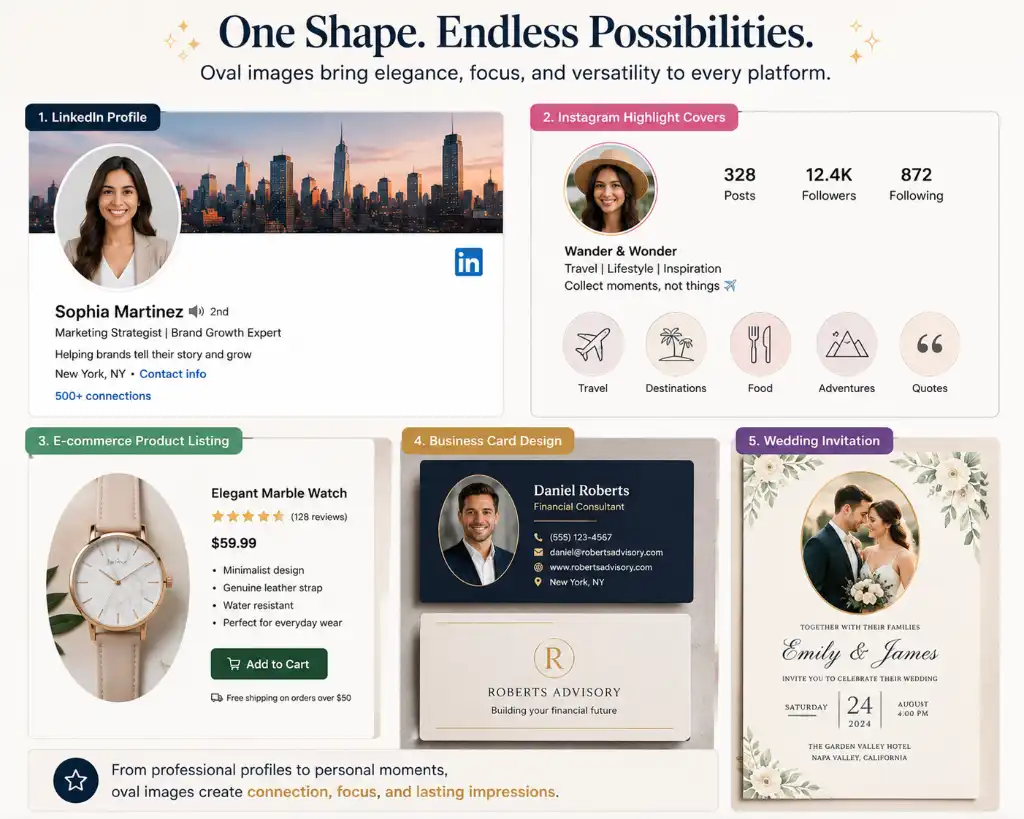
Where to Use Oval-Shaped Images (Real Examples)
You might be wondering, "Where exactly should I use these oval images?" Great question. Let me give you practical examples that actually work in the real world.
Social Media & Personal Branding
LinkedIn Profiles
Stand out in a sea of square headshots. Oval crops look more professional and approachable, perfect for making connections.
Instagram Highlights
Create cohesive highlight covers with oval-shaped product shots or personal photos for a polished feed aesthetic.
Twitter/X Bios
While the platform shows circles, uploading an oval gives you more control over what appears in the final crop.
Personal Websites
Add personality to your about page with oval team photos or founder portraits that feel less corporate.
E-commerce & Product Photography
Online sellers, this one's for you. Oval product images create visual interest in catalogs and can help items stand out in crowded marketplaces like Etsy, Amazon, or Shopify stores.
- Jewelry displays: Oval frames complement necklaces, pendants, and rings beautifully
- Cosmetics: Soft edges work perfectly for beauty products and skincare items
- Food photography: Create elegant menu images or recipe blog featured photos
- Handmade crafts: Give your artisanal products that boutique feel
Marketing & Design Projects
Designers and marketers love oval images because they break up the grid. Use them in:
- Email newsletters to highlight testimonials or team members
- Presentation slides for a modern, clean look
- Brochures and flyers to create visual hierarchy
- Business cards for memorable personal branding
- Event invitations (weddings, corporate events, parties)
Who Should Use This Oval Cropping Tool?
Honestly? Almost anyone who works with images. But let's get specific about who benefits most from knowing how to make oval shaped image online free.
Perfect For:
🎯 Target Users
Create consistent, eye-catching content that stops the scroll
Professional product photos without hiring a designer
Polished personal branding that builds trust
Unique featured images and author photos
Quick client proofs and portfolio presentations
Uniform employee directory photos
Stand-out resumes and application materials
Attractive product listings that convert
Why These Groups Love It
The common thread? Everyone here needs to look professional but doesn't always have the time, budget, or design skills for complex software. That's exactly why we built this tool – to democratize good design.
No more awkward rectangular headshots that feel outdated. No more paying designers $50 for a simple crop. No more downloading sketchy software that might harm your computer. Just upload, adjust, download. Simple as that.
Complete Your Image Toolkit:
- Custom Shape Crop Tool – Crop into hearts, stars, polygons, and more
- Auto Crop for E-commerce – AI-powered product photo optimization
- Add Watermark – Protect your oval-cropped images
- Overlay Images – Layer multiple images creatively
Key Features That Make This Tool Different
100% Free, No Hidden Traps
Let's address the elephant in the room: yes, it's actually free. No "free trial" that requires a credit card. No watermarks slapped on your downloads. No daily limits. We believe good tools should be accessible to everyone.
No Registration Required
We don't need your email. We don't need you to create an account. We don't even track what you crop. Upload your image, do your thing, download, and go. Your privacy matters.
Browser-Based & Lightning Fast
Everything happens in your browser. No uploads to servers, no waiting for processing. This means faster results and better security. Your images never leave your computer.
Professional-Grade Controls
Don't let the simplicity fool you. Under the hood, you get precise control over every aspect: exact dimensions, rotation angles, border widths, shadow intensity, and color selection. It's simple for beginners but powerful enough for pros.
Mobile-Friendly Design
Need to crop an image on your phone? No problem. Our responsive design works perfectly on tablets and smartphones. Create professional oval images from anywhere.
Multiple Export Options
Download as PNG with transparent backgrounds for maximum flexibility, or JPG for smaller file sizes. Choose quality settings that match your needs.
Advanced Techniques for Power Users
Once you've mastered the basics, try these advanced techniques to take your oval cropping to the next level:
Create Layered Compositions
Crop multiple images to oval shapes with transparent backgrounds, then layer them in design software for dynamic collages or team photos.
Match Brand Colors
Use the border color picker to match your exact brand hex codes. Consistency across all your visuals builds recognition.
Batch Processing Workflow
While our tool processes one image at a time, you can speed up workflow by: opening multiple browser tabs, using consistent settings across images, and downloading in batches.
Optimize for Different Platforms
- LinkedIn: 400x400px oval with subtle shadow
- Instagram: 1080x1080px with white border for grid consistency
- Website headers: Wider ovals (3:2 ratio) for hero sections
- Print materials: High-resolution PNG at 300 DPI
Frequently Asked Questions
Yes, 100% free! There are no hidden fees, no premium tiers, and no watermarks. You can crop as many images as you need without paying a cent. We believe professional image editing tools should be accessible to everyone.
Nope! No registration required. Just visit the page, upload your image, crop it to an oval shape, and download. No email address, no password, no hassle. Your privacy is important to us.
We support all major image formats including JPG, JPEG, PNG, WEBP, GIF, and BMP. The tool automatically detects and processes your image regardless of the format.
Absolutely! Simply select "Transparent (PNG)" from the Output Background dropdown menu. This is perfect for creating overlays, layering images, or using your oval crop on any colored background.
No limits whatsoever! Crop one image or one thousand – it's completely up to you. The tool is designed to handle unlimited use without restrictions.
The tool can handle images up to 300 pixels for both width and height radius adjustments. Most standard photos work perfectly. If you have extremely large images, we recommend resizing them first using our resize tool.
Yes! You have full rotation control from 0 to 360 degrees. You can choose to rotate just the oval frame while keeping your image straight, or rotate both the image and oval together for creative compositions.
No, your images never leave your device. All processing happens locally in your browser using HTML5 Canvas technology. This means faster processing and complete privacy – we never see or store your images.
Definitely! Use the Border Design controls to add borders from 0 to 20 pixels in any color you want. This is great for creating framed effects or matching your brand colors.
Yes! Our tool is fully responsive and works perfectly on all devices – desktop computers, laptops, tablets, and smartphones. The interface automatically adjusts to fit your screen size.
A circle has equal width and height (perfect round shape), while an oval (ellipse) can have different width and height dimensions, creating an elongated round shape. Oval cropping gives you more flexibility to match your composition needs. Try our circle crop tool if you need perfect circles.
Currently, the tool processes one image at a time to ensure quality and give you full control over each crop. However, the process is so quick (usually under 30 seconds per image) that you can easily crop multiple images in succession.
Your downloaded image maintains the original quality and resolution. For PNG files, you get lossless compression. For JPG, you can choose quality settings up to 100% for maximum fidelity.
Yes! You can use the oval images you create for any purpose – personal, commercial, client work, everything. There are no licensing restrictions on the images you create with our tool.
For a perfect oval that's symmetrical, set the Width (Radius X) and Height (Radius Y) to the same value. For an elongated oval, make one value larger than the other. The preview updates in real-time so you can see exactly what you're creating.
No worries! Simply upload the original image again and start fresh. All adjustments reset when you load a new image. You can also use your browser's back button or refresh the page to start over.
Yes! Use the Shadow Blur Effect slider (0-30px) to add realistic drop shadows. This creates depth and makes your oval images stand out, especially when placed on colored backgrounds or layered designs.
PNG is better if you need transparency or want lossless quality (larger file size). JPG is better for photos where you want smaller file sizes and don't need transparency. Choose based on your specific needs.
Completely safe. Since all processing happens in your browser and images are never uploaded to any server, your photos remain private and secure on your device. We never see, store, or share your images.
Absolutely! Use the "Share Tool" button to share via social media, email, or copy the link. We'd love for you to spread the word about this free resource.
Ready to Create Stunning Oval Images?
Join thousands of users who trust our free oval cropping tool for their professional images. No registration, no watermarks, no limits.
Start Cropping Free Now