
📋 On This Page
Rotate and Flip Image Online Free – Instant Browser Editor, Zero Uploads, No Quality Loss
Need to turn a sideways photo, rotate a picture, or mirror an image? Our rotate and flip image online free tool lets you change image orientation directly in your browser without uploading anything to servers. Whether you're fixing a photo taken in the wrong direction, creating a mirror effect for creative projects, or preparing images for social media, this instant browser-based editor handles it all with zero quality loss.
Unlike traditional photo editors that require software installation or cloud uploads, our tool processes everything locally on your device. This means your photos stay private, the editing happens instantly, and you maintain full control over your images. The tool supports common image formats including JPG, PNG, GIF, and WEBP, making it perfect for photos, graphics, screenshots, scanned documents, and everyday image files.
Why Our Rotate and Flip Image Online Free Tool Stands Out
When you need to rotate image online free without uploading sensitive photos or confidential documents, privacy matters. Our tool processes everything on your device using modern browser technology, which means your images never leave your computer. This local processing approach not only protects your privacy but also delivers faster results since there's no upload or download time.
Whether you're a professional photographer fixing orientation issues from a shoot, a social media manager preparing content for different platforms, or just someone who accidentally took a photo sideways, this tool eliminates the hassle of opening heavy desktop software. The interface is clean, intuitive, and designed for speed—you can rotate picture 90 degrees online free in literally seconds.
Zero Uploads, Complete Privacy
Your images never leave your device. All processing happens locally in your browser using client-side technology, ensuring complete privacy and security for your photos.
Instant Processing
No waiting for uploads or downloads. Rotate and flip images instantly with real-time preview, so you see results immediately before downloading.
Precise Control
Rotate left, right, 180 degrees, or use custom angles. Flip horizontally or vertically. Get exactly the orientation you need with pixel-perfect precision.
Works on Any Device
Use on desktop, laptop, tablet, or smartphone. The responsive interface adapts to your screen, making it easy to rotate sideways photo online from anywhere.
Multiple Format Support
Handle JPG, PNG, GIF, and WEBP files with ease. Perfect for photos, graphics, screenshots, memes, and web images without format conversion hassles.
No Quality Loss
Maintain original image quality with smart processing that avoids unnecessary re-compression. Your photos stay crisp and clear after rotation or flipping.
How to Use the Rotate and Flip Image Tool
Getting your images oriented correctly doesn't require technical expertise. We've designed this rotate and flip image online free tool to be as simple as possible while offering professional-level control. Here's exactly how to use each feature:
Select Your Image
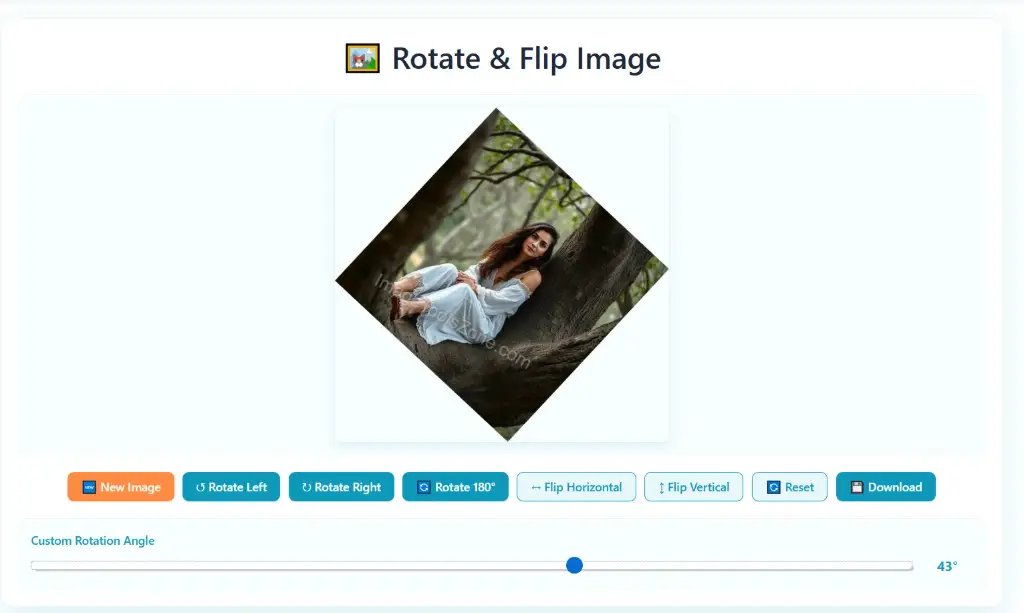
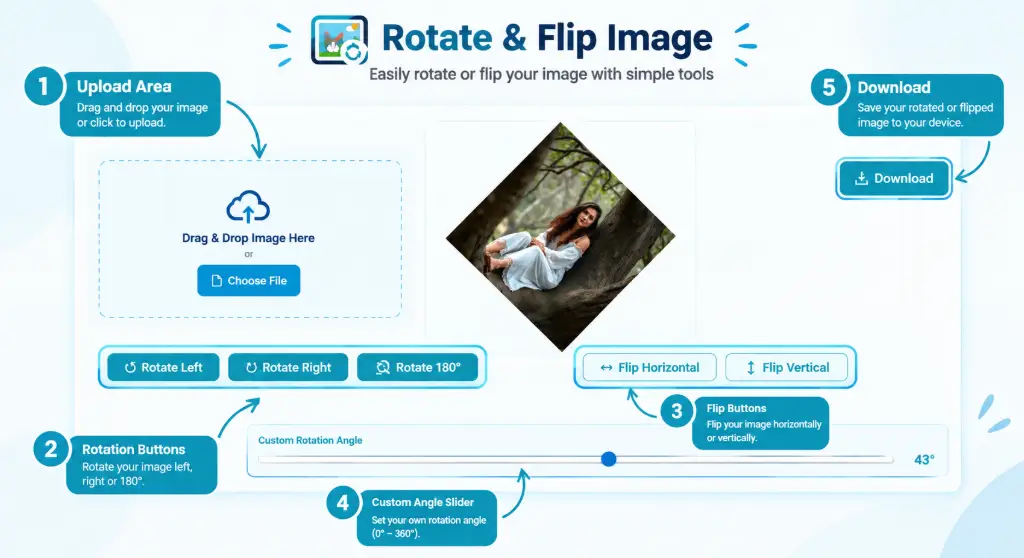
Click the upload area or simply drag and drop your image file into the tool. You can also paste an image directly from your clipboard. The tool instantly loads your image and displays it in the workspace, ready for editing.
Choose Rotation Direction
Use the Rotate Left button to turn your image 90 degrees counterclockwise, or Rotate Right for 90 degrees clockwise. If your photo is upside down, click Rotate 180° to flip it completely. Each rotation happens instantly with a smooth preview.
Flip for Mirror Effects
Need to flip image horizontally online free? Click the Flip Horizontal button to create a mirror image that switches left and right sides—perfect for fixing selfie orientations or creating artistic effects. Use Flip Vertical to reverse the image from top to bottom, useful for creating reflection effects or correcting scanned documents.
Custom Rotation Angle
For precise adjustments beyond standard 90-degree increments, use the Custom Rotation Angle slider. Drag to any angle between 0-360 degrees. This is ideal for straightening slightly tilted photos or achieving specific creative angles that standard rotations can't provide.
Preview and Download
Check the real-time preview to ensure your image looks exactly right. Once satisfied, click the Download button to save your rotated or flipped image. The file maintains its original format and quality, ready to use immediately.
Understanding Rotation vs. Flipping: What's the Difference?
Many people confuse rotating and flipping images, but they serve different purposes. Understanding when to use each transformation helps you achieve the exact result you need.
Rotation: Turning Your Image Around a Center Point
When you rotate JPG image online free or handle any other format, you're turning the entire image around its center point. Think of it like spinning a photograph on a table:
- 90-degree rotation changes portrait orientation to landscape (or vice versa). This is what you need when your phone photo appears sideways.
- 180-degree rotation turns the image completely upside down. Useful for photos taken with the camera held incorrectly or scanned documents loaded backwards.
- 270-degree rotation (or rotating left 90 degrees) provides the opposite effect of a right rotation.
- Custom angles let you rotate by any degree, perfect for straightening horizon lines in landscape photos or correcting slight tilts.
Flipping: Creating Mirror Images
Flipping creates a mirror reflection of your image, which is completely different from rotation. When you use a mirror image converter or mirror photo tool:
- Flip Horizontal switches the left and right sides. Text becomes reversed, and people face the opposite direction. This is essential for mirror a photo online without software when fixing selfie camera reversals.
- Flip Vertical reverses top and bottom. Less common but useful for creating water reflections, artistic effects, or correcting images that were scanned upside down and mirrored.
Rotate 90°
Fix sideways photos instantly
Rotate 180°
Turn upside-down images right
Flip Horizontal
Create mirror image effects
Flip Vertical
Reverse top to bottom
Real-World Example: When to Rotate vs. Flip
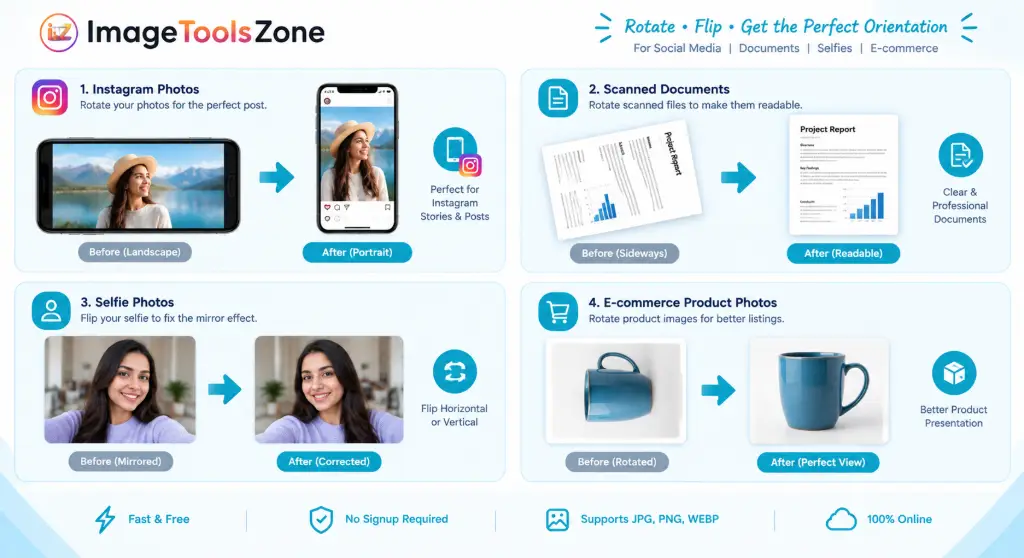
Imagine you took a selfie with your phone's front camera, and the text on your shirt appears backwards. You don't need to rotate the image—you need to flip image horizontally online free to correct the mirror effect that front cameras create.
On the other hand, if you photographed a document and it appears sideways on your screen, you'd rotate picture 90 degrees online free to make it readable, not flip it.
Supported Image Formats: JPG, PNG, GIF, and WEBP
Our rotate and flip image online free tool handles all the major image formats you encounter daily. Whether you're working with photos from your camera, screenshots from your computer, graphics from the web, or animated images, we've got you covered.
JPG/JPEG Images
The most common photo format worldwide. Perfect for rotate JPG image online free operations on camera photos, smartphone pictures, and web images. Our tool preserves JPG quality without introducing additional compression artifacts.
PNG Images
Ideal for graphics with transparency, screenshots, and images requiring lossless quality. When you rotate PNG image online free, the transparency is maintained perfectly, making it great for logos, icons, and web graphics.
GIF Images
Supports both static and animated GIFs. Rotate or flip meme images, simple animations, and graphics. Note that animated GIFs will maintain their animation after transformation.
WEBP Images
Modern web format offering superior compression. Perfect for rotating images optimized for websites and social media while maintaining smaller file sizes.
Ready to Fix Your Image Orientation?
Stop struggling with sideways photos and upside-down images. Our free tool makes it simple to change photo orientation online free in seconds, with no watermarks, no registration, and no quality loss.
Start Rotating Images NowWhen Should You Use This Image Rotation Tool?
The applications for a reliable rotate and flip image online free tool extend far beyond just fixing accidentally sideways photos. Here are real-world scenarios where this tool saves time and frustration:
Photography and Personal Use
- Fix smartphone photos: Phones don't always detect orientation correctly, leaving you with sideways vacation photos or portrait shots that need a quick rotate sideways photo online fix.
- Correct camera mistakes: When you hold your camera incorrectly or forget to check orientation during a shoot, batch-rotate multiple images to fix them quickly.
- Prepare photos for printing: Ensure all images are correctly oriented before sending them to a print service or creating photo books.
- Organize photo albums: Standardize orientation across all images in a collection for a professional, consistent look.
Social Media and Content Creation
- Optimize for different platforms: Instagram prefers square or vertical images, while Facebook and Twitter work better with landscape. Rotate images to match platform requirements.
- Create mirror effects: Use mirror image online features to create interesting visual effects for posts, stories, and advertisements.
- Fix selfie orientation: Front-facing cameras often create mirrored images. Flip them horizontally to show yourself as others see you.
- Prepare thumbnails: Ensure video thumbnails and featured images are correctly oriented before uploading to YouTube, blogs, or websites.
Business and Professional Use
- Scan document correction: Scanned documents sometimes load sideways or upside down. Quickly rotate PNG image online free or JPG scans to make them readable.
- Product photography: E-commerce sellers need consistent image orientation across all product photos. Standardize everything with quick rotations.
- Real estate listings: Property photos must display correctly. Fix orientation issues before listing homes or commercial spaces.
- Marketing materials: Ensure flyers, brochures, and digital ads have images oriented correctly for maximum impact.
Creative and Artistic Projects
- Create symmetrical designs: Use horizontal flip to create mirror-image compositions for artistic projects, logos, or patterns.
- Generate reflections: Flip images vertically and combine with originals to create water reflection effects or surreal compositions.
- Experiment with perspectives: Rotate images to unusual angles for creative photography presentations or abstract art.
- Fix composition issues: Sometimes rotating an image slightly can dramatically improve its visual balance and appeal.
Can You Rotate Images Without Losing Quality?
This is one of the most common concerns when editing images, and it's crucial for anyone working with rotate and flip image online free tools. The answer depends on the type of rotation and the format you're using.
Lossless Rotation (90°, 180°, 270°)
When you rotate an image by exact multiples of 90 degrees, the transformation is mathematically lossless. The pixel data is simply rearranged—no pixels are created, destroyed, or interpolated. This means:
- Perfect quality preservation: A 90-degree rotation of a JPG, PNG, or any format maintains identical image quality to the original.
- No re-compression artifacts: Our tool avoids unnecessary re-encoding for standard rotations, keeping your images crisp.
- Metadata retention: EXIF data, creation dates, and other metadata remain intact.
Custom Angle Rotation
When rotating by non-standard angles (like 15 degrees or 37 degrees), the software must interpolate pixels to fill in the gaps created by the rotation. This can introduce:
- Minor quality loss: Slight blurring or softening at the edges where new pixels are calculated.
- Increased file size: The image canvas may expand to accommodate the rotated corners, adding empty space.
- Anti-aliasing: Smooth edges are created to prevent jagged lines, which slightly alters pixel values.
Format-Specific Considerations
PNG and GIF: These formats use lossless compression, so rotating them maintains perfect quality regardless of angle (though custom angles still require pixel interpolation).
JPG: Since JPG uses lossy compression, each save can potentially reduce quality. However, our tool minimizes this by:
- Using high-quality export settings (95-100% quality)
- Avoiding multiple consecutive rotations without downloading
- Preserving the original compression level when possible
Best Practices for Quality Preservation
- Work from originals: Always rotate from the original file, not a previously edited version.
- Use standard angles when possible: Stick to 90°, 180°, or 270° rotations for guaranteed lossless results.
- Download after each major edit: If making multiple changes, download between sessions to avoid cumulative quality loss.
- Choose PNG for multiple edits: If you plan to edit an image multiple times, convert to PNG first to avoid JPG's generational loss.
Why Choose Our Online Image Rotator Over Desktop Software?
You might be wondering why you should use an online tool when programs like Photoshop, GIMP, or even basic Paint can rotate images. Here's why our rotate and flip image online free tool is often the better choice:
No Cost, No Subscription
Forget expensive software licenses or monthly subscriptions. Our tool is completely free with no hidden fees, no premium tiers, and no watermarks on your images.
No Installation Required
Don't waste time downloading and installing bulky software. Access the tool instantly from any browser on any device—perfect for quick edits on borrowed computers or work machines.
Privacy-First Approach
Unlike many online tools that upload your images to servers, we process everything locally. Your photos never leave your device, making it safe for sensitive or personal images.
Faster Workflow
Opening Photoshop just to rotate one image is overkill. Our tool loads in seconds, processes instantly, and gets you back to what you were doing without software bloat.
Mobile-Friendly
Desktop software doesn't work well on phones or tablets. Our responsive design lets you rotate image online free without uploading from any device, anywhere.
No Learning Curve
Complex software requires tutorials and practice. Our interface is intuitive—click a button, see the result, download. That's it. Perfect for non-technical users.
Complementary Tools for Complete Image Editing
After rotating or flipping your image, you might need additional edits. Our suite of free image tools works seamlessly together to handle all your editing needs without requiring multiple software programs or paid services.
For instance, after using our rotate and flip tool, you might want to:
- Crop your image to remove unwanted edges or focus on the main subject
- Resize it to specific dimensions for social media or web use
- Compress the file to reduce size without visible quality loss
- Convert formats if you need to switch from JPG to PNG or vice versa
Need more advanced edits? Try our professional image editor for comprehensive adjustments, or use the background remover to isolate subjects after rotating your image.
Frequently Asked Questions About Rotating and Flipping Images
To rotate image online free without uploading and maintain quality, use our browser-based tool that processes images locally. For 90°, 180°, or 270° rotations, the quality remains perfect because pixels are simply rearranged, not recalculated. For custom angles, we use high-quality interpolation algorithms to minimize any quality loss. Always download your rotated image in the same format as the original (or PNG for best quality), and avoid rotating the same file multiple times—instead, rotate the original once with all needed transformations applied.
Rotating 90 degrees turns your image clockwise or counterclockwise around its center point, changing portrait to landscape orientation or vice versa. Flipping horizontally creates a mirror image by reversing left and right sides—like looking at your photo in a mirror. If text in your image reads backwards, you need to flip horizontally, not rotate. If your photo is sideways, you need to rotate picture 90 degrees online free, not flip it.
Our current rotate and flip image online free tool processes one image at a time for optimal speed and quality control. However, each rotation takes only seconds, so you can quickly process multiple images in sequence. For batch processing needs, consider using our tool alongside other ImageToolsZone utilities. Simply rotate each image, download it, and move to the next. The no-upload, instant-processing design makes this faster than traditional batch software that requires file transfers.
Front-facing phone cameras often create mirrored selfies where text appears backwards and you're facing the opposite direction. To fix this, use the flip image horizontally online free feature in our tool. This creates a mirror image online that shows you as others see you, not as you see yourself in the phone's preview. Simply upload your selfie, click "Flip Horizontal," and download the corrected version. This is different from rotation—you're creating a mirror reflection, not turning the image.
When you rotate JPG image online free, file size changes can occur for several reasons. Standard 90° rotations shouldn't significantly change size, but custom angle rotations expand the canvas to accommodate rotated corners, adding empty (white or transparent) pixels that increase file size. Additionally, JPG compression is reapplied during save, which might use different compression levels than the original. To minimize size changes, stick to 90° increments when possible, or convert to PNG before rotating if file size consistency is critical.
Our rotate and flip image online free tool is fully responsive and works perfectly on smartphones, tablets, laptops, and desktop computers. The interface automatically adapts to your screen size, with touch-friendly buttons for mobile devices. You can rotate sideways photo online directly from your phone's browser without installing any apps. This makes it ideal for fixing photos immediately after taking them, before sharing to social media or sending to friends.
Yes, when you use our tool, it's completely safe. Unlike many online image editors that upload your files to remote servers, our rotate and flip image online free tool processes everything locally in your browser using client-side JavaScript. Your images never leave your device, aren't uploaded to any server, and aren't stored anywhere. This makes it safe for personal photos, confidential documents, business images, or any sensitive content. You can mirror a photo online without software concerns about privacy breaches or data leaks.
When rotating by non-90-degree angles, the image canvas expands to fit the rotated corners, creating triangular empty spaces that appear as white or black areas. To fix this, use our free image cropper after rotating to remove the unwanted corners. Alternatively, for 90° rotations, no corners appear because the image dimensions simply swap (width becomes height and vice versa). If you frequently need custom angle rotations without corner artifacts, consider rotating first, then using the crop tool to trim to your desired composition.
Absolutely! Our tool fully supports PNG transparency. When you rotate PNG image online free, the transparent areas remain transparent after rotation. This is perfect for rotating logos, icons, graphics with transparent backgrounds, or any PNG where you need to preserve alpha channels. The transparency is maintained through 90° rotations, 180° flips, horizontal/vertical mirroring, and even custom angle rotations. Just make sure to download as PNG (not JPG, which doesn't support transparency) to keep the transparent background intact.
For photos that are slightly tilted—like a horizon that's a few degrees off or a scanned document that's not perfectly aligned—use the Custom Rotation Angle slider in our tool. This lets you change photo orientation online free by any degree, not just standard 90-degree increments. Drag the slider gradually while watching the preview until the image looks straight. For precision, you can also type in exact degree values. This is ideal for landscape photography where the horizon needs adjustment, or architectural photos where vertical lines should be perfectly vertical.
Related Image Editing Tools You Might Need
After rotating or flipping your image, you might discover you need additional edits. Our comprehensive suite of free online image tools handles everything from basic adjustments to advanced transformations. Here are the most commonly used tools alongside our rotation feature:
Start Rotating Your Images Today
Don't let sideways photos or mirrored images slow you down. Our rotate and flip image online free tool gives you instant, privacy-focused, professional-quality results without the hassle of software installation or file uploads.
Whether you need to rotate picture 90 degrees online free, flip image vertically online free, or create a perfect mirror photo, we've got you covered. Try it now and see why thousands of users trust ImageToolsZone for their image editing needs.
Launch Rotate & Flip Tool NowFinal Thoughts: Your Go-To Solution for Image Orientation
Mastering image orientation doesn't require expensive software or technical expertise. With our rotate and flip image online free tool, you have everything you need to fix sideways photos, create mirror effects, and prepare images for any platform—all from your browser, with zero uploads, and no quality loss.
The combination of speed, privacy, and ease-of-use makes this tool perfect for everyone from casual smartphone users to professional photographers and content creators. Whether you're rotate JPG image online free for personal photos or need to change photo orientation online free for business documents, we deliver professional results in seconds.
Remember, the best editing workflow combines the right tools for each task. Start with rotation and flipping to get orientation right, then move to cropping, resizing, compressing, or other adjustments as needed. Our complete suite of free image tools ensures you never need to hunt for multiple solutions or pay for premium software.
Ready to transform your images? Give our rotate and flip tool a try today—your perfectly oriented photos are just clicks away!