Want to crop image into star shape online free — no Photoshop, no signup, no watermark? Cut any photo into 3, 4, 5, 6, 7 or 8-point stars (or a fully custom star) right in your browser, in just a few clicks.
Read the Guide🌟 Introduction: Beautiful Star Photos Without Photoshop
Let's be honest — most of us just want a quick star cut-out for a profile picture, a birthday card, or a classroom worksheet. We don't want a 40-minute design session, a pricey software subscription, or a tutorial marathon. That's exactly why this tool exists.
Our Star Image Crop Tool lets you crop images into 3-point, 4-point, 5-point, 6-point, 7-point, 8-point, and fully custom star shapes in just a few clicks. Whether you're designing profile pictures, social media graphics, greeting cards, stickers, classroom projects, or marketing materials, this free online star cropper keeps things fast, easy, and completely browser-based.
🔒 Privacy first: No registration, no watermark, and no uploads to a server — your images stay on your device from start to finish.
✂️ How to Crop Image Into Star Shape Online Free (9 Easy Steps)
No design degree needed. If you can drag a slider, you can make a star. Here's the full walkthrough, from upload to download:
Upload Your Image
Click Choose File and pick a picture from your device. The tool supports JPG, PNG, WEBP, JPEG, and BMP, so practically any photo works out of the box. Changed your mind? Hit Choose Another Image anytime and swap it out.
Select the Number of Star Points
From the left panel, choose your star style: ⭐ 3, 4, 5, 6, 7, or 8 Point Star. Each option creates a different visual look, suitable for logos, decorations, profile images, badges, and creative designs.
Choose a Star Design Variation
Pick a personality for your star: Rounded, Sharp, Fat, Thin, Sparkle, or Sheriff Badge. (More on each style below.)
Customize the Star Shape
Open the Star Settings panel and fine-tune size, rotation, point length, rounded corners, and concave/convex depth until the shape feels just right.
Adjust the Image
Use the toolbar above the canvas: Zoom In, Zoom Out, Rotate, Flip, Undo, Redo, Reset, Center Image, and Fit to Screen. Nudge your photo until the subject sits perfectly inside the star.
Choose the Background
From the right panel pick Transparent, White, Black, a Custom Color, or a Gradient background. Transparent PNG is perfect for logos and stickers.
Select Export Settings
Choose PNG, JPG, or WEBP, set the quality slider, and pick an output size like 512×512, 1024×1024, or 2048×2048.
Crop the Image
Click the Crop Star button. The tool instantly creates your star-shaped image — no waiting, no queue.
Download & Share
Click Download to save your cropped image. You can also Copy Image, Share Image, or save it with a transparent background.
⭐ Multi Point Star Crop: Choose 3 to 8 Star Points
Stars aren't one-size-fits-all — the point count changes the whole personality of your cut-out. A 3-point star looks like a sleek delta, great for tech logos. A 4-point star reads as a sparkle or glint, which is why sale badges love it. The 5-point star is the universal classic. A 6-point star feels like a snowflake, 7 points look quirky and mystical, and an 8-point star brings bold compass-rose energy.

Quick picking guide
- Logos & badges: 4 or 8 points for symmetry and punch.
- Classic, friendly look: 5 points — the gold-star everyone recognizes.
- Holiday & winter designs: 6 or 8 points for snowflake vibes.
- Edgy, unusual graphics: 3 or 7 points to stand out.
🎨 6 Star Design Variations for Every Project
Point count is only half the story. The design variation decides whether your star feels cute, corporate, or celebratory:
🟢 Rounded Star
Smooth, puffy corners that feel friendly, soft, and modern.
🔴 Sharp Star
Crisp, needle-point edges that look precise and professional.
🟠 Fat Star
Wider body with thicker arms that grab attention instantly.
🟣 Thin Star
Elegant, narrow points with a minimal, premium feel.
✨ Sparkle Star
A twinkling, decorative look that screams celebration.
🛡️ Sheriff Badge Star
The classic Western badge silhouette we all instantly recognize.
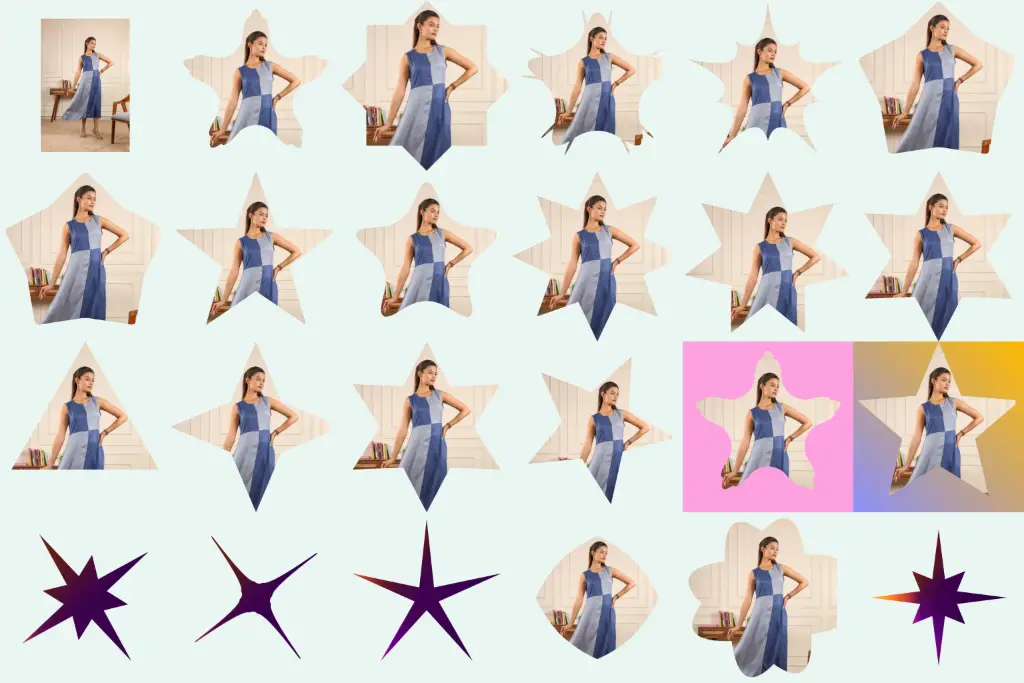
Star cropping transforms your photo into creative star-shaped designs, from classic five-point stars to rounded, sharp, thin, sparkle, and badge-style shapes. It creates eye-catching images for social media, profile pictures, cards, posters, websites, and creative projects.
🎛️ Custom Star Shape Crop: Fine-Tune Every Point
This is where the tool stops being a simple cropper and starts feeling like a mini design studio. The Star Settings panel gives you real control:
⭐ Star Size
Increase or decrease the overall size of the star — handy when you want more or less of the image inside the crop.
🔄 Rotation
Rotate the star to any angle. A slight tilt instantly makes a composition feel more dynamic.
📏 Point Length
Longer points create dramatic, spiky stars; shorter points create compact, badge-like stars.
⭕ Rounded Corners
Smooth the tips of the star — ideal for friendly, modern designs aimed at kids or lifestyle brands.
↔ Concave ↔ Convex
Adjust how deep the inner corners appear. Concave gives the classic pinched star; convex puffs it outward. One slider, completely different star styles.
Photo controls that help you nail the composition
A great shape is nothing without a well-placed photo. The toolbar above the canvas lets you zoom in/out, rotate the image, flip it, undo, redo, reset, center it, or fit it to screen — so faces land in the middle of the star, not on a pointy edge.
🫧 Transparent Star Image Crop & Background Options
Need a star that floats cleanly over any design? Choose Transparent Background and export as PNG — the go-to combo for logos, stickers, and layered graphics. Prefer a solid look? Pick White, Black, any custom color from the picker, or a smooth Gradient for extra pop.
Export settings before you download
- Image format: PNG (best for transparency), JPG (small files), or WEBP (modern & light).
- Image quality: use the slider to balance crispness against file size.
- Output size: export at 512×512, 1024×1024, or 2048×2048 depending on where it's headed.
Save it your way
Click Download to save the file, Copy Image to paste straight into a doc or chat, or Share Image to send it off — all without leaving the page.
🏅 5 Point Star Crop Tool: The Classic That Never Fails
Why does the 5-point star win so often? Because it's the shape of gold stars on school work, flag stars, rating icons, and superhero logos — our brains read it as "achievement" in half a second. If you're making reward stickers, review graphics, patriotic designs, or a simple standout profile picture, the 5 point star crop is the safest, most recognizable choice. Start there, then experiment with rounding and point length to make it yours.
⚡ Main Features of the Star Crop Tool
💡 Best Uses of a Star Image Crop Tool
💙 Why Use Our Star Crop Tool?
Unlike traditional editors that bury a simple star crop under ten menus, our tool is built to do one job brilliantly:
🆓 Free Forever
No trials, no "pro" paywall waiting to ambush you at export.
🧒 Beginner-Friendly
Clear panels and plain-language controls — zero learning curve.
🌐 Browser-Based
Nothing to install; it runs in Chrome, Safari, Firefox, and Edge.
🔒 Privacy-Focused
Processing happens on your device, so private photos stay private.
⚡ High-Speed
Crop and download in seconds, even on modest phones.
📱 Mobile Responsive
The layout adapts neatly to small screens — edit on the go.
🎨 Many Designs, One Tool
Six styles × six point counts × endless sliders = thousands of stars.
🧰 More Free Image Tools You'll Love
Once your star is ready, these handy sibling tools help you polish it further:
❓ Frequently Asked Questions
Is the Star Crop Tool really free?
Does it add a watermark to my image?
Can I create transparent PNG star images?
Can I crop photos into stars on mobile?
Are my images uploaded to a server?
Which image formats can I upload?
How many star points can I choose?
What's the difference between concave and convex stars?
What's the difference between Rounded and Sharp star styles?
Can I export in high resolution?
How do I keep a face centered inside the star?
Can I use star-cropped images commercially?
🚀 Final Thoughts: Your Photos, Star-Shaped in Seconds
You don't need expensive software to make eye-catching star graphics. With a free multi point star crop tool that runs entirely in your browser, you get six point counts, six design styles, deep custom controls, transparent PNG exports, and total privacy — all in one place. Upload a photo, pick your star, and download a graphic that actually turns heads.
⭐ Crop Your First Star — Free