Crop Image into Circle Shape Online Free – Perfect Round Photos in Seconds
Transform your photos into perfect circular profile pictures in seconds. No signup required, no quality loss, 100% free.
📋 On This Page
Looking to crop image into circle shape for your social media profiles, professional headshots, or creative projects? You've landed in the right place. Our free online circle crop tool makes it incredibly easy to create stunning circular profile pictures without any technical skills or expensive software.
What is Circle Crop and Why Does It Matter?
Circle cropping has become the gold standard for profile pictures across virtually every major platform. From LinkedIn to Instagram, WhatsApp to Twitter, circular avatars dominate the digital landscape. But what exactly is circle cropping, and why has it become so essential?
When you crop photo into circle shape online free, you're essentially masking your image within a perfect circular boundary, removing all corners and creating a clean, professional look. This isn't just about aesthetics—it's about creating visual consistency and making your profile instantly recognizable.
💡 Did You Know?
Over 85% of social media platforms now use circular profile pictures as their default format. Creating a circular profile picture from your photo isn't just trendy—it's expected.
The Psychology Behind Circular Profile Pictures
Circles represent unity, completeness, and approachability. When you create circular profile picture from photo, you're subconsciously signaling these qualities to viewers. Unlike sharp-edged squares or rectangles, circles feel more friendly and accessible—perfect for personal branding and professional networking.
Why Square Photos Don't Cut It Anymore
Remember when profile pictures were simple squares? Those days are long gone. Modern platforms automatically crop your uploads into circles, often cutting off important parts of your image. That's why using a dedicated circle profile picture cropper online is crucial—you control exactly what appears in the final result.

Why Choose ImageToolsZone Circle Crop?
With dozens of image editing tools available online, what makes our circle crop tool stand out? Let's be honest—you've probably tried other tools that promised the world but delivered mediocre results. Here's why thousands of users trust ImageToolsZone to make image round without losing quality:
🎯 Pixel-Perfect Precision
Our advanced cropping algorithm ensures your circular crop is mathematically perfect every single time. No jagged edges, no awkward cuts—just smooth, professional results.
⚡ Lightning Fast Processing
Upload, crop, and download in under 30 seconds. We've optimized every step of the process so you're never waiting around.
🔒 100% Privacy Protected
Your images are processed securely and automatically deleted from our servers after download. We don't store, share, or misuse your photos—ever.
📱 Mobile-Friendly Design
Whether you're on a desktop, tablet, or smartphone, our tool adapts perfectly to your screen. Crop images on the go, anywhere, anytime.
🎨 Advanced Customization
Choose from multiple border styles (plain, cut, dotted), adjust border width, pick custom colors, and even rotate your image before cropping.
💾 Multiple Format Support
Download your circular crop in PNG, JPEG, WebP, GIF, SVG, or TIFF format. Plus, if you need to convert image format without quality loss, we've got you covered there too.
Zero Learning Curve
We believe powerful tools should be simple to use. That's why our interface is so intuitive that you'll create your first circular profile picture before you even finish reading this sentence. No tutorials, no confusing menus, no hidden features—just straightforward image editing that works.
Advantages of Crop Image into Circle Shape
Still wondering if circle cropping is worth the effort? Let's break down the real-world benefits you'll experience when you crop image into circle shape for your various projects:
1. Professional Brand Consistency
Whether you're building a personal brand or managing multiple social media accounts, consistency is key. Circular profile pictures create a cohesive visual identity across all platforms. When someone sees your circular avatar on LinkedIn, then spots the same image on Twitter or Instagram, they instantly recognize you—that's powerful branding.
2. Better Mobile Optimization
Circular images load faster and display better on mobile devices. They take up less visual space while maintaining impact, making them perfect for today's mobile-first world. Plus, if you need to reduce file size after cropping, check out our image compressor tool to optimize your circular photos further.
3. Enhanced Visual Focus
Circles naturally draw the eye to the center of the image. When you create circular profile picture from photo, you're directing attention exactly where it should be—your face or main subject. There's no competing visual noise from corners or edges.
4. Platform Compatibility
Every major platform expects circular profile pictures these days. By preparing your images in advance with a circle profile picture cropper online, you avoid the awkward auto-cropping that platforms do, which often cuts off heads or important details.
5. Creative Flexibility
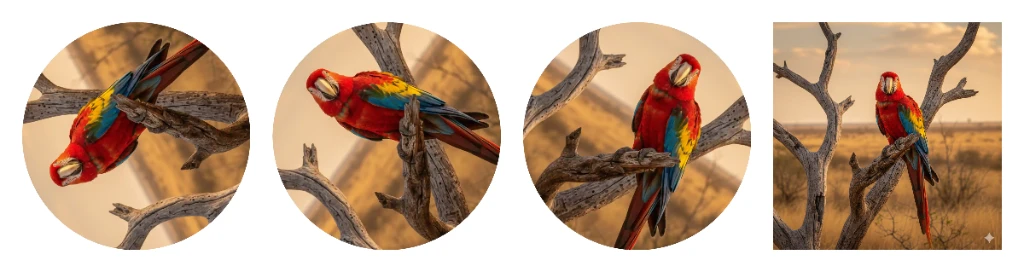
Beyond profile pictures, circular images work beautifully for:
- Team member showcases on company websites
- Testimonial sections
- Product badges and icons
- Social media story highlights
- Email signatures
- Business cards and marketing materials
Quality Preservation Matters
One of the biggest concerns when cropping images is quality loss. Our tool uses advanced algorithms to make image round without losing quality. You maintain the original resolution and clarity, ensuring your circular profile picture looks crisp on both mobile screens and retina displays.
Who Should Use This Tool?
The beauty of our circle crop tool is its versatility. Here's who benefits most from using it:
👔 Professionals & Job Seekers
First impressions matter. A polished circular profile picture on LinkedIn can increase profile views by up to 21%. Make yours count with a perfectly cropped professional headshot.
📱 Social Media Influencers
Your profile picture is your digital business card. Stand out from the crowd with a eye-catching circular avatar that represents your personal brand perfectly.
🏢 Small Business Owners
Create consistent team photos for your website, uniform profile pictures across all business social accounts, and professional-looking staff directories.
🎨 Content Creators
From YouTube channel icons to podcast cover art, circular images are everywhere in content creation. Get the perfect crop every time.
🎓 Students & Graduates
Update your student profiles, create professional photos for job applications, and build your online presence with confidence.
👥 HR & Recruitment Teams
Standardize employee photos across company directories, create uniform team pages, and maintain professional visual standards.
How to Crop Photo into Circle Shape Online Free
Ready to create your perfect circular profile picture? Here's a step-by-step guide to using our tool:
-
Upload Your Image
Click the upload button and select your photo from your computer, or paste an image URL. We support PNG, JPG, JPEG, WebP, and GIF formats. -
Adjust the Crop Circle
Use your mouse or finger to drag the circular overlay and position it exactly where you want. Zoom in or out for precision, and rotate if needed. -
Customize Your Border
Choose from no border, plain border, cut border, or dotted line. Pick your favorite color and adjust the width to match your style. -
Preview & Download
See your circular crop in real-time. When you're happy with the result, click download and choose your preferred format (PNG recommended for best quality).
💡 Pro Tip
For the best results, start with a high-resolution image (at least 1080x1080 pixels). This ensures your circular crop looks sharp even on high-DPI displays. If you're working with large files, consider using our image compressor after cropping to optimize file size.
Key Features That Set Us Apart
Advanced Border Customization
Most circle crop tools give you a basic circle and call it a day. We go further. Our border options let you add personality to your circular images:
- Plain Border: Clean, solid color ring around your image
- Cut Border: Modern double-line effect with depth
- Dotted Border: Playful, creative dashed outline
- Custom Colors: Match your brand colors or personal style
- Adjustable Width: From subtle 1px to bold 50px borders
Real-Time Preview
What you see is what you get. Our live preview updates instantly as you adjust settings, so there are no surprises when you download. This saves time and ensures you get exactly what you want on the first try.
Multiple Export Formats
Need your circular image in a specific format? We support:
- PNG: Best quality with transparent background
- JPEG: Smaller file size, universal compatibility
- WebP: Modern format with superior compression
- GIF: For animated circular images
- SVG: Scalable vector format
- TIFF: Professional print quality

Integration with Other Tools
Our circle crop tool works seamlessly with our other image editing utilities. After cropping your image into a circle, you might want to:
- Compress the file size for faster web loading
- Convert to a different format for specific platform requirements
- Add watermarks or overlays for branding protection
Popular Use Cases for Circular Images
Social Media Profile Pictures
LinkedIn, Facebook, Instagram, Twitter, TikTok, Pinterest—every platform uses circular profile pictures. Get it right once, use it everywhere.
Professional Headshots
Corporate websites, email signatures, business cards, and professional directories all benefit from clean, circular headshots.
E-commerce & Product Badges
Create circular product badges, sale tags, and feature highlights that stand out on your online store.
Team Pages
Showcase your team with uniform circular photos that create visual harmony on your "About Us" page.
App Icons & Avatars
Design circular app icons, user avatars, and interface elements for websites and applications.
Event Badges
Create circular speaker photos, attendee badges, and event branding materials.
Frequently Asked Questions
Absolutely! Our circle crop tool is 100% free with no hidden charges, no watermarks, and no usage limits. You can crop as many images as you need without paying a cent. We believe everyone deserves access to professional-quality image editing tools.
Not at all! Our tool is specifically designed to make image round without losing quality. We use advanced algorithms that preserve your original image resolution and clarity. The only quality change might come from your chosen export format—PNG offers the best quality, while JPEG provides smaller file sizes.
Yes! Our circle crop tool is fully responsive and works perfectly on smartphones, tablets, and desktop computers. The interface automatically adapts to your screen size, so you can crop photo into circle shape online free from any device, anywhere.
We support all major image formats including PNG, JPG, JPEG, WebP, and GIF. If you need to work with other formats, you can first convert your image format without quality loss using our conversion tool, then come back to crop it into a circle.
For best results across all platforms, we recommend starting with an image that's at least 1080x1080 pixels. Our tool creates circular crops at 1080x1080 pixels by default, which looks sharp on both mobile devices and high-resolution displays. This size works perfectly for LinkedIn, Instagram, Facebook, and most other platforms.
Yes! We offer multiple border customization options. You can choose from no border, plain border, cut border (double-line effect), or dotted border. Plus, you can select any color and adjust the border width from 1px to 50px to match your style or brand colors.
Your privacy is our top priority. All image processing happens securely on our servers, and your images are automatically deleted immediately after you download the cropped version. We don't store, share, or use your images for any purpose. What happens in the crop tool, stays in the crop tool.
Absolutely! Our tool includes a rotation feature that lets you adjust your image angle from 0 to 360 degrees before cropping. This is perfect for fixing tilted photos or creating creative angled profile pictures.
PNG format preserves transparency and offers the highest quality, making it ideal for professional use and images with text or sharp edges. JPEG creates smaller file sizes but doesn't support transparency and uses compression. For profile pictures, PNG is usually the better choice unless file size is a major concern.
Currently, our tool processes one image at a time to ensure the highest quality and give you full control over each crop. However, the process is so fast (usually under 30 seconds per image) that you can quickly crop multiple images in succession.
No registration required! You can start cropping images into circles immediately without signing up, logging in, or providing any personal information. Just upload your image and start editing.
Yes! Once you download your circular cropped image, it's yours to use however you want—personal projects, commercial use, social media, websites, print materials, anything. We don't claim any rights to your images.
No problem! You can adjust the crop circle position, size, rotation, and border settings as many times as you want before downloading. Our real-time preview lets you see exactly how your final image will look, so you can make adjustments until it's perfect.
Yes! If your image is already hosted online, you can simply paste the image URL instead of uploading a file. This is great for quickly cropping images from websites, cloud storage, or social media platforms.
The actual image file is square (1080x1080 pixels) with a circular crop inside and transparent corners. When you view it in some image viewers or upload it to platforms that don't support transparency, it may appear square. However, when used on social media platforms or websites that support PNG transparency, it will display as a perfect circle. If you need a different background, you can use our overlay image tool to add a custom background.
To create an eye-catching circular profile picture: 1) Use good lighting and a clear, high-resolution photo, 2) Choose a simple, uncluttered background, 3) Make sure your face takes up about 60-70% of the circle, 4) Add a colored border that matches your personal brand, 5) Smile naturally and make eye contact with the camera. Remember, you can always optimize the file size after cropping to ensure fast loading on all platforms.
Yes! When you download your circular crop in PNG format, the corners outside the circle are automatically transparent. This is perfect for overlaying your circular image on different backgrounds, creating professional designs, or using in presentations and documents.
Our circle crop tool works on all modern web browsers including Chrome, Firefox, Safari, Edge, and Opera. Just make sure your browser is updated to the latest version for the best experience and performance.
Ready to Create Your Perfect Circular Profile Picture?
Join thousands of professionals, creators, and businesses who trust ImageToolsZone for their image editing needs. It's free, fast, and produces professional results every time.
Start Cropping Now - It's Free!