
- Professional Image Editor Online Free – Overview
- Edit Images Without Installing Software
- What Can You Do With This Editor?
- How to Edit an Image Online
- Why Use an Online Image Editor?
- Perfect for Different Users
- Common Image Editing Tasks
- Professional vs Basic Tools
- When to Use Dedicated Tools
- Image Editing Tips
- Choosing the Right Format
- Mobile Image Editing
- Frequently Asked Questions
- More Free Image Tools
Professional Image Editor Without Watermark – Edit Images Easily
Looking for a Professional Image Editor Without Watermark that actually delivers? You've found it. Our browser-based photo editing tool lets you crop, resize, rotate, adjust, add text, apply filters, and so much more – all without downloading a single thing. Whether you're touching up a quick snapshot or preparing images for your website, social media, or presentation, this online image editor handles it all right in your browser.
What makes this different? It's designed for real people doing real work. Students finishing assignments, bloggers optimizing content, small business owners creating promotional materials, or anyone who needs to edit photos online without the hassle of complicated software. The interface is intuitive enough for beginners yet powerful enough for those who need professional-style results fast. Your images are processed in your browser whenever possible, keeping things simple and straightforward.
From basic tasks like crop image online and resize image online to more advanced features like adding overlays, drawing annotations, adjusting brightness and contrast, and applying creative filters – everything you need is here. Export your finished work as JPG, PNG, or WebP and move on with your day. No watermarks, no signup headaches, just pure editing functionality.
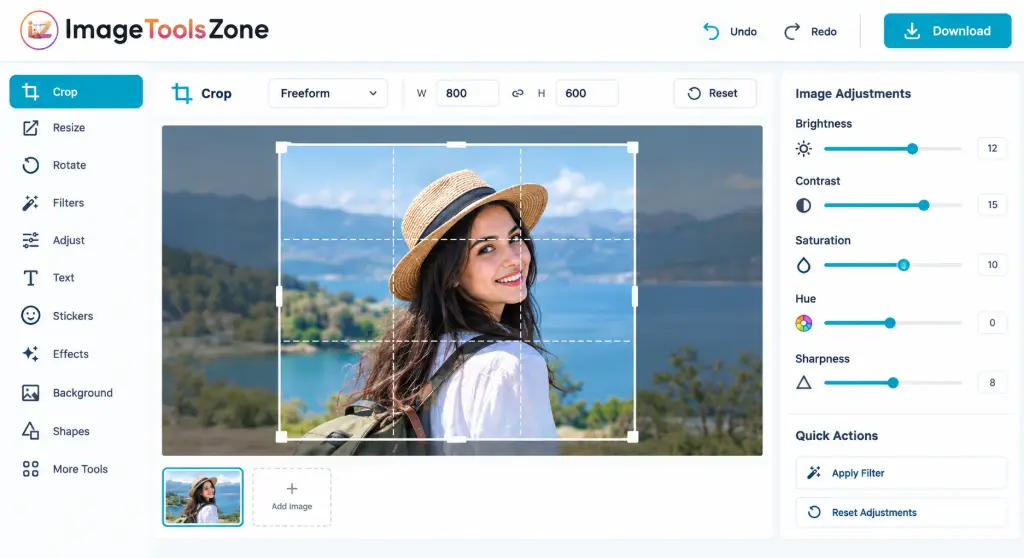
Edit Images Online Without Installing Software
Let's be honest – nobody wants to download massive software packages just to make a few quick edits. That's where browser-based editing shines. Our free image editor online works directly in your modern web browser, which means:
- Zero installation – just open and start editing
- No complicated setup or configuration
- Works on Windows, Mac, Linux, Chromebook – any device with a browser
- Perfect for occasional editing tasks
- Always updated – no manual updates needed
Whether you're a student rushing to finish a presentation, a blogger preparing featured images, a marketer creating social media content, or just someone who needs to edit JPG online or edit PNG online quickly, this image editing tool eliminates the friction. Open your browser, upload your image, make your changes, download – done.
What Can You Do With This Online Image Editor?
This isn't just a one-trick pony. Our professional image editor online free packs multiple editing capabilities into one convenient interface. Here's what you can accomplish:
Crop Images
Remove unwanted areas and create the perfect composition. Crop to custom dimensions or use preset ratios for social media, prints, or web use.
Resize Images
Change dimensions for websites, social media platforms, forms, applications, or any online requirement while maintaining quality.
Rotate and Flip
Correct orientation issues or create mirrored versions. Rotate 90°, 180°, or flip horizontally/vertically with one click.
Adjust Colors
Fine-tune brightness, contrast, saturation, and exposure to make your photos look their absolute best.
Add Text
Overlay titles, labels, quotes, promotional text, or captions. Customize fonts, sizes, colors, and positioning.
Apply Filters
Transform your images with grayscale, vintage, sepia, warm, cool, dramatic, and other creative filters instantly.
Draw and Annotate
Highlight important areas, add arrows, circles, freehand drawings, or notes directly on your images.
Add Shapes & Overlays
Insert geometric shapes or overlay another image to create composite visuals and branded graphics.
Export Your Edited Image
Once you're satisfied with your edits, export in the format that works best for your needs. Choose from JPG for photographs and smaller file sizes, PNG when you need transparency or lossless quality, or WebP for modern web optimization. The photo editor online gives you control over quality settings so you can balance file size and image clarity perfectly.
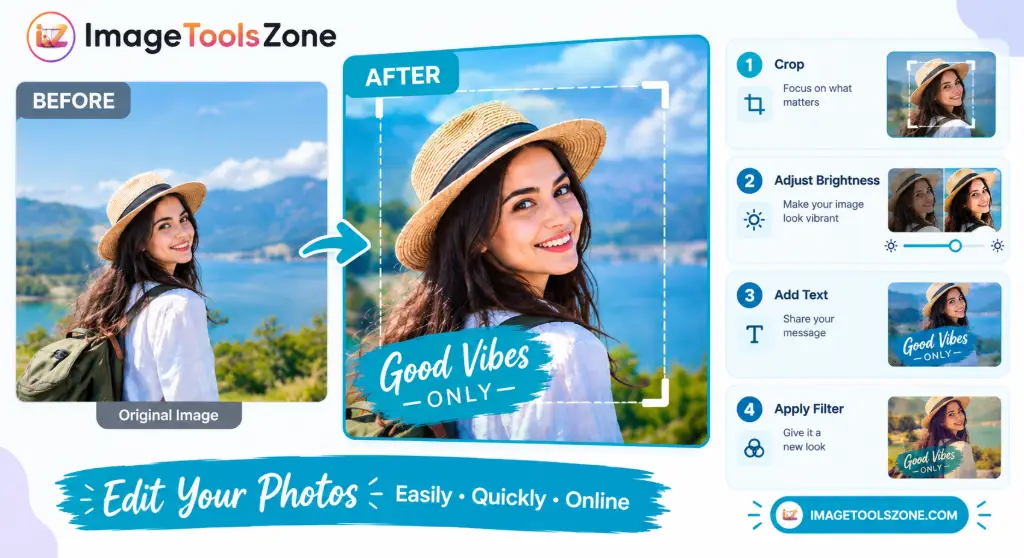
How to Edit an Image Online
Getting started takes seconds. Here's your step-by-step guide:
Upload Your Image
Click the upload button and select your JPG, PNG, or WebP file from your device. You can also drag and drop directly into the browser window.
Choose an Editing Tool
Select from the toolbar: crop, resize, rotate, adjust, text, filters, draw, or shapes. Each tool activates its own set of controls.
Make Your Changes
Use the intuitive controls to edit your image. Drag to crop, slide to adjust brightness, type to add text – it's that straightforward.
Preview the Result
See your edits in real-time. Toggle between before and after views to ensure you're happy with the changes.
Download Your Edited Image
Choose your export format (JPG, PNG, or WebP), adjust quality if needed, and download your finished image to your device.
Why Use an Online Image Editor?
The advantages of using a browser-based online photo editing tool extend beyond convenience. You get:
- Speed: No waiting for software to load or updates to install
- Accessibility: Edit from any device with an internet connection
- Simplicity: Clean interface designed for common tasks, not overwhelming features
- Versatility: One tool handles cropping, resizing, rotating, adjusting, and more
- Compatibility: Works with the image formats you actually use
- Cost: Free to use without hidden fees or watermarks
Perfect for Different Users
🎓 For Students
Edit images for assignments, presentations, and projects. Crop screenshots, resize diagrams, add annotations, and prepare visuals for documents without needing expensive software licenses.
✍️ For Bloggers & Website Owners
Optimize images for your site. Resize featured images, compress for faster loading, crop to perfect dimensions, add watermarks, and prepare graphics that look professional.
📱 For Social Media Creators
Create eye-catching content. Crop for Instagram, Facebook, Twitter specs, add text overlays, apply filters, resize for different platforms, and maintain consistent branding.
🏢 For Small Businesses
Produce promotional materials in-house. Create product visuals, announcement graphics, branded social posts, and marketing images without hiring a designer for every small task.
👤 For Everyday Users
Fix photos quickly. Correct orientation, crop out photobombers, adjust brightness, add captions to family photos, or prepare images for online forms and applications.
Common Image Editing Tasks
| Task | What You Can Do |
|---|---|
| Crop Image | Remove unwanted areas and focus on what matters |
| Resize Image | Change dimensions for web, print, or social media |
| Rotate Image | Correct orientation or create artistic angles |
| Flip Image | Mirror horizontally or vertically |
| Adjust Brightness | Make images lighter or darker |
| Adjust Contrast | Improve distinction between light and dark areas |
| Add Text | Place captions, titles, or annotations |
| Apply Filter | Change visual style with one click |
| Draw on Image | Add freehand marks, arrows, or highlights |
| Add Shapes | Insert circles, rectangles, arrows, etc. |
| Overlay Image | Place one image over another |
| Export | Save as JPG, PNG, or WebP |
Professional Image Editor vs Basic Tools
You might wonder why use a multi-function professional image editor online free instead of visiting separate websites for each task. Here's the practical difference:
When you need to crop, resize, adjust brightness, add text, and apply a filter to the same image, using a single comprehensive editor means uploading once and working continuously. You're not juggling multiple tabs, re-uploading the same file five times, or losing quality through repeated downloads and uploads. Everything happens in one workflow.
That said, sometimes you need specialized tools for specific jobs. If you only need to compress an image file size, a dedicated compressor might offer more advanced options. If you need to remove a background, a specialized remover will do that better. The key is having both options available.
When Should You Use a Dedicated Image Tool?
While our image editor without downloading software handles most everyday tasks beautifully, certain situations call for specialized solutions. Here are scenarios where you might want to try our dedicated tools:
- Need to reduce file size significantly? Try our Image Compressor for advanced compression options.
- Want a perfect circular profile picture? Use our Circle Crop Image tool.
- Need to remove backgrounds automatically? Check out our Background Remover.
- Require exact pixel dimensions? Our Resize Image to Exact Size gives you precise control.
- Preparing images for print? Use the Image DPI Changer.
- Want to protect your images? Add protection with our Add Watermark tool.
- Need to check image details? View technical info with our Image Metadata Viewer.
These specialized tools complement the main editor, giving you a complete toolkit for any image-related task.
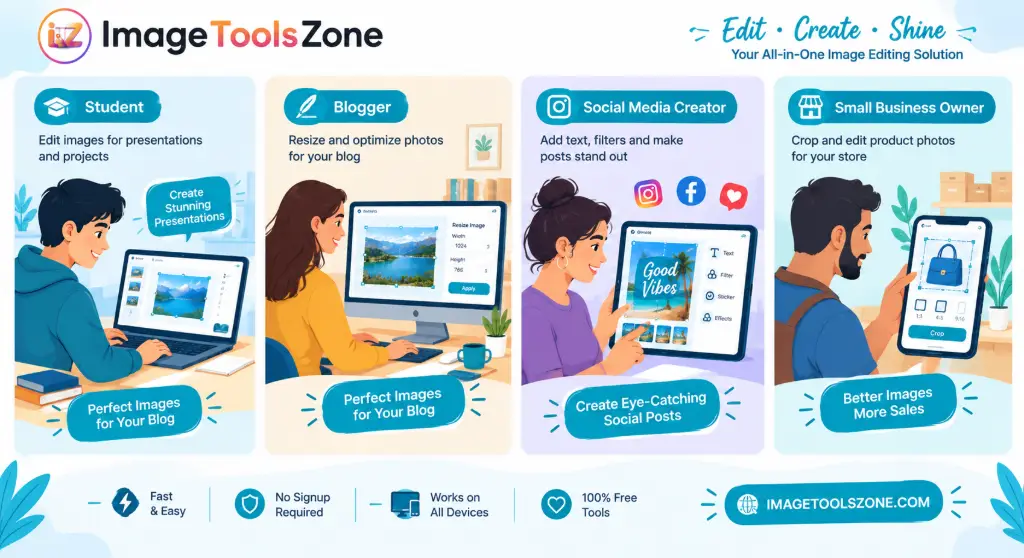
Image Editing Tips for Better Results
Want your edits to look professional? Follow these practical tips:
- Keep your original: Always save a copy before making major edits. You can't undo a download.
- Crop before resizing: Remove unnecessary areas first, then resize to your target dimensions for best quality.
- Avoid over-compression: Don't repeatedly export and re-upload the same image – quality degrades each time.
- Mind the edges: Keep important subjects away from crop boundaries to avoid accidental cutting.
- Choose formats wisely: Use JPG for photos, PNG for graphics with text or transparency, WebP for web optimization.
- Preview before downloading: Always check the full-size preview to catch issues before you finish.
- Adjust moderately: Subtle brightness and contrast changes usually look more natural than extreme adjustments.
How to Choose the Right Image Format
JPG (JPEG)
Best for: Photographs and complex images with many colors
Advantages: Smaller file sizes, universal compatibility, good quality at reasonable compression
Use when: Sharing photos online, email attachments, web images where transparency isn't needed
PNG
Best for: Images requiring transparency or lossless quality
Advantages: Supports transparent backgrounds, no quality loss, sharp text and graphics
Use when: Logos, screenshots, images with text, graphics needing transparent backgrounds
WebP
Best for: Modern websites and efficient delivery
Advantages: Superior compression, smaller files than JPG/PNG, supports transparency
Use when: Website images, modern web applications, balancing quality and file size
Image Editor for Mobile Devices
Yes, you can absolutely edit images on your phone or tablet! Our browser-based image editor works on supported modern browsers across mobile devices. Here's what you can do:
- Upload images directly from your phone's gallery
- Use touch-friendly controls optimized for smaller screens
- Crop, resize, and rotate with intuitive gestures
- Apply filters and adjustments on the go
- Add text and annotations using your device's keyboard
- Download edited images back to your device
Whether you're using an iPhone, Android phone, or tablet, the responsive design adapts to your screen size. No app download required – just open your mobile browser and start editing.
Frequently Asked Questions
A professional image editor online free is a browser-based tool that lets you edit photos without installing software. You can crop, resize, rotate, adjust colors, add text, apply filters, and perform various editing tasks directly in your web browser. It's designed to provide professional-level editing capabilities without the cost or complexity of desktop software.
Yes! Our professional image editor is completely free to use. You can upload your images, make edits, and download the results without paying anything. There are no hidden fees, no watermarks on your exported images, and no requirement to create an account.
Absolutely. Our editor supports JPG, PNG, and WebP formats for both uploading and exporting. You can edit JPG online for photographs or edit PNG online for images requiring transparency. The tool maintains quality across all supported formats.
Yes, cropping and resizing are core features. You can crop image online to remove unwanted areas or change composition, and resize image online to specific dimensions for social media, websites, or print. Both tools offer precise controls and real-time previews.
Definitely. The text tool lets you add captions, titles, quotes, labels, or any text overlay to your images. You can customize the font, size, color, and position to create memes, announcements, watermarks, or annotated images.
Yes. You can rotate image online by 90°, 180°, or any angle, and flip images horizontally or vertically. This is perfect for correcting orientation issues or creating mirrored effects.
Our editor includes adjustment controls for brightness, contrast, saturation, and exposure. You can fine-tune these settings to improve underexposed photos, enhance contrast, or achieve the exact look you want.
Yes! The editor works on mobile devices through your phone's web browser. It's optimized for touch controls and smaller screens, so you can edit photos online from your iPhone or Android device without installing any apps.
No installation required. This is a browser-based image editor without downloading software. Just open the website in Chrome, Firefox, Safari, Edge, or any modern browser, and you can start editing immediately.
You can export your edited images as JPG, PNG, or WebP. Each format has its advantages: JPG for photos and smaller files, PNG for transparency and lossless quality, and WebP for modern web optimization with excellent compression.
Ready to Edit Your Image?
Upload your photo, make the changes you need, and download your finished result in seconds. No signup, no watermarks, no hassle.
Edit My Image NowMore Free Image Tools
Looking for more specific image editing capabilities? Explore these complementary tools:
- Free Image Cropper – Easily trim and crop your photos to the perfect dimensions directly in your browser
- Auto Crop Object for Ecommerce – Automatically center and crop product images for consistent, professional online store listings
- Advanced Photo Editor – Edit and enhance your photos professionally online without any annoying watermarks
- Merge Images Online – Combine multiple photos into a single, seamless image quickly and effortlessly
- Photo to Cartoon Converter – Transform your regular pictures into fun, artistic cartoon avatars instantly
- Resize Image for Instagram Post – Optimize your photo dimensions specifically for perfect, pixel-ready Instagram feeds