
Image Metadata Viewer & Remover
View, Edit & Remove Image Metadata Online — Free, Fast & Private
Drop Your Image Here
or
JPG, JPEG, PNG, WebP • Max file size: 25 MB
(HEIC, AVIF, TIFF supported for viewing and basic metadata extraction)
You can also paste an image (Ctrl+V / Cmd+V)
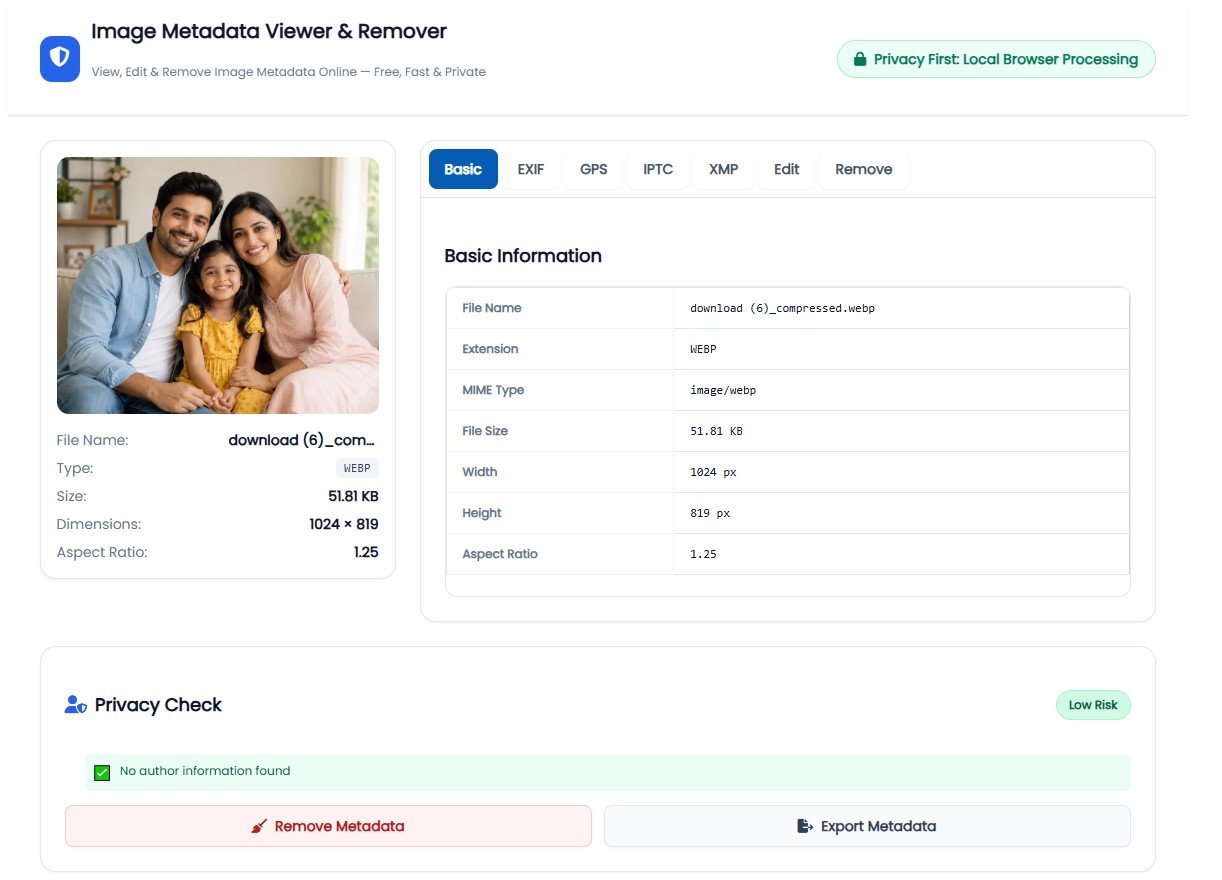
Privacy Check
Analyzing...0 images loaded
View Image Metadata Online Instantly – Unlock Hidden Photo Details Free
Discover what's really hiding in your photos. Check EXIF data, GPS coordinates, camera settings, and privacy information in seconds – no software needed.
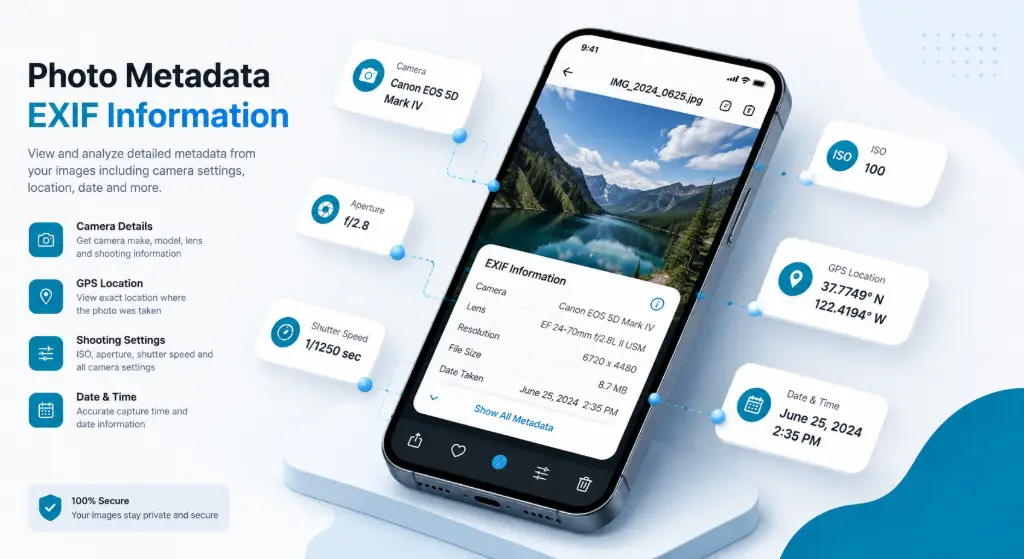
What Is Image Metadata?
Think of image metadata as a digital fingerprint hidden inside every photo you take. When you snap a picture with your phone or camera, it doesn't just capture what you see – it quietly records a ton of behind-the-scenes information about that moment.
This hidden data includes everything from what camera you used and what settings you chose, to the exact GPS coordinates of where you were standing. It's like your photo has a secret diary that most people never think to read.
Why Does Metadata Exist?
Metadata wasn't created to spy on you. Professional photographers rely on it to organize thousands of images, track camera settings, and prove ownership. Journalists use it to verify when and where a photo was taken. Even your phone's gallery uses it to sort pictures by date and location.
EXIF Data
Camera settings, technical details, and shooting information automatically recorded by your device.
IPTC Data
Copyright information, captions, and credits added by photographers and publishers.
XMP Data
Editing history and descriptive information from software like Photoshop and Lightroom.
Ready to See What's Hiding in Your Photos?
Upload any image and instantly view all metadata – it takes less than 10 seconds.
View Your Metadata FreeWhat Is EXIF Data in a Photo?
EXIF (Exchangeable Image File Format) is the most common type of metadata you'll find in digital photos. It's automatically embedded by your camera or smartphone every time you take a picture, containing a wealth of technical information about how that photo was created.
What EXIF Data Actually Shows
When you view image metadata, the EXIF section reveals fascinating details about your photo:
| Information Type | What It Tells You | Why It Matters |
|---|---|---|
| Camera Model | Canon EOS R6, iPhone 14 Pro | Identifies the exact device used |
| Lens Information | 50mm f/1.8, 24-70mm zoom | Shows which lens captured the image |
| ISO Setting | ISO 100, 400, 3200 | Indicates light sensitivity used |
| Shutter Speed | 1/250s, 1/60s | Shows sensor exposure time |
| Aperture | f/2.8, f/8, f/16 | Reveals depth of field settings |
| Date & Time | Aug 20, 2026 3:45 PM | Exact moment the photo was taken |
| GPS Coordinates | Latitude/Longitude | Pinpoints exact location |
How to View Image Metadata Online
Checking what information is stored in your photos used to require downloading special software. Now, you can view image metadata online in three simple steps – no technical knowledge needed.
Drag & drop or browse
We scan all fields
See EXIF, GPS, IPTC
Step-by-Step Process
Step 1: Upload Your Image
Simply drag and drop your photo into the upload area. We support JPG, JPEG, PNG, and WebP formats up to 25MB. The upload happens right in your browser.
Step 2: Automatic Analysis
Our image metadata viewer instantly scans your photo for all types of metadata, including EXIF data, GPS coordinates, IPTC information, and XMP data.
Step 3: Review the Results
You'll see a complete breakdown organized into easy-to-read sections. Check the privacy score to see if your photo contains sensitive location data.
Related Tools You Might Need
What Information Can Be Found in Image Metadata?
When you use our photo metadata viewer, you might be surprised by how much information is packed into a single image file. Here's a comprehensive breakdown:
| Category | Specific Information | Privacy Risk |
|---|---|---|
| Device Info | Camera make, model, serial number, lens type | ⚠️ Medium |
| Shooting Settings | ISO, aperture, shutter speed, focal length | ✅ Low |
| Location Data | GPS latitude/longitude, altitude, direction | 🔴 High |
| Timing Info | Date taken, time taken, date modified | ⚠️ Medium |
| Image Properties | Dimensions, resolution (DPI), color space | ✅ Low |
| Author Details | Artist name, copyright holder, contact info | ⚠️ Medium |
The Privacy Implications
While some metadata is harmless, other information can pose serious privacy risks. GPS coordinates are the biggest concern – they can reveal your home address, workplace, or favorite vacation spots. This is why knowing how to view image metadata before sharing photos online is so important.
Can a Photo Reveal Your Location?
Yes, absolutely. Many photos, especially those taken with smartphones, contain precise GPS coordinates embedded in their metadata. This means anyone who downloads your photo can potentially pinpoint exactly where you were standing.
Where GPS Metadata Shows Up
Real Estate Photos
Property listings can reveal exact home addresses, compromising security.
Travel Photos
Vacation pictures can show you're away from home, inviting break-ins.
Family Photos
School events can reveal where your children spend their time.
Check Your Photo for GPS Data
Find out if your location is exposed before sharing.
Scan Image MetadataHow to Remove GPS Location From a Photo
Once you've used our image metadata viewer to discover that your photos contain GPS coordinates, the next step is removing that sensitive location data safely and effectively.
The Removal Process
Our image metadata remover makes it incredibly simple:
- Upload Your Photo – Drag and drop or browse to select your image.
- Check the GPS Section – Look for latitude and longitude coordinates.
- Click "Remove GPS Data" – One click strips all location information.
- Download Clean Image – Save your privacy-protected photo.
How to Remove EXIF Data From an Image
While GPS coordinates are the most sensitive, EXIF data contains a wealth of other information you might want to keep private. Learning how to remove EXIF data from images gives you complete control.
Does Removing EXIF Affect Image Quality?
The short answer: no, removing EXIF data does not reduce image quality. EXIF data is stored separately from the actual image pixels. Think of it like removing the label from a water bottle – the water stays exactly the same. Our tool uses smart processing to remove metadata without re-encoding the image, meaning:
- ✓ Original image quality preserved 100%
- ✓ No compression artifacts added
- ✓ File size actually gets smaller
Does Image Metadata Affect Privacy?
Absolutely. Image metadata can be a privacy nightmare if you're not careful about what you share online. Our EXIF viewer online includes a unique Privacy Score that instantly shows you how much sensitive information your photo contains:
GPS + Personal Info
Camera + Date Info
Basic Info Only
Image Metadata vs EXIF vs IPTC vs XMP
People often use these terms interchangeably, but they're actually different types of metadata that serve different purposes. Understanding the difference helps you know what information you're dealing with when you view image metadata.
| Type | Full Name | What It Contains |
|---|---|---|
| EXIF | Exchangeable Image File Format | Camera settings, technical data, GPS, timestamps |
| IPTC | Intl. Press Telecommunications Council | Copyright, captions, credits, keywords |
| XMP | Extensible Metadata Platform | Editing history, ratings, descriptions, workflow |
| File | Basic File Information | Dimensions, file size, format, color space |
Does Removing Metadata Reduce Image Quality?
No, removing metadata does not reduce image quality. Not even a little bit. When you remove metadata, you're just deleting the hidden information, not changing the photo itself. Every pixel stays exactly where it was. The colors don't shift, and the resolution doesn't drop.
Some tools remove metadata by re-encoding the entire image, which can cause quality loss. Our image metadata remover uses smart extraction that strips metadata without touching the actual image data, so you get zero quality loss.
Clean Your Image Without Unnecessary Editing
Remove metadata while preserving 100% of image quality.
Remove Metadata SafelyWho Should Use an Image Metadata Tool?
Almost everyone who takes or shares photos can benefit from knowing how to view image metadata online. Here are the people who use our tool most often:
Check settings & protect work
Remove GPS before sharing
Verify photo authenticity
Prepare product photos
Real-World Use Cases
📸 Professional Photographers
You want to share your work online but protect your copyright. You use our tool to keep your IPTC copyright information while removing GPS data that could reveal client locations.
🔐 Privacy-Conscious Parents
You're excited to share photos of your kids' school play. Before posting, you check the metadata and discover GPS coordinates. You quickly remove the location data, protecting your family's privacy.
Before You Share a Photo Online, Check These 5 Things
Don't know what's hidden inside your image? Here's your essential pre-sharing checklist to protect your privacy and security:
Remove exact coordinates
Serial numbers, device details
Personal contact details
Reveals your schedule
Keep or remove as needed
Don't Know What's Hidden in Your Image?
Upload it and check its metadata instantly – it's free and takes 10 seconds.
Check Image Metadata Free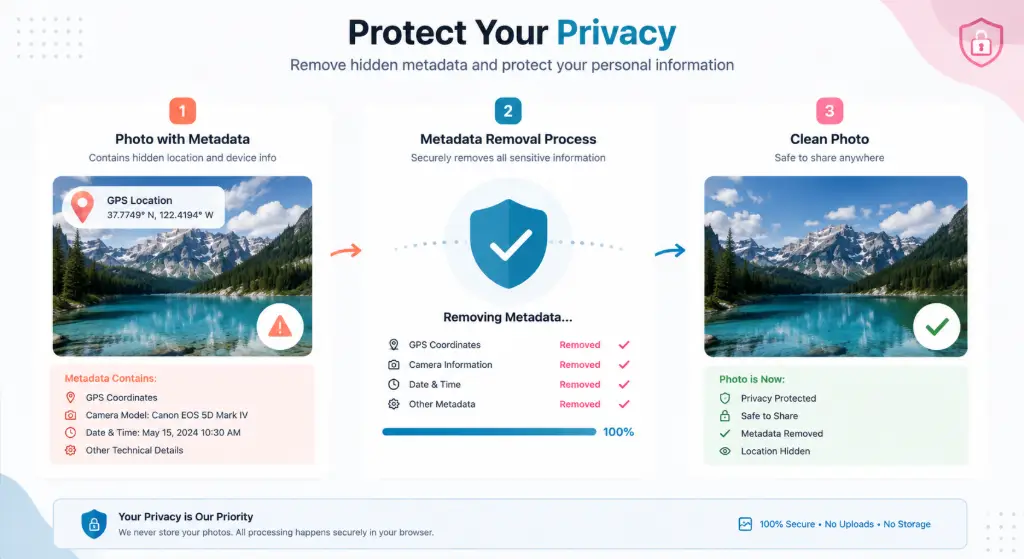
Frequently Asked Questions
Image metadata is hidden information stored within digital photo files. It includes technical details like camera settings, device information, location data (GPS), timestamps, and copyright information. Think of it as a digital fingerprint that travels with your photo.
EXIF (Exchangeable Image File Format) data is the most common type of image metadata. It's automatically recorded by your camera or smartphone and includes camera make, lens info, exposure settings, date/time, and often GPS coordinates. It matters because it can reveal sensitive location and equipment information.
Simply use our free online image metadata viewer. Just drag and drop your photo or click to upload, and within seconds you'll see all the metadata displayed in an easy-to-read format. No software installation needed, and your photos are processed locally in your browser.
Yes, absolutely. If your photo contains GPS metadata (which most smartphone photos do by default), anyone who downloads your image can see the exact latitude and longitude where it was taken. Always check and remove GPS data before sharing photos publicly.
After uploading your photo to our tool, check the GPS section to confirm location data exists. Then click "Remove GPS Data" or "Remove All Metadata" to strip all location information. Download the cleaned image, and you're good to share without revealing your location.
Use our image metadata remover to strip EXIF data. Upload your image, review what metadata exists, then click "Remove All Metadata" or selectively choose which types to remove. Download your cleaned photo. The process preserves 100% of image quality.
Yes! Removing metadata does not reduce image quality at all. Metadata is stored separately from the actual image pixels. Our tool uses smart processing that strips metadata without re-encoding the image, so you get zero quality loss and a smaller file size.
Yes, PNG files can contain metadata, though typically less than JPEG files. PNG metadata can include creation date, software used, color profile information, and text comments. However, PNG files don't support EXIF camera data or GPS coordinates like JPEG files do.
It depends on the metadata present. Photos with GPS coordinates are definitely not safe to share publicly, as they reveal your exact location. Photos with camera serial numbers or personal author information can also pose privacy risks. Always check metadata before sharing.
Most major platforms (Facebook, Instagram, Twitter) automatically strip EXIF metadata when you upload photos. However, this isn't guaranteed, and some platforms may keep certain data. If you share photos via email, messaging apps, or file-sharing services, the metadata usually remains intact. Always check it yourself.
Ready to Check Your Image Metadata?
Join thousands of photographers, designers, and privacy-conscious users who trust our free tool to view and remove image metadata safely.
View Image Metadata Now – It's Free✓ No registration required ✓ 100% free ✓ Processed locally ✓ No quality loss