What is an Image Cropper?
Let's be honest—we've all been there. You snap what seems like the perfect photo, but there's that photobomber in the corner, too much empty space around your subject, or the composition just feels... off. That's exactly where a free image cropper online saves the day.
An image cropper is a digital tool that lets you trim away unwanted portions of your photograph, focusing on what truly matters. Think of it as digital scissors for your photos—but way more precise and without the risk of accidentally cutting off someone's head (we've all done that with actual scissors, haven't we?).
Cropping isn't the same as resizing. When you crop, you're removing parts of the image to change its composition. When you resize, you're changing the dimensions of the entire image without cutting anything out. Need both? We've got you covered with our image resizer too.
When Does Cropping Become Your Best Friend?
You'll reach for a cropping tool when you need to:
- Eliminate distracting backgrounds that steal attention from your subject
- Adjust composition to follow the rule of thirds
- Fit images into specific social media dimensions
- Create professional product photos for your online store
- Prepare passport or visa photos that meet strict requirements
- Remove unwanted objects or people from the frame edges
Why Use an Online Image Cropper?
Here's the thing: you could download expensive software, spend hours watching tutorials, and still end up frustrated. Or, you could use a free image cropper no watermark no signup USA residents (and everyone else) love—and get it done in under 60 seconds.
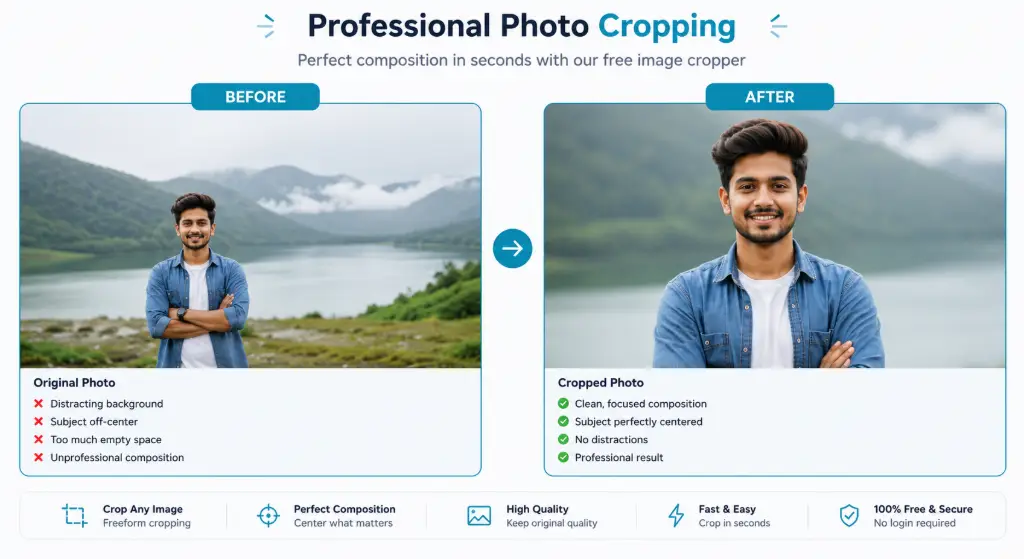
Remove Unwanted Background
That ex who photobombed your vacation pic? Gone. The trash can in your product shot? History. Crop it out and keep only what matters.
Focus on Your Subject
Make your subject the star of the show. Whether it's a product, person, or pet, cropping eliminates distractions and draws the eye exactly where you want it.
Perfect Social Media Photos
Instagram, Facebook, LinkedIn—they all want different sizes. Our tool helps you crop profile pictures for social media free online without the headache.
Professional Product Images
Selling on Amazon, Etsy, or Shopify? Clean, properly cropped product photos can increase conversions by up to 30%. Your competitors are already doing it.
Passport & Document Photos
Government forms are picky. Get the exact dimensions and composition required for passports, visas, and ID cards without visiting a photo studio.
Website Banners That Load Fast
Cropping reduces file size by removing unnecessary pixels. Faster loading = better SEO and happier visitors. It's a win-win.
Features of Our Free Image Cropper
We didn't just build another cropping tool. We built the tool we wished existed when we needed to crop image for WhatsApp DP at 2 AM before a job interview. Here's what makes it special:
🔧 Freeform Crop - Total Creative Control
Forget rigid templates. Drag, drop, and resize your crop area however you want. Need a perfect square for Instagram? Done. A wide banner for your blog? Easy. An oddly specific dimension for that one weird website requirement? We've been there too.
🔍 Precision Zoom Controls
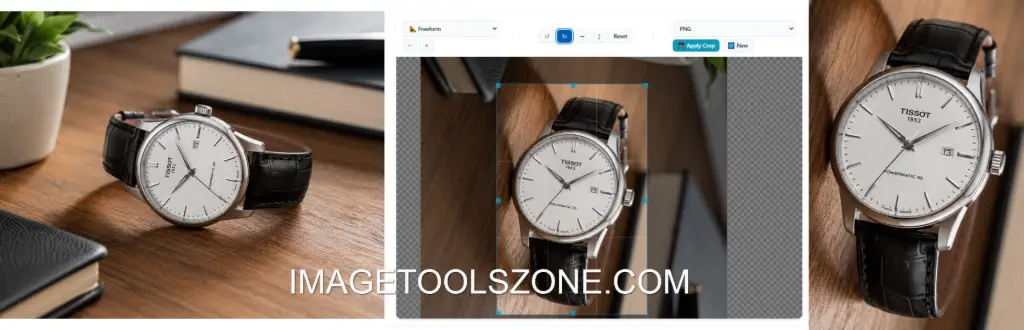
Sometimes you need pixel-perfect accuracy. Zoom in to get that exact edge, or zoom out to see the full composition. No more guessing whether you cut off half an ear.
🔄 Rotate & Flip Like a Pro
Shot a photo in portrait when you needed landscape? No problem. Rotate left or right with one click. Need to flip that selfie because the text reads backwards? We've got horizontal and vertical flip options too.
↩️ Instant Reset Button
Made a mistake? Hit reset and start fresh instantly. No need to re-upload or refresh the page. We know creativity requires experimentation.
💾 Export in Multiple Formats
Choose what works best for your needs:
| Format | Best For | Why Choose It |
|---|---|---|
| PNG | Graphics with transparency, logos, screenshots | Lossless compression, supports transparent backgrounds |
| JPEG | Photographs, social media, general use | Smaller file size, universal compatibility |
| WebP | Websites, modern browsers, speed optimization | Superior compression, faster loading times |
Client-Side Processing - Your Privacy Matters
Here's something most tools won't tell you: many "free" online editors upload your images to their servers. Not us. Everything happens in your browser. Your photos never leave your device. This means:
- ✓ Complete privacy - your images stay yours
- ✓ Lightning-fast processing - no upload/download wait
- ✓ Works offline once loaded - perfect for spotty connections
🚫 No Watermarks. Ever.
Nothing screams "amateur" like a giant watermark across your professional photo. Our tool is 100% free with zero watermarks. What you see is what you get—clean, professional images every time.
📱 Works Everywhere
Whether you're on Android, iPhone, Windows, Mac, or even that old Chromebook gathering dust in your closet—if it has a browser, it works. No downloads, no installations, no compatibility nightmares.
How to Crop an Image Online (In 7 Simple Steps)
We've made this so simple that if you can click a mouse (or tap a screen), you can crop like a pro. Here's how:
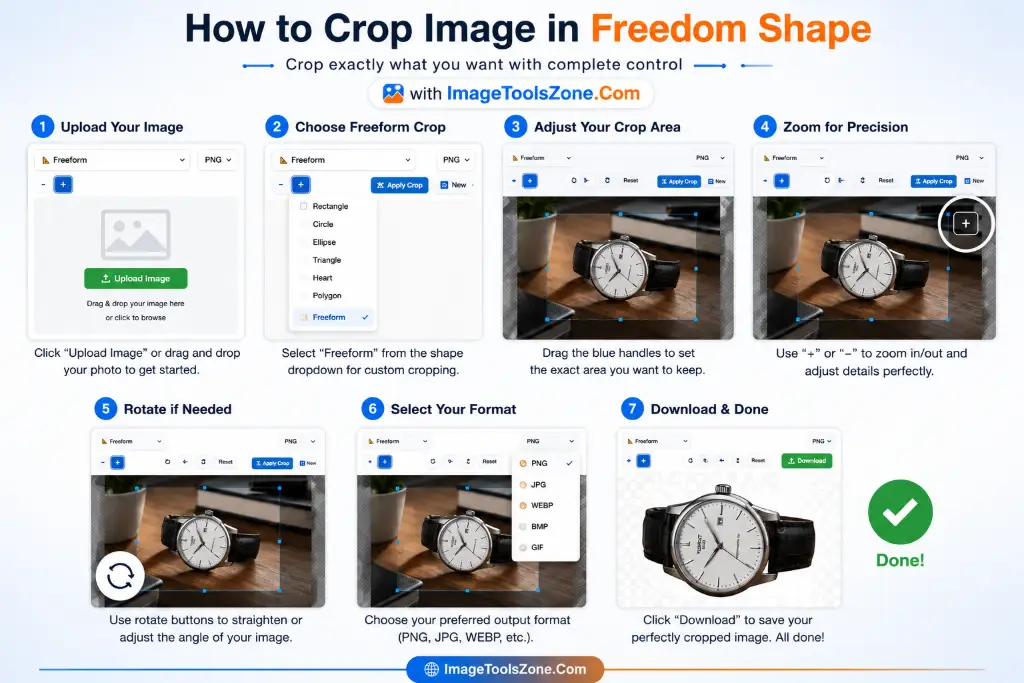
Upload Your Image
Drag and drop or click to browse. Supports JPG, PNG, WebP, and more. No file size anxiety—we handle large files with ease.
Choose Freeform Crop
Select the freeform option for complete control. Want specific ratios? We've got those too, but freedom tastes better.
Adjust Your Crop Area
Drag the corners or edges to frame your perfect shot. The overlay shows exactly what will be kept vs. cropped out.
Zoom for Precision
Need to get that edge just right? Use the zoom controls to fine-tune your crop with pixel-level accuracy.
Rotate if Needed
Straighten that horizon or fix a tilted shot. Rotate left or right until it's perfect.
Select Your Format
Choose PNG for transparency, JPEG for photos, or WebP for web optimization. Pick what fits your needs.
Download & Done
Click download and your perfectly cropped image is ready. Need to make adjustments? Click "Crop Again" without re-uploading.
Best Image Format After Cropping
Choosing the right format isn't just technical jargon—it affects your image quality, file size, and where you can use it. Let's break it down:
PNG - The Quality Champion
Advantages: Lossless compression means zero quality loss. Supports transparent backgrounds (perfect for logos). Ideal for images with text, sharp edges, or graphics.
Disadvantages: Larger file sizes. Not ideal for photographs where slight compression won't be noticed.
Best for: Screenshots, logos, images requiring transparency, professional graphics that need our watermark tool later.
JPEG - The Universal Standard
Advantages: Smaller file sizes. Universal compatibility—every device and platform supports it. Great for photographs.
Disadvantages: Lossy compression (some quality loss). No transparency support. Quality degrades with repeated editing.
Best for: Social media photos, general photography, email attachments, when file size matters.
WebP - The Modern Marvel
Advantages: Superior compression (25-35% smaller than JPEG). Supports both lossy and lossless compression. Transparency support like PNG.
Disadvantages: Not supported by very old browsers (though 95%+ of users have compatible browsers now).
Best for: Websites, modern applications, when you need to compress images without visible quality loss.
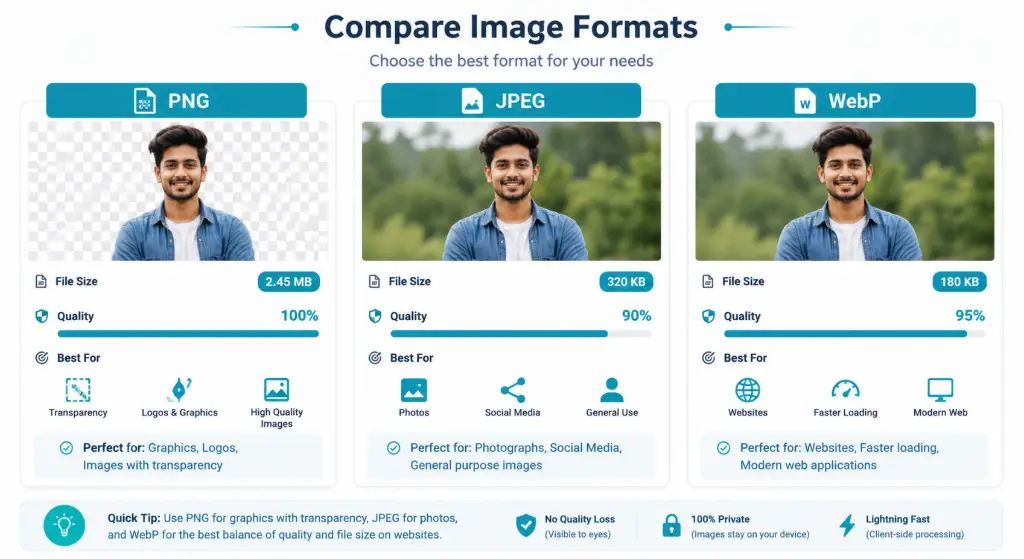
Image Cropper Use Cases - Who Benefits?
Spoiler alert: pretty much everyone who uses images. But let's get specific:
Crop Image for Documents - Meet Official Requirements
Government forms don't mess around. Get your photo rejected because of wrong dimensions, and you're looking at weeks of delays. Here's what you need:
Passport Photos
Most countries require 2x2 inches (51x51 mm) with your head between 1-1.4 inches. Plain white or off-white background. Neutral expression. We help you nail these specs every time.
Visa Applications
Varies by country, but typically 2x2 inches. Some require specific head sizes and background colors. Check requirements, then crop precisely.
Government Forms
From driver's licenses to national ID cards, each has strict requirements. Our tool lets you crop to exact specifications without guesswork.
Job Applications
Professional headshots matter. Crop to remove distracting backgrounds and present your best self. Combine with our image enhancer for that polished look.
School Admissions
Student IDs, yearbooks, application forms—schools need clean, properly sized photos. Make a great first impression.
Exam Forms
IELTS, TOEFL, GRE, SAT—standardized tests require specific photo dimensions. Don't let a bad photo delay your dreams.
Crop Images for E-commerce - Boost Your Sales
Your product photos are your salespeople. Make them count. Here's platform-specific guidance:
📦 Amazon
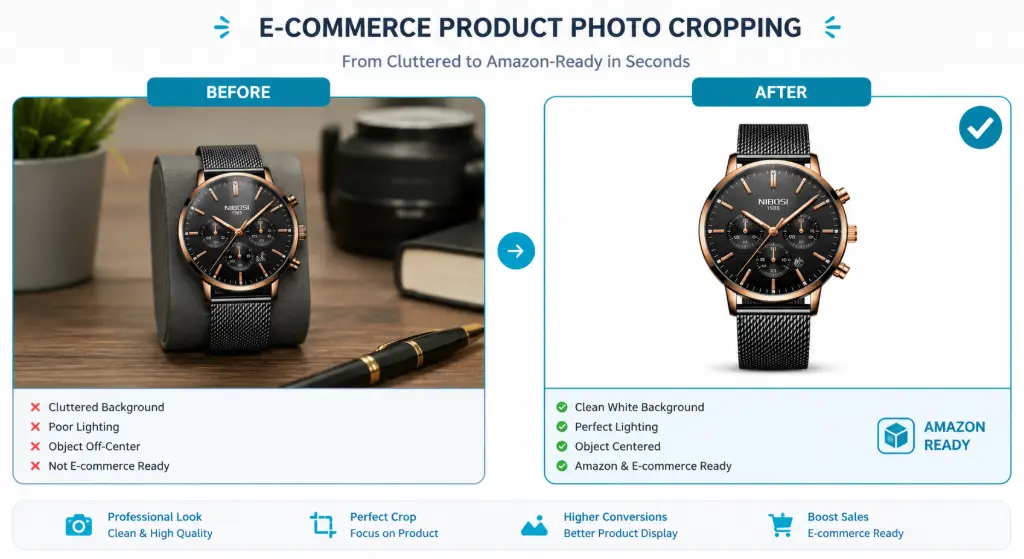
Main Image: Pure white background (RGB 255,255,255), product fills 85% of frame, minimum 1000x1000 pixels. Use our background remover first, then crop to perfection.
🛍️ Flipkart
Requirements: White background, minimum 1024x1024 pixels, product centered. Square images perform best in search results.
🎨 Etsy
Recommended: 2000x2000 pixels for zoom feature. First image should be clean and professional. Lifestyle shots can follow, but lead with a perfectly cropped product shot.
🏪 Shopify
Best Practice: 2048x2048 pixels for high-quality zoom. Consistent sizing across all products creates a professional storefront. Use our auto-crop tool for batch processing.
- Always use square images (1:1 ratio) for consistency
- White backgrounds increase conversions by up to 30%
- Multiple angles = more trust = more sales
- Optimize file size with our compressor for faster page loads
Why Choose ImageToolsZone?
Look, there are dozens of image cropping tools out there. Here's why thousands of users choose us daily:
Free Forever
No hidden fees, no premium tiers, no "upgrade to remove limitations." What you see is what you get—completely free.
No Watermark
Zero branding on your images. Your work stays yours, clean and professional.
No Login Required
No email, no password, no account creation. Just upload, crop, download. Done in seconds.
Client-Side Processing
Your images never leave your device. Complete privacy, faster processing, works offline.
Mobile Friendly
Works perfectly on phones and tablets. Crop on the go, anywhere, anytime.
Lightning Fast
No upload delays, no server processing time. Instant results every time.
Unlimited Cropping
Crop one image or one thousand. No daily limits, no restrictions.
Multiple Formats
PNG, JPEG, WebP—choose what works best for your needs.
Works Everywhere
Android, iPhone, Windows, Mac, Linux—if it has a browser, it works.
Image Cropper vs Image Resizer - What's the Difference?
These terms get thrown around interchangeably, but they're not the same. Here's the breakdown:
| Feature | Image Cropper | Image Resizer |
|---|---|---|
| What it does | Removes parts of the image | Changes overall dimensions |
| Image content | Content is removed | All content retained |
| Aspect ratio | Can change ratio | Maintains or changes ratio |
| File size | Reduces size (fewer pixels) | Can increase or decrease |
| Best for | Changing composition, removing distractions | Fitting specific dimensions |
| Quality impact | No quality loss on kept area | Can lose quality if enlarged |
| Example use | Removing background, focusing on subject | Making image fit Instagram post size |
Common Cropping Mistakes (And How to Avoid Them)
We've all made these errors. Learn from our collective pain:
-
Cropping too aggressively
Leaving no breathing room around your subject makes images feel cramped. Follow the rule of thirds and leave some negative space.
-
Ignoring aspect ratio requirements
Uploading a square image when the platform wants 16:9? It'll get awkwardly stretched or cropped. Always check requirements first.
-
Saving in the wrong format
Using JPEG for logos with transparency? You'll get a white box around it. Use PNG for graphics, JPEG for photos.
-
Losing important content
Crop too tight and you might cut off text, faces, or crucial details. Always preview before downloading.
-
Starting with low-quality images
Cropping a tiny image and enlarging it = pixelation nightmare. Start with the highest resolution possible. If you need to enhance quality first, try our image enhancer.
🔗 Explore More Free Image Tools
Frequently Asked Questions
Absolutely! Our free image cropper online is 100% free with no hidden charges, no premium tiers, and no trial periods. We believe professional image editing tools should be accessible to everyone. Use it as much as you want, whenever you want.
Yes! We support all major image formats including PNG, JPEG, WebP, GIF, BMP, and more. You can also export your cropped images in PNG, JPEG, or WebP format—whatever works best for your needs.
Never. Zero. Zilch. Unlike many "free" tools that slap watermarks on your images, we provide 100% clean, watermark-free output. Your images are yours, period.
Nope! This is a client-side tool, which means all processing happens in your browser. Your images never leave your device. This ensures complete privacy, faster processing, and the ability to work offline once the page loads.
Definitely! Our tool is fully responsive and works perfectly on Android, iPhone, iPad, and any mobile device with a web browser. Touch controls are optimized for mobile, so you can crop profile pictures for social media free online right from your phone.
Cropping itself doesn't reduce quality—the pixels you keep remain exactly as they were. However, if you crop a small area and then enlarge it, you might see pixelation. We recommend starting with high-resolution images for best results.
Absolutely! We support all Instagram dimensions: 1080x1080 for square posts, 1080x1350 for portrait, 1080x566 for landscape, and 1080x1920 for stories. You can also use our specialized tools to crop profile pictures perfectly.
Yes! You can crop to exact passport photo dimensions (typically 2x2 inches or 51x51mm). Just make sure your original photo meets other requirements like white background and proper lighting. For best results, combine with our background remover.
Our tool handles large files efficiently since everything processes in your browser. While there's no strict limit, extremely large files (over 50MB) might take longer to load depending on your device. For typical photos and graphics, you'll have no issues.
Currently, our tool processes one image at a time to ensure the best quality and user experience. However, you can quickly crop multiple images by using the "Crop Again" button after downloading, which lets you upload a new image without refreshing the page.
No registration required! Just visit the page, upload your image, crop it, and download. No email, no password, no account creation. We respect your time and privacy.
We support all modern browsers including Chrome, Firefox, Safari, Edge, and Opera. For the best experience, make sure you're using the latest version of your browser.
Our freeform cropper lets you create any rectangular crop. For circular, oval, heart, star, or polygon shapes, check out our specialized tools: Circle Crop, Oval Crop, Heart Shape, Star Shape, and Polygon Crop.
Yes! Our tool includes rotate left/right and flip horizontal/vertical options. This is perfect for fixing camera orientation or creating mirror effects for product photography and selfies.
WhatsApp displays profile pictures as circles at 500x500 pixels. Upload your image, use the square crop option (1:1 ratio), center your face or subject, and download. For a preview of how it'll look as a circle, try our circle crop tool.
Absolutely! Use the Reset button to instantly restore your original image and start over. You can also adjust your crop area as many times as needed before downloading.
Ready to Crop Like a Pro?
Crop your images in seconds with ImageToolsZone's Free Image Cropper. No sign-up, no watermark, and everything runs securely in your browser. Upload your photo, choose the perfect crop, and download high-quality PNG, JPEG, or WebP images instantly.
Start Cropping Now - It's Free!
Crop Image for Social Media - Perfect Dimensions Every Time
Each platform has its own personality—and its own size requirements. Here's your cheat sheet for crop profile pictures for social media free online:
📷 Instagram
Profile Picture:
320 x 320 pxPost:
1080 x 1080 px (Square) 1080 x 1350 px (Portrait)Story:
1080 x 1920 pxFacebook
Profile Picture:
170 x 170 pxCover Photo:
820 x 312 pxPost Image:
1200 x 630 px💬 WhatsApp
Profile Photo (DP):
500 x 500 pxPerfect for crop image for WhatsApp DP with our specialized tool
Displays as circle, so center your subject!
YouTube
Channel Icon:
800 x 800 pxThumbnail:
1280 x 720 pxChannel Banner:
2560 x 1440 px📌 Pinterest
Profile Picture:
165 x 165 pxPin Image:
1000 x 1500 pxBoard Cover:
222 x 150 px💼 LinkedIn
Profile Photo:
400 x 400 pxCover Image:
1584 x 396 pxPost Image:
1200 x 627 pxTwitter/X
Profile Picture:
400 x 400 pxHeader Photo:
1500 x 500 pxIn-Stream Photo:
1200 x 675 pxWhen cropping for WhatsApp or any platform that displays profile pictures as circles, always keep your subject centered and leave some breathing room around the edges. Use our circle crop tool to preview exactly how it'll look!