
How to Crop a Photo Into a Star Shape Online (Free Star Shape Image Cropper Guide)
A practical, no-fluff guide to turning ordinary photos into eye-catching star-shaped graphics — no Photoshop, no downloads, no design degree required.
Let's be honest for a second — rectangular photos are fine. They're also everywhere, which is exactly why a star-shaped picture stops the scroll. If you've been wondering how to crop a photo into a star without installing heavy editing software, you've landed on the right page. This guide walks you through everything: what star cropping actually is, the different star styles and point counts you can play with, the best real-world use cases, and a simple step-by-step tutorial that takes you from plain photo to polished star graphic in under a minute.
Whether you're a teacher building certificates, a parent designing a birthday invitation, a small business owner making promo graphics, or a creator refreshing your profile picture, star-shaped photos add instant personality. And the best part? You don't need Photoshop or any design background. A free online star shape image cropper does the heavy lifting for you.
Ready to Create a Star-Shaped Photo?
Upload your image and crop it into a star shape online for free — no signup, no software, no watermark.
⭐ Crop Into a Star — Free1. What Is Star-Shaped Image Cropping? ⭐
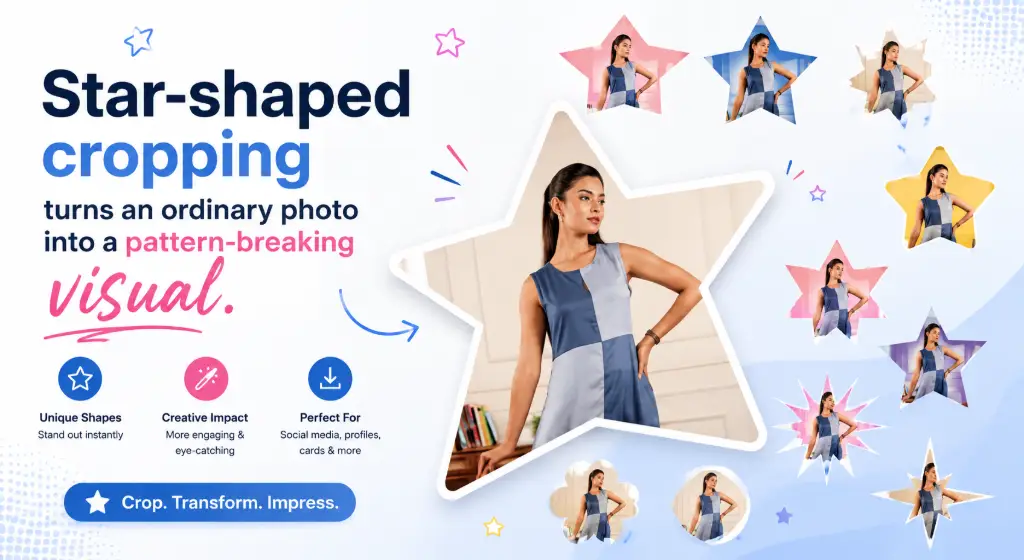
Star-shaped image cropping is exactly what it sounds like: instead of keeping your photo inside the usual rectangular or square boundary, you place the most important part of the image inside a star-shaped frame. Everything outside the star is removed (or made transparent), and everything inside stays perfectly visible. The result is a photo that literally wears its personality on the outside.
Normal Crop vs. Shape Crop — What's the Difference?
A normal crop trims the edges of a photo but keeps the four straight sides. It's what you do when you want a tighter composition — cutting out a distracting background corner, for example. A shape crop goes one step further: it uses a shape, in this case a star, as a mask. Think of it like a cookie cutter pressed into dough. The star defines what stays visible, and the rest of the photo simply disappears. Same photo, completely different impression. If you ever need the classic trim instead, a standard free image cropper handles straight-edge jobs in a couple of clicks.
Why Star-Shaped Photos Attract Attention
Our eyes are trained to ignore what's familiar. Nearly every image on the web is a rectangle, so rectangles blend into the background. A star breaks that pattern instantly. Stars also carry built-in meaning — achievement, celebration, magic, "you did great!" — so a star-shaped photo doesn't just look different, it feels different. That's why stars show up everywhere: on awards, ratings, party invitations, holiday graphics and kids' designs.
Who Uses Star-Shaped Images?
Far more people than you'd expect. Teachers build certificates and worksheets with them. Parents and party planners design invitations. Small businesses create promo badges and "special offer" graphics. YouTubers and streamers add personality to thumbnails. Scrapbookers preserve memories, and web designers decorate landing pages, team cards and hero sections. If someone wants a photo to feel celebratory, a star is usually the first shape they reach for.
Online vs Manual Editing: The Time Math
Let's do the time math. A manual star cutout in desktop software means drawing a star path, adjusting anchor points, feathering the edges and exporting with transparency — ten to fifteen minutes if you know what you're doing, considerably longer if you don't. Online star cropping means upload, pick a star, download — usually under a minute. That's not a small saving; it's the difference between "I'll do it later" and "done before my tea cools." And because the shape is generated mathematically, every edge comes out smooth, with no wobbly hand-drawn points.
2. What Is a Star Crop Tool? (Meet the Star Shape Image Cropper) 🛠️
A star crop tool is a simple web app that applies a star-shaped mask to any photo you upload. The star acts like a window: your image shows through the star, and everything outside the window is cut away. You never draw anything by hand — the tool already knows what a mathematically perfect star looks like, so your edges come out smooth every single time.
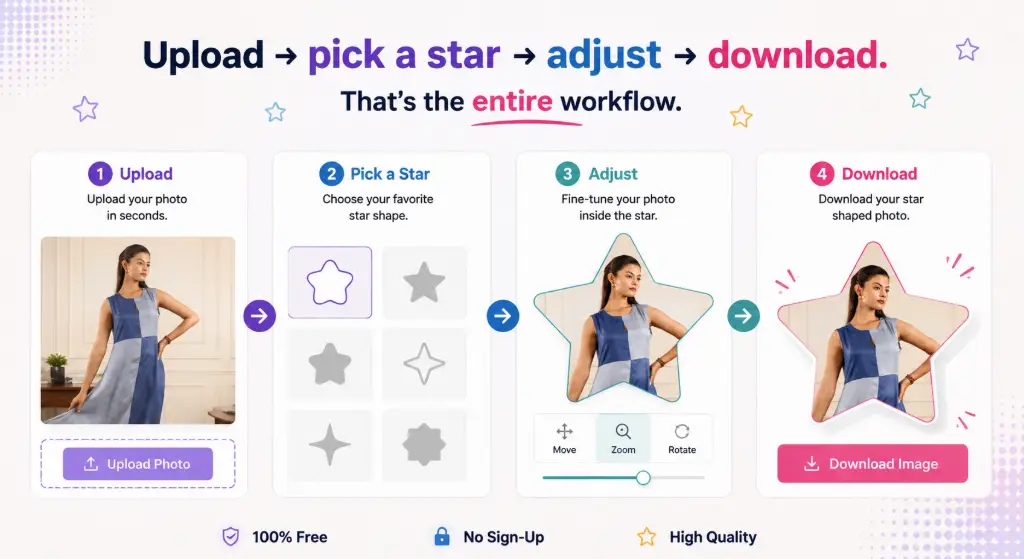
Here's the typical workflow inside a star shape image cropper:
Upload your image
Drag in or select a JPG, PNG or WEBP file straight from your device.
Select the star shape
Pick your preferred star style — classic, rounded, sparkle, badge and more.
Adjust the crop area
Zoom in or out until the framing feels right for your design.
Position the subject
Drag the photo so faces or products sit comfortably inside the star body.
Preview the result
See the exact star-shaped output before you commit to anything.
Download the image
Save the finished star-shaped photo to your device, usually as PNG.
Because the star works as a shape mask, you get perfectly smooth points and clean curves — no jagged selections, no wobbly hand-drawn edges, no erasing pixels one by one. It's the kind of result that used to require a designer; now it's a two-minute browser task.
Quick Glossary: Five Terms That Make You a Star-Cropping Pro
3. How Many Types of Star-Shaped Cropping Are There? 🌠
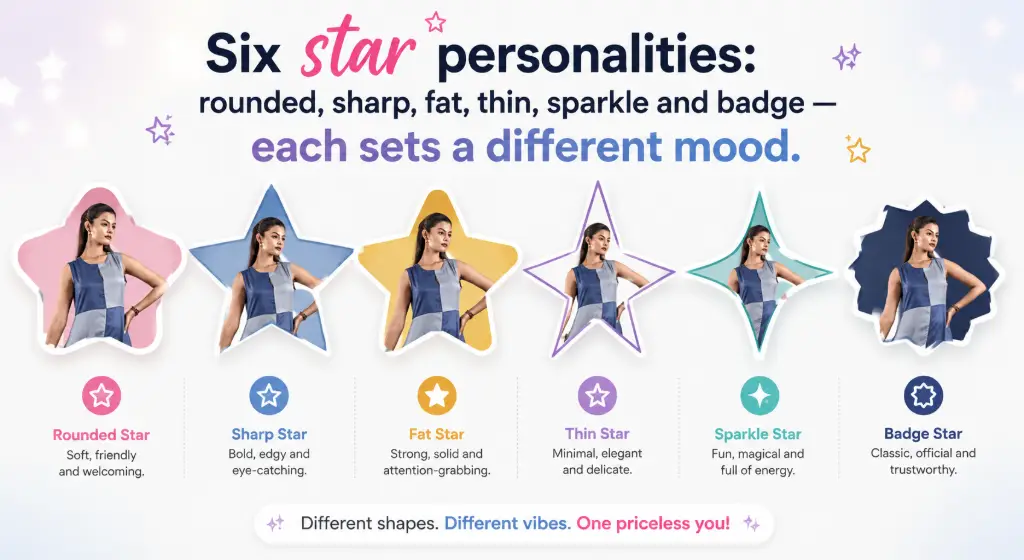
Not all stars are created equal. Depending on the tool, you'll usually find a handful of star "personalities," each suited to a different mood. Here are six practical star styles you'll actually use:
Rounded Star
Soft, curved tips that feel friendly and playful. Best for social media graphics, baby showers and kids' birthday invitations.
Sharp Star
Classic pointed tips, bold and confident. Best for logos, badges and profile images that need a strong silhouette.
Fat Star
A wider body with chunky points and maximum photo area. Best for stickers, thumbnails and promotional graphics.
Thin Star
Long, slim points that read elegant and decorative. Best for elegant designs, holiday cards and decorations.
Sparkle Star
A four-point twinkle shape that screams "ta-da!". Best for highlights, celebrations and creative graphics.
Sheriff Badge Star
A multi-point badge silhouette with official energy. Best for awards, certificates and "star employee" recognition.
Crop Picture Into 5 Point Star — Plus 3, 4, 6, 8, 10 & 12-Point Options
Beyond style, stars also differ in point count, and changing the points completely changes the vibe. The classic 5-point star is the default most people picture, but the whole family is worth knowing:
These variations open up genuinely fun creative territory. A 4-point star photo crop feels like a sparkle, an 8-point star image crop looks like an energetic burst, and a 12-point crop reads like an official seal — perfect behind a graduation portrait or an employee-of-the-month badge. If you ever want to go beyond stars entirely, a custom shape crop tool lets you mask photos into practically any silhouette you can imagine.
4. Why Crop an Image Into a Star Shape? 💫
Enough theory — what does a star crop actually do for your design? Here are the benefits that matter in real projects:
Makes photos stand out
In a feed full of rectangles, a star is an instant pattern interrupt. People notice it before they even process the content.
Eye-catching social graphics
Perfect for profile pictures, posts, stories and promotional designs that need to earn the tap.
Perfect for celebrations
Birthdays, Christmas, graduations, achievements, parties — stars naturally speak the language of celebration.
Useful for education
Students and teachers use star-shaped photos in worksheets, certificates and school projects all the time.
Great for badges & awards
Star shapes communicate achievement and recognition without a single word of text.
Useful for creative websites
Designers drop star-shaped images into hero sections, cards and decorative layouts to break grid monotony.
No design software required
An online cropper handles the shape for you — no Photoshop, no complicated editing software, no learning curve.
5. Best Uses of Star-Shaped Photos 🎯
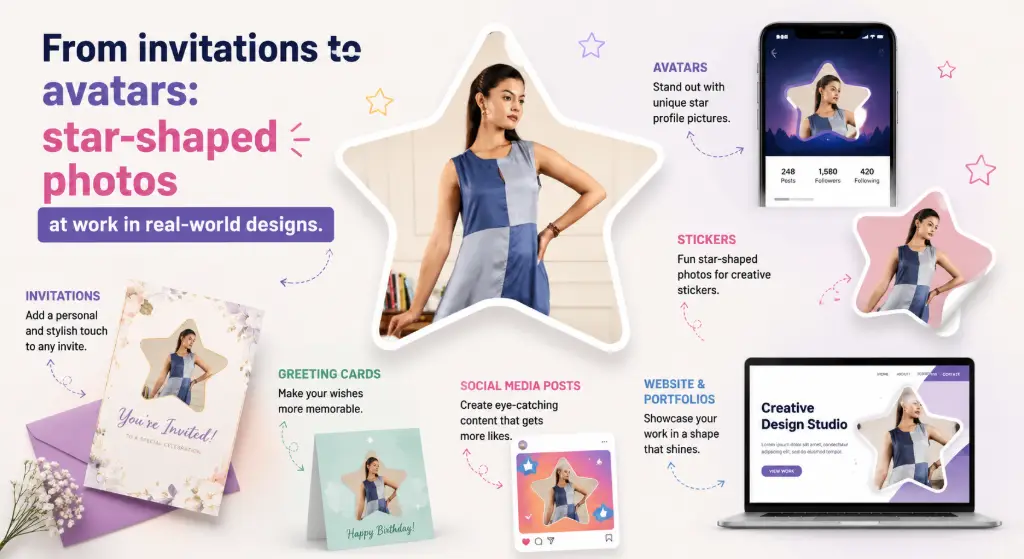
Wondering where star-shaped photos genuinely shine? Here are the most popular ways people use them, with a little inspiration for each.
Star Photo Crop for Social Media Profile Pictures
Most platforms crop avatars into circles — but nothing says your uploaded image has to be a boring square. A star-shaped portrait makes your profile instantly memorable in a sea of round faces. It works especially well for creators, tutors, DJs, party planners and anyone whose personal brand is "fun and energetic." Pair it with a bold background color and you've got a mini logo that reads clearly even at thumbnail size.
Birthday Invitations
A child's smiling face inside a bright star turns a simple invitation into a keepsake. Add the party details around the star and you're done — no designer needed. Rounded stars feel sweet for little kids; sparkle stars feel magical for princess or superhero themes. Parents often print the same star on the welcome board and thank-you cards for a matching set.
Graduation & Achievement Graphics
Combine a graduate's portrait with a star shape and a "Congrats!" line, and you have a shareable achievement post families will repost forever. Sheriff badge and 12-point seal styles look wonderfully official here — like a medal the photo earned.
School Projects
Students use star-shaped photos in posters, presentations and worksheets to make their work pop. It's also a safe, simple editing task kids can do themselves — upload, pick a star, download. Need to hand it in as a document? You can even add the image to a PDF right in the browser.
Stickers
Star-shaped photos make delightful stickers: laptop stickers, party favors, reward stickers for classrooms, even product packaging inserts. Download as PNG with transparency and send them straight to a sticker printer. Fat stars give you the most printable photo area per sticker.
Scrapbooking
Stars add rhythm to a memory page. Mix star-cropped photos with regular rectangles and a few heart shapes, and your collage instantly feels designed rather than dumped. For extra variety, run a few prints through a custom photo frame generator and mix framed and star-cropped shots on the same page, or merge images into a single printable collage file.
Party Decorations
Banners, welcome boards, cupcake toppers, table cards — printed star photos bring a personal touch to any celebration. A string of family stars makes a charming birthday garland. Planning a huge star poster? Split a high-resolution image into tiles with an image splitter and assemble it across several A4 sheets.
Website Design
Designers use star-shaped images for team cards, testimonial avatars, hero sections, promotional banners and feature cards. If a star feels too loud for your layout, softening the photo with rounded corners is a gentler alternative that still breaks the rectangle monotony. Want the page to match the photo? Pull the dominant colors with an image palette generator and use them for the section background around your star.
YouTube & Creator Graphics
Star-shaped portraits work beautifully in thumbnails, channel banners and community posts. Viewers recognize the shape at a glance, which helps with brand recall across videos. A black-and-white portrait inside a thin star makes a surprisingly classy channel badge — convert color to black and white in one click before cropping.
Product Promotions
A featured product inside a star screams "special offer!" Use fat stars for sale announcements, sparkle stars for new arrivals, and badge stars for best-seller callouts. Sellers shooting on plain backgrounds often isolate the product first with an auto crop object tool for e-commerce, then star-crop the cutout. Publishing promo graphics publicly? Add a small watermark to protect your designs without hurting quality.
6. How to Crop a Photo Into a Star: Step-by-Step Online Tutorial ✂️
Alright, the hands-on part. Here's exactly how to crop a photo into a star shape online, from zero to downloaded file:
Open the Star Crop Tool
Head over to the free Star Image Crop Tool on ImageToolsZone. It runs entirely in your browser — there's nothing to install and no account to create.
Upload Your Image
Click the upload button (or drag and drop). JPG, PNG, WEBP and other common formats all work. Pick a photo where the subject is clear and reasonably centered.
Choose a Star Shape
Select the star style that matches your mood — classic 5-point, rounded, sparkle, badge — and decide how many points you want.
Adjust the Image
Zoom and drag until the important part — usually a face or a product — sits comfortably inside the star's body, away from the thin points.
Preview the Crop
Check the live preview carefully. Are any important details clipped by a point? Is the face centered? Fine-tune before downloading.
Download
Hit download and save your star-shaped image. Choose PNG if you need transparency around the star, JPG for a smaller file.
Before You Download: A 10-Second Checklist
Try It Now
Crop your photo into a star shape online for free — the whole process takes less than a minute.
🚀 Crop My Photo Into a Star7. How to Get the Best Results When Cropping Photos Into Stars 🏆
The difference between an okay star crop and a great one usually comes down to a few small habits. Steal these:
8. Star Crop vs Circle Crop vs Square Crop 🔵
Every crop shape has a job. Here's a quick comparison so you always pick the right one for the moment:
| Crop Shape | Best For | Free Tool |
|---|---|---|
| Square | Profile photos, websites, product images | Free image cropper |
| Circle | Avatars, social profiles, team photos | Circle image cropper |
| Oval | Portraits, vintage frames, elegant layouts | Oval shape cropper |
| Heart | Romantic designs, Valentine's projects, weddings | Heart shape cropper |
| Polygon | Modern layouts and creative designs | Polygon shape cropper |
| Star | Awards, celebrations, creative graphics | ⭐ This guide's tool |
A good rule of thumb: squares feel professional, circles feel friendly, hearts feel romantic, polygons feel modern — and stars feel celebratory. When the message is "congratulations," "special offer" or "look how fun this is," the star wins.
9. Star Shape Cropping for Different Users 👥
For Bloggers
Create featured graphics and decorative images that make your posts visually unforgettable.
For Students
Build school projects, presentations and worksheets that stand out on the notice board.
For Teachers
Design certificates, classroom materials and activity sheets kids actually get excited about.
For Graphic Designers
Knock out masked images in seconds without opening complex software for a two-click job.
For Social Media Creators
Make distinctive profile pictures, thumbnails and posts that build a recognizable identity.
For Small Businesses
Create promotional graphics, badges and special-offer visuals without hiring a designer.
10. Why Use ImageToolsZone for Star Image Cropping? 💙
Plenty of tools promise the moon, so let's keep this simple and honest. Here's what you actually get with ImageToolsZone's star cropper:
Create your star-shaped image with ImageToolsZone and see the result instantly. No learning curve, no watermarks hovering over your work, no "upgrade to continue" surprises mid-crop.
11. Star Crop vs Photoshop — Which Should You Use? 🆚
This isn't a battle — it's about picking the right tool for the job. Here's the honest split:
Online Star Cropper
- No software installation
- Beginner-friendly from the first click
- Quick for simple shape cropping
- Convenient for one-off projects
- Works on any device, including phones
Photoshop
- Advanced editing capabilities
- More control over every pixel
- Better suited to professional multi-step designs
- Requires software and more editing knowledge
- Overkill for a single shape crop
Photoshop is fantastic — for professional, multi-layer design work. But if all you need is "put this photo inside a star," opening a full design suite is like renting a moving truck to deliver a pizza. An online star cropper gets you the same shape-mask result in seconds, and your expensive software stays closed for the jobs that actually need it.
12. What Image Formats Work for Star Cropping? 📁
JPG / JPEG
The universal photo format. Great for uploading; smaller files but no transparency.
PNG
Supports transparency — the best choice for downloading star shapes that float on any background.
WEBP
Modern web format with great compression; ideal for websites and fast loading.
GIF & others
Simple graphics formats also work in most browsers; upload support can vary by tool.
JPG or PNG for the final download? Here's the simple rule: choose PNG when you want the area outside the star to stay transparent (for overlays, stickers and design work). Choose JPG when you just need a small, shareable file and don't mind a solid background. If you're ever unsure, convert between image formats without quality loss, and run heavy files through an image compressor before sharing.
13. How to Choose the Right Star Shape 🧭
Still staring at the shape picker? Use this quick decision guide:
When in doubt, go with the classic 5-point star. It's the shape every human on earth recognizes, and it never looks out of place.
14. Creative Star Photo Ideas to Try This Weekend 💡
Need a spark? Here's a grab-bag of star photo ideas people love:
One fun trick: crop the same photo into three different star styles and let your family vote on the winner. Another: build a "star wall" of your year's best moments — one star per month — and print it as a New Year poster. Feeling artistic? Convert the photo with an image-to-sketch converter, apply an oil painting effect, or run it through a photo-to-cartoon converter first — then star-crop the artwork for a one-of-a-kind gift. Small effort, big smile.
15. Common Problems When Cropping Photos Into Stars (and Easy Fixes) 🔧
"My face gets cut off."
Almost always a positioning issue. Zoom out a little and drag the photo so the face sits in the star's center body, not near a point. The middle of the star is your safe zone.
"The star points cut important parts of my photo."
Points are narrow by design, so details placed near them will vanish. Choose a fatter star style, or reposition the subject so key details stay inside the wide central area.
"My downloaded image has a background."
That's the difference between shape cropping and transparent output. If you need see-through corners, download as PNG. For fully clean cutouts, pair it with a free background remover.
"The image looks blurry."
Cropping zooms in, so a low-res original gets worse. Always start with the highest-resolution photo you have, and if you need exact output dimensions, resize the image to the exact size you need after cropping.
"My star photo looks tilted."
Straighten the original first, then crop. A quick pass through a rotate & flip image tool fixes sideways or leaning shots before they enter the star.
16. Star Crop FAQs ❓
Quick answers to the questions we hear most often about star-shaped photo cropping:
What is a star image cropper?
Can I crop a photo into a star shape online for free?
Is there a free star shape cropper with no signup?
How do I crop an image into a 5-point star?
What types of star shapes can I use?
Can I crop a picture into a star without Photoshop?
Can I use a star-shaped photo for social media?
Can I crop JPG images into a star?
Can I crop PNG images into a star?
What is the best image format for a star-shaped photo?
Can I use a star crop for stickers?
How do I make a star-shaped profile picture?
Will cropping my photo into a star reduce its quality?
Can I crop a star shape on my phone?
Why does my star-cropped image have a white background instead of transparency?
How many points should my star have?
Can I print star-cropped photos for parties and certificates?
Can I use star-cropped images in commercial projects?
17. Related ImageToolsZone Tools You'll Love 🔗
Once your star crop is done, these free tools pair beautifully with it:
18. Final Thoughts: Give Your Photos Some Star Power 🌟
Star-shaped cropping is one of those small tricks with an outsized payoff. It takes a photo anyone could have taken and turns it into a graphic people actually notice — on invitations, certificates, profiles, banners and beyond. And as you've seen, you don't need design skills, expensive software, or even a desktop computer to pull it off.
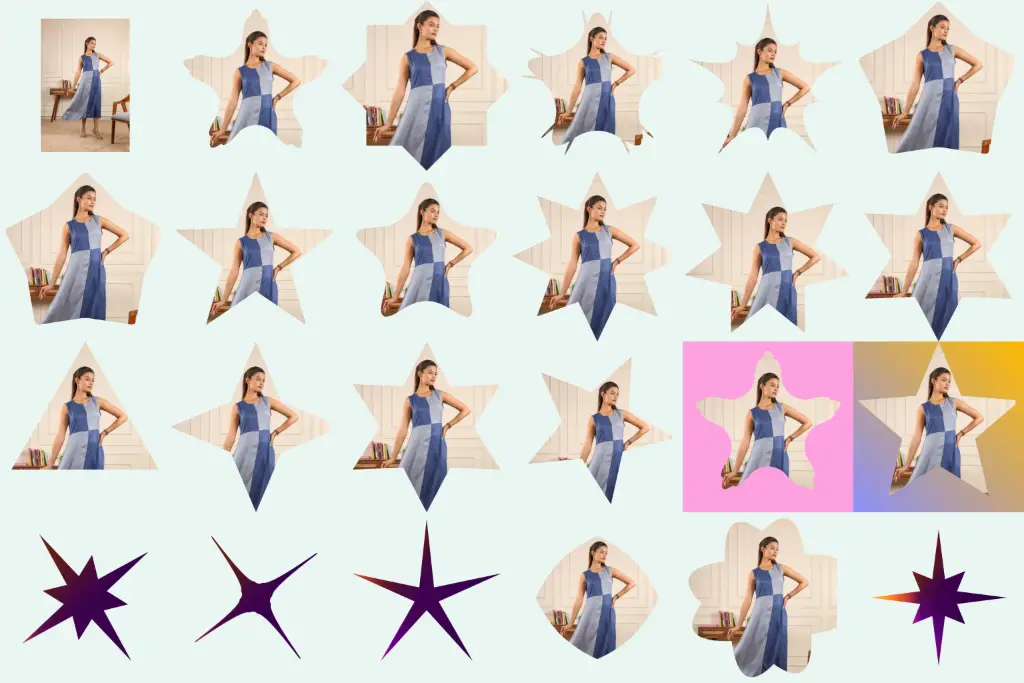
Turn Your Photo Into a Star
Give your photos a creative look without complicated editing software. Upload your image, choose a star shape, adjust the crop and download your finished design.
⭐ Try the Free Star Image Crop ToolSo go ahead — pick a photo that makes you smile, drop it into a star, and see how different it feels. Your next birthday card, certificate or profile picture will thank you for it. ✨