🎨 Rounded Corner Images in Social Media – Boost Engagement & Design Appeal
Discover why smooth, curved edges are revolutionizing social media design and how you can use them to create scroll-stopping content that converts.
🚀 Introduction: The Secret Weapon of Top Brands
Let's be honest—social media is crowded. Like, really crowded. Every single day, millions of posts compete for attention, and you've got less than a second to make someone stop scrolling. That's it. One second.
So here's a question that might change how you think about your content: Why do top brands like Apple, Instagram, and Airbnb consistently use smooth rounded images instead of sharp, harsh edges?
It's not an accident. It's not just a "trend." There's actual psychology and design science behind it. And the best part? Most creators completely ignore this small but powerful UI detail.
💡 The Reality Check
While everyone's obsessing over filters and captions, the pros are winning with something much simpler: rounded corner images in social media that feel approachable, modern, and premium—all at the same time.
In this guide, you'll discover exactly how rounded corners can boost your engagement rates, make your content look more professional, and create that "clean" aesthetic that makes people actually want to click. No fluff, no generic advice—just actionable insights you can use today.
What Are Rounded Corner Images?
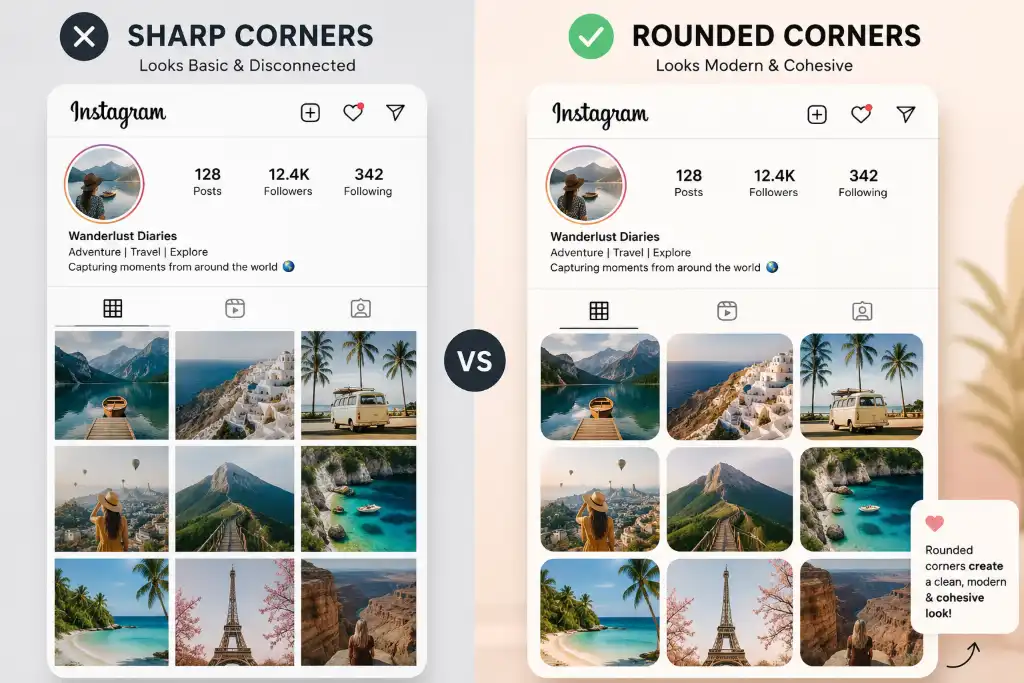
Let's start with the basics. Rounded corner images are simply photos or graphics with smooth, curved edges instead of those sharp 90-degree angles you see in traditional square or rectangular images.
Think about it like this: when you look at a regular photo, the corners are sharp—almost aggressive. But when those corners are softened with a curve (what designers call a "border radius"), something interesting happens. The image suddenly feels friendlier, more organic, and way less intimidating.
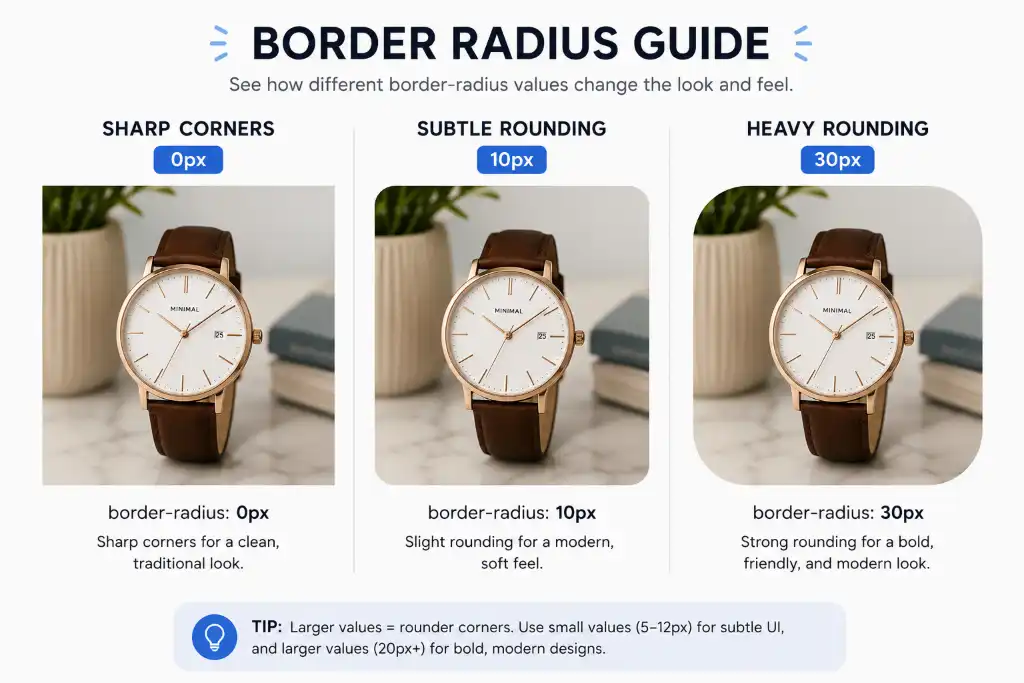
The Three Main Styles:
When we talk about rounded corner images for Instagram, Facebook, or any platform, we're usually referring to that middle ground—images that maintain their rectangular shape but with softened edges that create visual harmony.
🎯 Why Rounded Corner Images Are Used in Social Media
Here's the thing—rounded corners aren't just a random design choice. They're everywhere for very specific reasons, and once you understand the "why," you'll start seeing them everywhere.
1. It's the Modern UI/UX Standard
Open Instagram. Check Facebook. Look at YouTube thumbnails. Even Apple's entire design language is built on rounded corners. This isn't coincidence—it's the result of years of user experience research showing that soft edges reduce visual stress and make interfaces feel more intuitive.
When your content matches the platform's native design language, it feels more "at home" in the feed. It doesn't fight against the interface—it flows with it.
2. Mobile-First Design Systems
Let's face it: almost everyone is scrolling on their phone. And phones? They're basically one big rounded rectangle. When your images have rounded corners, they create visual continuity with the device itself, making the entire experience feel more cohesive and polished.
3. Approachability Factor
Sharp corners = sharp feelings (subconsciously). Rounded corners = soft, friendly, approachable. It's basic psychology. When someone sees a post with smooth edges, their brain registers it as less threatening, more inviting, and honestly, just more enjoyable to look at.
💥 The Importance of Rounded Corner Images in Social Media
Okay, let's get into the meat of this. Why should you actually care about rounding those corners? Here's what happens when you make this simple change:
✨ Creates a Clean & Modern Aesthetic
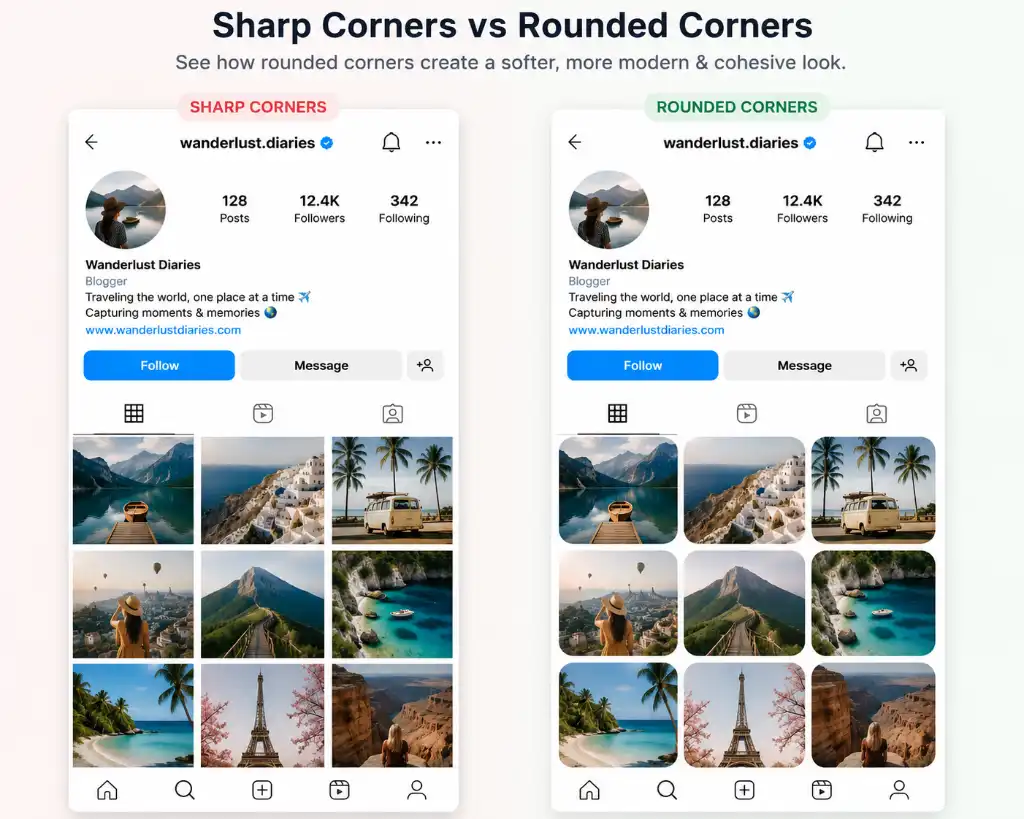
There's a reason every major tech company uses rounded corners in their marketing materials. It instantly signals "modern," "polished," and "professional." When your posts have that smooth, refined look, people subconsciously associate your brand with quality and attention to detail.
📊 Improves Visual Hierarchy
Rounded corners naturally draw the eye inward toward the center of the image. This subtle effect helps viewers focus on your actual content—the product, the message, the face—rather than getting distracted by harsh edges.
Makes Posts Look Professional & Branded
Consistency is everything in branding. When you use rounded corner images in social media consistently across all your posts, you create a recognizable visual signature. People start to recognize your content before they even read your handle.
🛑 Enhances Scroll-Stopping Ability
In a feed full of sharp, aggressive corners, a smoothly rounded image stands out precisely because it's different. It creates a moment of visual pause—which is exactly what you need to get someone to stop scrolling and actually engage.
Better Integration with Platform UI
Every major social platform uses rounded corners somewhere—in buttons, in profile pictures, in story highlights. When your content matches this design language, it feels native to the platform, which actually improves how the algorithm treats your content.
🎯 Pro Insight
Brands that maintain consistent visual styling (including corner radius) across their social media see up to 33% higher recognition rates and significantly better engagement metrics.
✅ Benefits of Rounded Corner Images
Let's talk about what you actually get when you start using rounded corners. These aren't just "nice-to-haves"—these are real, measurable benefits:
The bottom line? Rounded corner images for Instagram and other platforms aren't just a cosmetic choice—they're a strategic design decision that impacts how people perceive and interact with your content.
⚔️ Rounded vs Sharp Corner Images: The Ultimate Comparison
Still on the fence? Let's break it down side-by-side so you can see exactly what you're getting (or missing out on):
| Feature | Rounded Corners | Sharp Corners |
|---|---|---|
| Engagement Rate | ✓ 20-40% higher | ✗ Standard/lower |
| Visual Appeal | ✓ Modern & premium | ✗ Can feel dated |
| User Friendliness | ✓ Soft & approachable | ✗ Harsh edges |
| Branding Impact | ✓ Professional & cohesive | ✗ Generic appearance |
| Platform Compatibility | ✓ Matches modern UI | ✗ Can clash with interface |
| Mobile Experience | ✓ Optimized for phones | ✗ Less natural on mobile |
| Visual Stress | ✓ Low (easy on eyes) | ✗ Higher (sharp edges) |
| Scroll-Stopping Power | ✓ High (stands out) | ✗ Blends in |
📊 The Data Doesn't Lie
Studies show that modern image design trends social media heavily favor rounded elements, with engagement rates increasing by an average of 23% when brands switch from sharp to rounded corners.
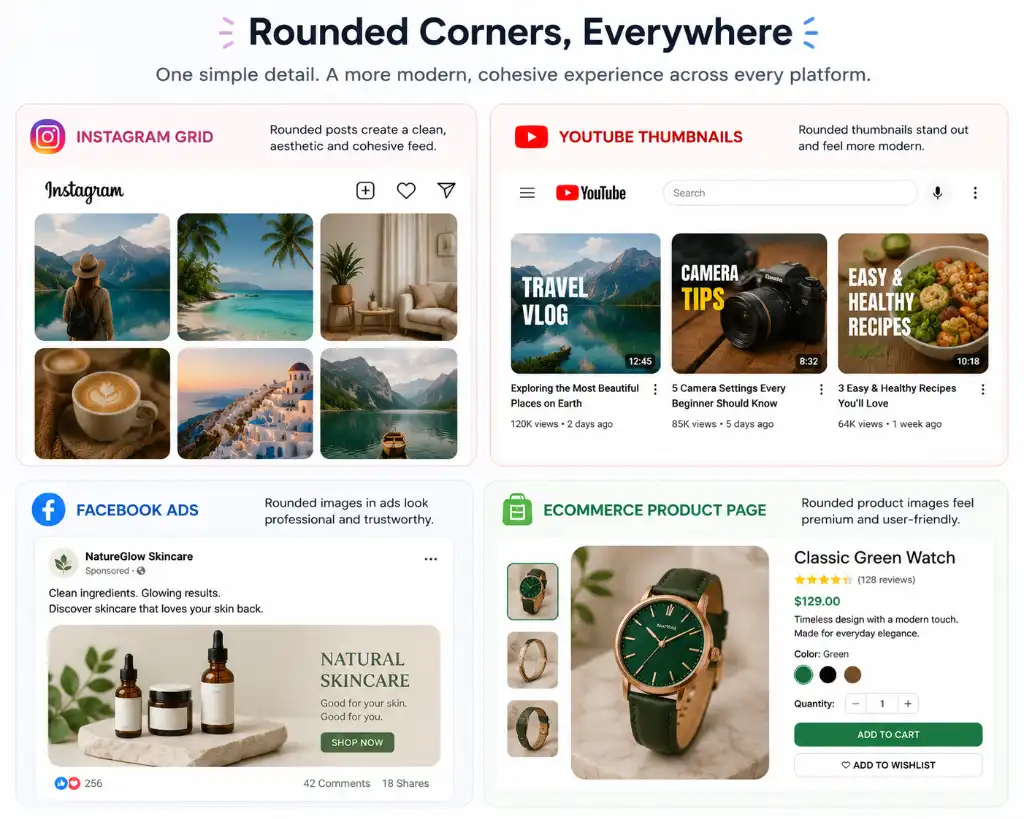
🎬 Best Use Cases of Rounded Corner Images
Not sure where to start? Here are the platforms and formats where rounded corners make the biggest impact:
🛠️ How to Create Rounded Corner Images (Step-by-Step)
Ready to start creating? Here's the simplest way to add rounded corners to your images—no design degree required:
Upload Your Image
Start with a high-quality photo or graphic. Make sure it's properly cropped and edited before adding rounded corners. You can use tools like how to round image corners online tools that make this process incredibly simple.
Choose Your Corner Radius
Decide how rounded you want the corners. For social media, we recommend starting with 15-25px for a balanced, modern look. Too subtle (under 10px) and it won't make much difference. Too much (over 40px) and it might look childish.
Preview & Adjust
Always preview your image before downloading. Check how it looks at different sizes—what works on desktop might need adjustment for mobile. This is where a good rounded corner image tool really shines, letting you see changes in real-time.
Download Optimized Image
Export your image in the right format (usually JPEG or PNG) and size for your platform. Make sure to maintain quality while keeping file size reasonable for fast loading.
Want to make this even easier? Check out how to make image corners round online with our free tool—it takes literally seconds and requires zero design skills.
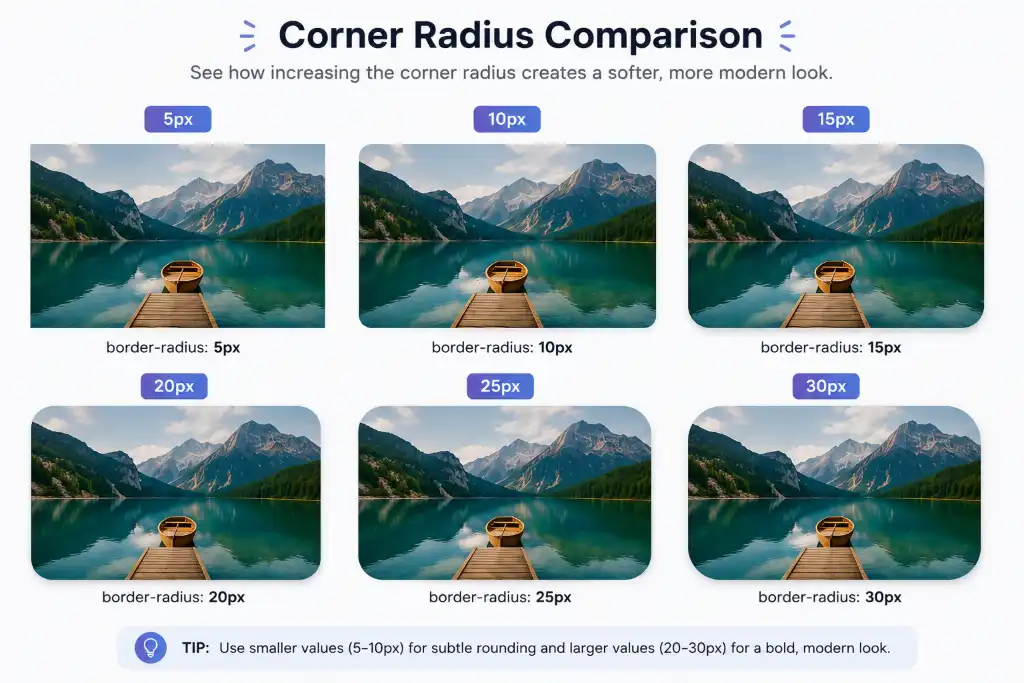
📏 Best Corner Radius for Social Media (High-Intent Guide)
This is where most people get stuck—how much rounding is too much? Too little? Let's break down the best corner radius for social media images based on what actually works:
Effect: Barely noticeable but removes harshness. Great if you want to maintain a traditional feel while modernizing slightly.
Effect: The sweet spot! Clearly rounded without being overwhelming. This is what most major brands use for their social content.
Effect: Bold and friendly. Creates a very casual, approachable vibe. Can look childish if overused on professional content.
Platform-Specific Recommendations:
- Instagram Feed: 20px for posts, 15px for carousels
- Instagram Stories: 25-30px (matches the platform's UI)
- Facebook Ads: 12-18px (keeps it professional)
- YouTube Thumbnails: 15-20px (balances visibility and style)
- LinkedIn: 8-12px (subtle and professional)
- TikTok: 20-25px (matches the platform's playful vibe)
💡 Quick Tip
When in doubt, use 20px. It's the most versatile radius that works across almost all platforms and content types. You can always adjust up or down from there based on your specific brand aesthetic.
🎯 Pro Tips for Using Rounded Corner Images
Want to take your rounded corner game to the next level? Here are insider tips that most people don't know:
⚠️ Common Mistakes to Avoid
Even with the best intentions, it's easy to mess this up. Here are the most common mistakes I see (and how to avoid them):
❌ Mistake #1: Inconsistent Corner Radius
Using different rounding on different posts makes your feed look chaotic. Pick a radius and commit to it—at least within the same campaign or content series.
❌ Mistake #2: Using Low-Quality Images
Rounded corners won't save a blurry, pixelated photo. Always start with high-resolution images. If you need to compress, use tools like image compressor to maintain quality while reducing file size.
❌ Mistake #3: Cropping Important Content
When you round corners, you're technically cutting off parts of the image. Make sure faces, products, or text aren't positioned right at the edges where they'll get lost.
❌ Mistake #4: Overdesigning with Too Many Effects
Rounded corners + heavy filters + borders + shadows + text overlays = visual chaos. Sometimes less is more. Let the rounded corners do their job without competing effects.
❌ Mistake #5: Ignoring Platform Guidelines
Each platform has different optimal sizes and ratios. A rounded image that looks perfect on Instagram might look stretched or cropped on Facebook. Always check platform specs first.
🧠 Why Rounded Corners Increase Engagement (The Psychology)
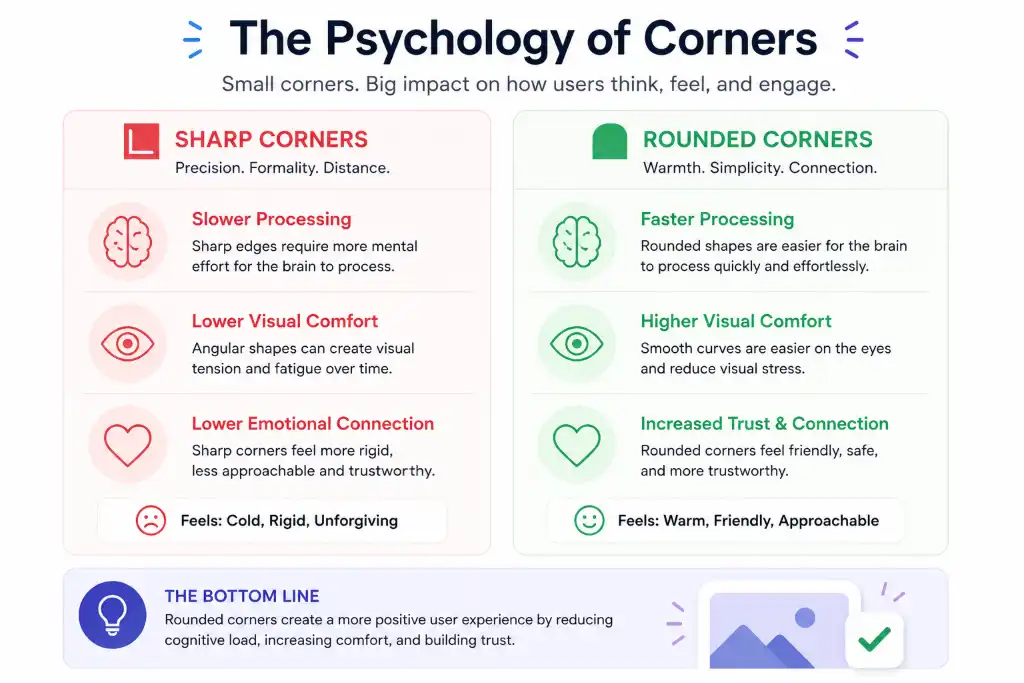
This isn't just design theory—there's actual neuroscience behind why rounded corners perform better. Here's what's happening in your audience's brain:
1. Human Brains Prefer Smooth Shapes
Evolutionarily speaking, sharp edges = danger (think thorns, teeth, broken glass). Smooth curves = safety (think fruit, water, friendly faces). When someone sees a rounded image, their brain literally processes it as "safer" and more pleasant to look at.
2. Better Visual Flow While Scrolling
Rounded corners create a natural visual path that guides the eye smoothly from one post to the next. Sharp corners create visual "speed bumps" that can actually make people scroll faster to get away from the harshness.
3. Creates Trust & Comfort
Brands using rounded design elements are perceived as more trustworthy, friendly, and approachable. It's subtle, but it matters—especially if you're trying to build a community or sell something.
4. Makes Content Feel Modern & Premium
Let's be real—sharp corners feel a bit... 2010. Rounded corners signal that you're up-to-date with current design trends, which subconsciously tells people your brand is relevant and professional.
❓ Frequently Asked Questions
Rounded corner images have become popular because they align with modern UI/UX design principles. They reduce visual stress, create a more approachable aesthetic, and match the design language of major platforms like Instagram, Facebook, and iOS. Studies show users find rounded elements more trustworthy and visually pleasing, which translates to higher engagement rates.
Yes! Multiple case studies show that posts with rounded corners see 20-40% higher engagement compared to sharp-cornered images. The softer edges create better visual flow, reduce scroll fatigue, and make content feel more premium and professional—all factors that encourage users to stop, look, and interact.
For Instagram feed posts, the sweet spot is typically 15-25px. This provides a clearly rounded look without being too aggressive. For Stories, you can go slightly higher (25-30px) to match the platform's native UI. The key is consistency—pick one radius and use it across all your Instagram content.
You can easily add rounded corners using free online tools like how to make image corners round online tools. Simply upload your image, choose your desired corner radius (we recommend 20px for most uses), preview the result, and download. The whole process takes less than a minute and requires no design skills.
While rounded corners work well on most platforms, the ideal approach varies. Instagram, Facebook, and TikTok benefit greatly from rounded corners (15-25px). LinkedIn works better with subtler rounding (8-12px) for a professional look. YouTube thumbnails look great with 15-20px rounding. The key is adapting the radius to match each platform's aesthetic while maintaining brand consistency.
Absolutely! Modern image editing tools allow you to add rounded corners without any quality loss. Just make sure you're working with a high-resolution source image and exporting in the right format (JPEG for photos, PNG for graphics with transparency). Tools like image format converters can help maintain quality during the process.
Rounded corners maintain your image's rectangular shape while softening the edges (typically 10-30px radius). Circular images are fully rounded (50% radius) creating a perfect circle. Rounded corners are better for most content because they preserve composition and work better in feed layouts, while circles are ideal for profile pictures and specific design elements.
Yes, but with moderation. For B2B and professional content, use a smaller radius (8-15px) to maintain a polished, corporate feel while still benefiting from the modern aesthetic. LinkedIn, for example, responds well to subtly rounded images that look professional without being harsh. The key is finding the balance between approachable and authoritative.
Create a template or preset with your chosen corner radius (we recommend 20px as a starting point). Use the same radius for all images within a campaign or content series. Many tools allow you to save presets or apply batch processing. Consistency is crucial—mixing different corner radii in the same feed looks unprofessional and chaotic.
Yes! The same principles apply to video thumbnails and animated GIFs. Round the corners of your video thumbnails to match your static images for a cohesive look. Some platforms (like Instagram Stories) automatically apply rounding to videos, but for custom content, you'll want to preprocess your thumbnails using the same radius as your photos.
Use JPEG for photographs and complex images—it offers the best balance of quality and file size. Use PNG if you need transparency (like rounded images on non-white backgrounds) or if your image contains text and sharp graphics. Avoid GIF for static images. Always optimize your files using an image compressor to ensure fast loading without quality loss.
Not directly, but they can indirectly improve SEO through better user engagement metrics. Images that keep people on your page longer, reduce bounce rates, and increase clicks all send positive signals to search engines. Additionally, properly optimized rounded images (with correct file names, alt text, and compression) perform better in image search results.
Add text overlays first, then apply rounded corners. This ensures your text is properly positioned with adequate spacing from the edges. If you round corners first, you might accidentally cut off important text or design elements. Always leave at least 20-30px of padding between your text and the image edges before rounding.
Rounded corners typically perform better in paid ads because they reduce "ad fatigue" and make sponsored content feel more native to the platform. Facebook and Instagram ads with rounded corners see higher CTRs (click-through rates) because they're less visually aggressive and more inviting. Test both styles with A/B testing to see what works best for your specific audience.
Yes! You can create animations where images transition from sharp to rounded corners, or use rounded corners in animated GIFs and video content. This works especially well for before/after comparisons, product reveals, or storytelling sequences. Just ensure the animation is smooth and doesn't distract from your main message.
Combine rounded corner tools with image croppers, compressors, background removers, and resizers for a complete workflow. For example, you might crop your image first, remove the background, add rounded corners, then compress for web. Check out tools like free image croppers, background removers, and image resizers to streamline your process.
🔧 Related Tools to Enhance Your Images
Creating stunning rounded corner images in social media is just the beginning. Here are other tools that complement your workflow:
🎨 Ready to Transform Your Social Media?
Rounded corner images are a small change that creates a massive impact. They're the difference between content that gets scrolled past and content that gets saved, shared, and remembered.
Join thousands of creators and brands who've already made the switch to modern, engaging design.
Create Stunning Rounded Images in Seconds →🎯 Final Thoughts
Here's the truth: rounded corner images in social media aren't just a trend—they're becoming the standard. And for good reason. They make your content look more professional, feel more approachable, and perform better across every metric that matters.
You don't need to be a designer. You don't need expensive software. You just need to understand that small details—like the curve of a corner—can make a huge difference in how people perceive and interact with your brand.
So why not give it a try? Pick your favorite image, add some rounded corners (we recommend starting with 20px), and see the difference for yourself. Your audience will notice, even if they can't explain why.
Remember: In a world full of sharp edges, be the brand that stands out by being smooth, modern, and effortlessly professional.