
Why Remove Image Background? 15 Powerful Benefits You Should Know
Discover how background removal transforms your photos, boosts sales, and saves hours of editing time with AI-powered tools
📋 On This Page
Introduction
Why remove image background? It's a question that crosses the mind of every photographer, marketer, ecommerce seller, and content creator at some point. The answer might surprise you—it's not just about making photos look prettier. Background removal has become one of the most essential editing techniques in today's digital world, and for good reason.
Whether you're selling products on Amazon, creating stunning social media posts, or designing professional marketing materials, removing backgrounds can be the difference between amateur and professional-looking visuals. The best part? You no longer need expensive software or advanced editing skills to achieve this.
What is Image Background Removal?
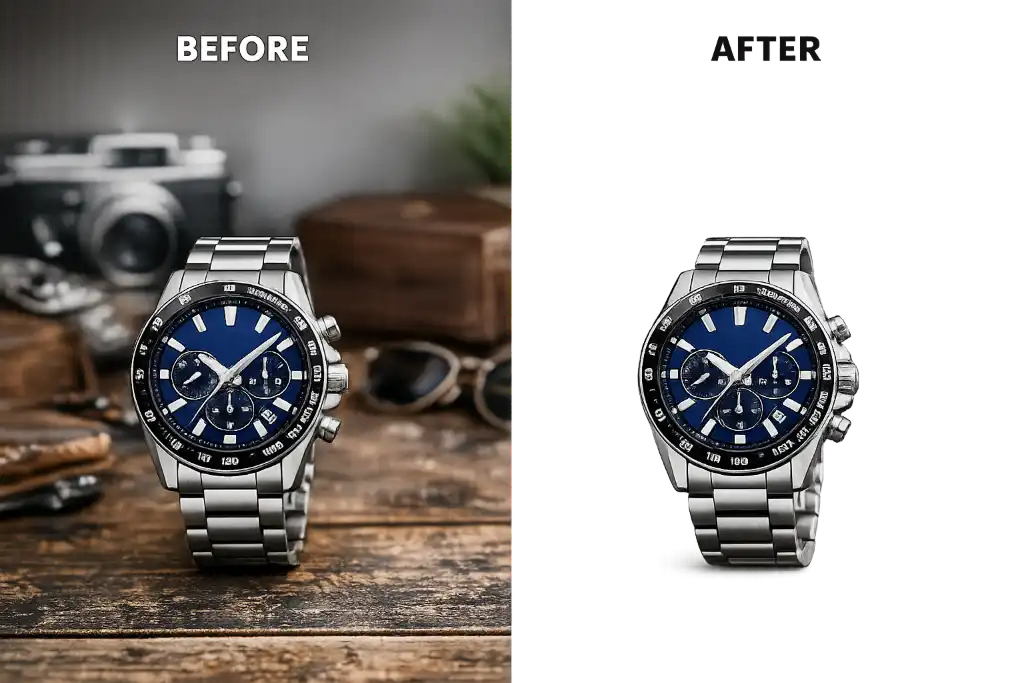
Image background removal is the process of isolating the main subject of a photograph by eliminating everything behind it. The result? A clean, transparent (or customizable) background that puts your subject front and center. Think of it as giving your images a fresh start—a chance to fit perfectly into any design, website, or marketing material without distracting elements competing for attention.
Why More People Use Background Remover Tools Today
The rise of AI-powered background remover tools has democratized professional photo editing. What once required hours of meticulous work in Photoshop can now be accomplished in seconds with a single click. Small business owners, freelancers, and even hobbyists can now create studio-quality images without breaking the bank.
Consider Sarah, a handmade jewelry seller on Etsy. She used to spend entire weekends photographing her products against white sheets, trying to get clean backgrounds. Now, she snaps photos anywhere—in her living room, at craft fairs, even outdoors—and uses an online background remover to create consistent, professional product images in minutes.
1. Makes Photos Look Professional
Let's be honest—first impressions matter. A lot. When potential customers, clients, or followers see your images, they form an opinion about your brand within milliseconds. Background removal instantly elevates your photos from "snapshot" to "studio quality."
Cluttered home office background, visible shadows, distracting objects, inconsistent lighting
Clean white background, professional appearance, focus on subject, consistent branding
Real-Life Examples
Professional Headshots: LinkedIn profile photos with removed backgrounds look significantly more polished. Instead of that coffee shop or busy office behind you, you get a clean, professional appearance that works perfectly on any platform.
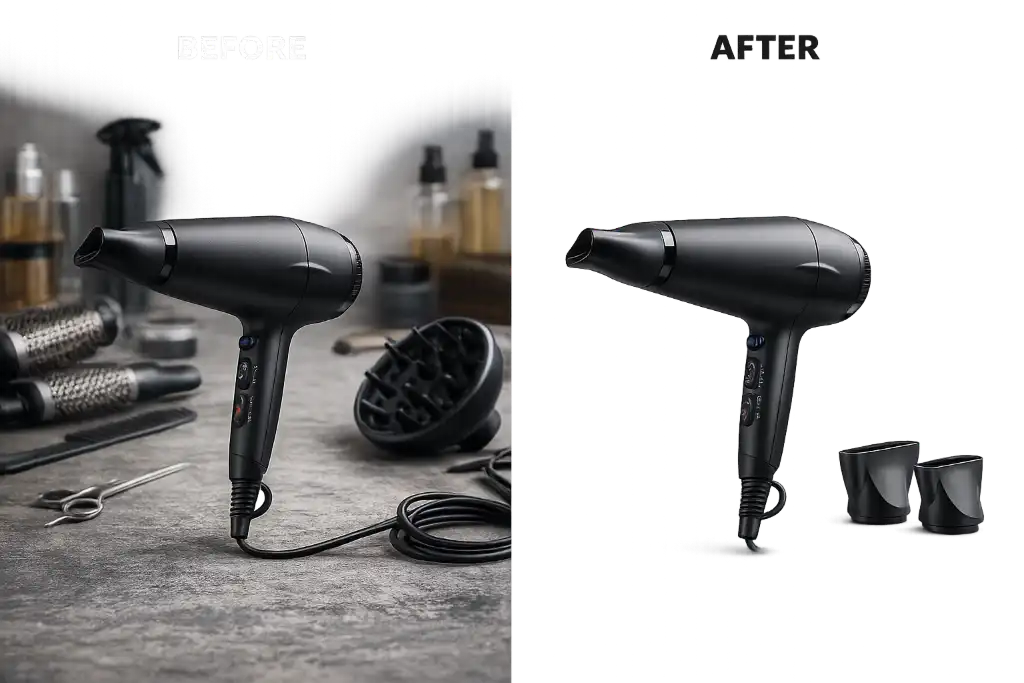
Product Photography: Whether you're selling handmade crafts, electronics, or clothing, background removal creates consistency across your entire catalog. Every product looks like it belongs together, building trust with potential buyers.
2. Improves Product Sales
If you're selling online, this benefit alone justifies learning why remove image background techniques. Ecommerce is visual. Customers can't touch, feel, or try your products—they rely entirely on images to make purchasing decisions.
Ecommerce Platform Requirements
Major platforms have strict image guidelines:
- Amazon: Requires pure white backgrounds (RGB 255,255,255) for main product images
- eBay: Recommends white or light gray backgrounds for better visibility
- Shopify: Suggests consistent backgrounds across all products
- Etsy: While more flexible, clean backgrounds significantly improve click-through rates
Using a specialized ecommerce cropping tool combined with background removal ensures your products meet these standards while looking their absolute best.
3. Helps Create Transparent PNG Images
Transparent PNG images are the Swiss Army knife of digital design. Once you remove the background and save as PNG, your image becomes incredibly versatile.
Need to place your product on different colored backgrounds for A/B testing? Want to create a collage for social media? Transparent PNGs make all of this possible without those ugly white boxes around your subjects.
Learn more about creating perfect transparent images with our format conversion guide to ensure maximum quality.
5. Faster Graphic Design
Time is money, especially for freelancers and small business owners. Background removal dramatically speeds up your design workflow.
Before AI Tools:
- 30-60 minutes per image in Photoshop
- Required advanced skills
- Expensive software subscription
- Frustrating manual selection process
With Modern Tools:
- 5-10 seconds per image
- No skills required
- Free or affordable options
- Batch processing available
Try our professional image editor to see how quickly you can create stunning designs without watermarks or limitations.
6. Makes Marketing Materials More Attractive
From brochures to billboards, background-removed images give your marketing materials that polished, professional edge.
Flyers & Brochures
Clean images that integrate seamlessly with text and graphics
Email Campaigns
Products that stand out in crowded inboxes
Banners & Posters
Eye-catching visuals for events and promotions
Digital Ads
Higher click-through rates with clean imagery
Marketing is about grabbing attention in seconds. Background removal eliminates visual noise, letting your message—and your products—shine through.
7. Improves Brand Identity
Consistency builds trust. When all your images share the same clean, professional look, you create a cohesive brand identity that customers recognize and remember.
Whether it's your logo, product images, or team photos, removing backgrounds ensures everything works together harmoniously across your website, social media, and print materials.
8. Better Website Design
Your website is often the first interaction customers have with your brand. Background-removed images load faster, look cleaner, and integrate better with modern web design.
Website Benefits:
- Faster page load times (smaller file sizes with PNG optimization)
- Better mobile responsiveness
- Cleaner, more modern aesthetic
- Easier to implement dark/light mode themes
- Improved accessibility
Use our image compressor after background removal to ensure your website stays lightning-fast while maintaining visual quality.
9. Creates Better Ads
Advertising costs money—every click counts. Background removal helps your ads stand out in crowded feeds and search results.
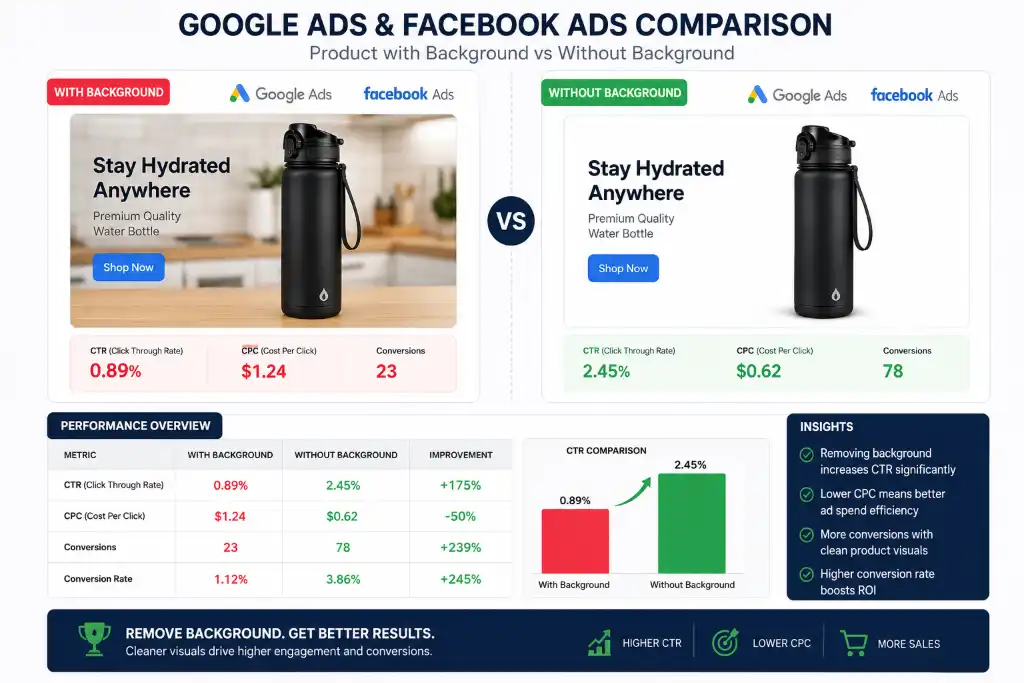
Clean, professional images in your ads signal quality and trustworthiness. They also give you flexibility to test different backgrounds and see what resonates best with your audience.
10. Perfect for Passport and ID Photos
Government documents have strict requirements, and background removal makes compliance simple.
Common Requirements:
- Plain white or light gray background
- No shadows or patterns
- Specific dimensions
- Professional appearance
Instead of paying $15-20 at a photo studio, you can take a photo at home and use free background removal tools to create compliant passport photos, visa applications, or ID cards.
Combine this with our exact size resizer to meet specific dimension requirements for different countries.
11. Better Logos and Icons
Logos need to work everywhere—on your website, business cards, social media profiles, merchandise, and more. A background-removed logo (typically in PNG or SVG format) gives you maximum flexibility.
Create custom shapes with our custom shape crop tool to make your logo fit perfectly into any design context.
12. Saves Editing Time with AI
Modern AI background removers are incredibly accurate. They can detect hair, fur, transparent objects, and complex edges that would take hours to manually select.
AI Capabilities:
- Automatic subject detection
- Hair and fur refinement
- Batch processing (100s of images at once)
- Edge smoothing and refinement
- Shadow detection and removal
What used to be a specialized skill is now accessible to everyone. The AI handles the heavy lifting, so you can focus on creativity and strategy.
13. Works Without Photoshop
Let's address the elephant in the room: Photoshop is expensive and has a steep learning curve. The good news? You don't need it anymore for background removal.
Our advanced photo editor provides professional results without watermarks, subscriptions, or complicated interfaces.
14. Improves User Experience
Good design isn't just about looking pretty—it's about function. Background-removed images improve user experience in several ways:
Faster Loading
Optimized PNGs with transparent backgrounds often have smaller file sizes
Better Focus
Users can concentrate on the product, not the background
Cleaner Layouts
Images integrate seamlessly with your design
Accessibility
Better contrast and clarity for all users
15. Completely Free Online Solutions
The democratization of photo editing means professional results are now free and accessible to everyone. No credit card required, no watermarks, no limitations.
Try our free background remover tool right now—upload your image, watch the AI work its magic, and download your professional-looking result in seconds.
Ready to Transform Your Images?
Join thousands of satisfied users who've discovered why remove image background is essential for modern digital success.
Remove Background Now - It's Free!Common Use Cases
Understanding why remove image background matters becomes clearer when you see how different professionals use this technique:
Ecommerce Sellers
Create consistent product catalogs that convert browsers into buyers
Bloggers
Design eye-catching featured images and graphics
Freelancers
Deliver professional work faster without expensive software
Graphic Designers
Speed up workflow and offer more services to clients
Students
Create professional presentations and projects
Teachers
Design engaging educational materials
Digital Marketers
Create high-converting ads and landing pages
Small Businesses
Compete with larger brands on a limited budget
Content Creators
Design thumbnails, overlays, and promotional graphics
YouTubers
Create professional channel art and video elements
Common Mistakes to Avoid
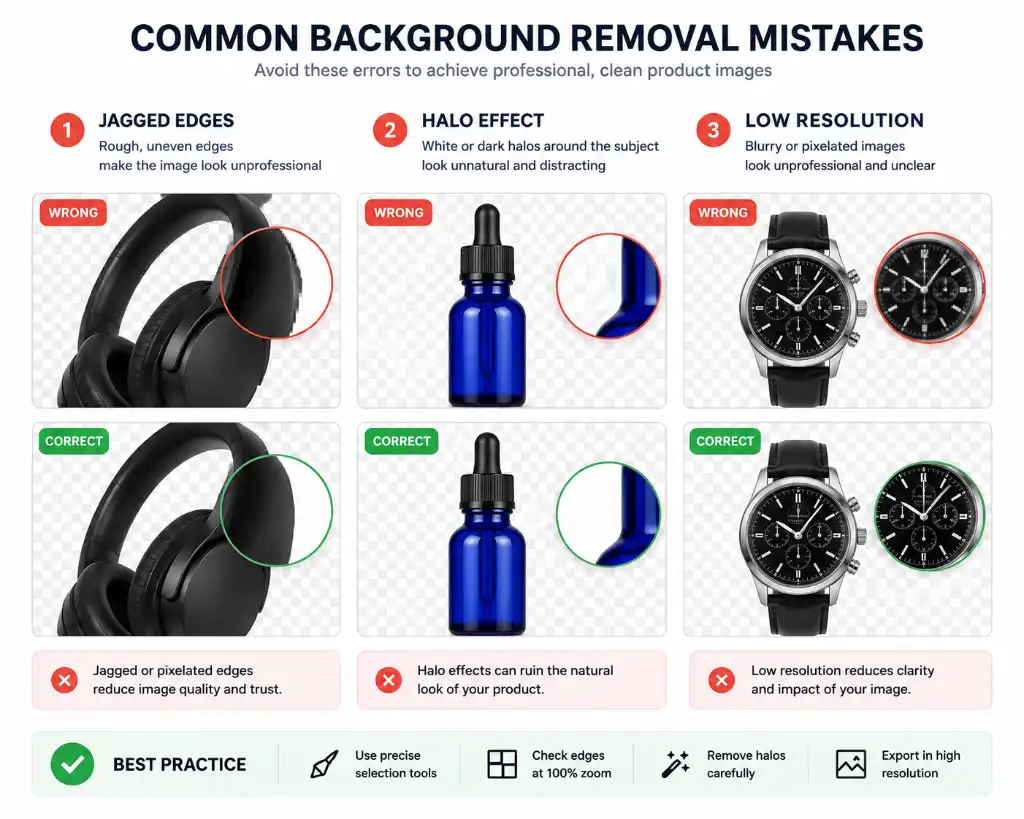
Even with powerful AI tools, certain mistakes can ruin your background removal results. Here's what to watch out for:
- Using Low-Quality Images: AI can only work with what you give it. Blurry, pixelated, or poorly lit images will produce poor results. Always start with the highest resolution possible.
- Choosing Wrong Background Color: While white is standard for ecommerce, sometimes light gray or transparent works better depending on your use case.
- Saving in JPG Instead of PNG: JPG doesn't support transparency! If you remove a background and save as JPG, you'll get a white box around your subject. Always use PNG for transparent backgrounds.
- Ignoring Resolution: Don't upscale small images. If your original is 500x500 pixels, don't expect miracles when you need 2000x2000. Start with high-res images.
- Forgetting to Check Edges: Always zoom in and check the edges of your subject. Hair, fur, and transparent objects need extra attention.
Tips for Better Results
Maximize your background removal quality with these pro tips:
- Use High-Resolution Images: The higher the resolution, the better the AI can detect edges and fine details. Aim for at least 1000 pixels on the shortest side.
- Choose PNG Format: For transparent backgrounds, PNG is essential. It preserves transparency and maintains quality without compression artifacts.
- Check Edge Quality: Zoom to 200-400% and inspect edges carefully. Look for halos, jagged pixels, or missing details.
- Remove Shadows: Shadows can make your image look unprofessional. Use tools to remove or soften shadows after background removal.
- Good Lighting: Take photos in bright, even lighting. Avoid harsh shadows and backlighting when possible.
- Contrast Helps: Subjects that contrast well with their background are easier for AI to detect accurately.
- Batch Process Smartly: If you have hundreds of images, use batch processing but spot-check results to ensure quality.
After removing backgrounds, enhance your images further with our image enhancer or add creative effects with our oil painting effect tool.
🔗 Related Tools You Might Find Useful
Frequently Asked Questions
Removing image backgrounds offers numerous benefits: it makes your photos look more professional, improves product sales on ecommerce platforms, creates versatile transparent PNG images, enhances social media graphics, speeds up your design workflow, and helps maintain consistent branding. Whether you're selling products, creating content, or building a professional portfolio, background removal elevates the quality and versatility of your images.
Background removal itself doesn't technically improve the resolution or sharpness of your image, but it significantly improves perceived quality. By eliminating distracting elements, your subject becomes the clear focus, making the image appear more professional and polished. When combined with proper optimization and format conversion (like saving as PNG), you maintain or even enhance the overall visual quality.
Absolutely! PNG is essential for background-removed images because it supports transparency. JPG doesn't support transparent backgrounds—if you save a background-removed image as JPG, it will automatically fill the transparent areas with white (or another color), defeating the purpose of background removal. PNG also uses lossless compression, meaning your image quality stays intact. Use our format converter to ensure you're using the right format.
Yes! Modern AI-powered tools make Photoshop unnecessary for most background removal tasks. Free online tools like our background remover can automatically detect and remove backgrounds in seconds with results comparable to manual Photoshop editing. These tools are perfect for non-designers, small businesses, and anyone who needs quick, professional results without the learning curve or expense of Photoshop.
Modern AI background removal is remarkably accurate, handling complex edges like hair, fur, and transparent objects with impressive precision. For 90-95% of use cases—ecommerce products, marketing materials, social media content, and professional photos—AI delivers results indistinguishable from manual editing. For extremely complex images or critical print work, you might need minor touch-ups, but the AI handles the heavy lifting, saving you 90% of the time.
Yes, many online tools offer completely free background removal with no watermarks, no registration required, and no hidden fees. Our free background remover tool provides professional-quality results at no cost. Some services offer free tiers with limitations (like file size or number of images), while others are completely free. Always check for watermarks and usage rights before using a "free" tool.
Images work best for background removal when they have: high resolution (at least 1000px on the shortest side), good lighting with minimal shadows, clear contrast between subject and background, sharp focus on the subject, and simple, uncluttered backgrounds. Products photographed against contrasting backgrounds, professional headshots with good lighting, and objects with defined edges produce the best results. Avoid blurry, dark, or low-contrast images.
Absolutely! In fact, most major ecommerce platforms prefer or require background-removed images. Amazon mandates pure white backgrounds (RGB 255,255,255) for main product images. eBay, Shopify, Etsy, and Flipkart all recommend clean, consistent backgrounds for better conversion rates. Background removal helps you meet these requirements while creating professional, cohesive product catalogs that build trust with buyers and increase sales.
While background removal doesn't directly impact SEO algorithms, it indirectly improves several SEO factors: faster page load times (optimized PNGs are often smaller), better user engagement (clean images keep visitors on your page longer), lower bounce rates, improved mobile experience, and higher quality scores for ads. All these factors contribute to better search rankings and overall website performance.
The best online background removers for beginners are those that require no registration, have simple drag-and-drop interfaces, process images quickly, and deliver high-quality results without watermarks. Look for tools that offer batch processing, multiple export formats, and additional editing features. Our background remover tool is designed specifically for ease of use while maintaining professional quality.
With modern AI tools, background removal typically takes 5-10 seconds per image. This includes upload time, processing, and download. Batch processing can handle dozens or hundreds of images simultaneously, though total time depends on your internet speed and the number of images. Compare this to manual Photoshop editing, which can take 15-60 minutes per image, and you'll see why AI tools have revolutionized this process.
Yes! Advanced AI background removers are specifically designed to handle complex edges like hair, fur, and transparent objects. The AI detects fine details and preserves them during the removal process. For best results with hair or fur, use high-resolution images with good lighting and contrast. Some tools offer refinement brushes or edge detection adjustments for perfecting these challenging areas.
Background removal eliminates the background entirely, creating a transparent PNG image. Background replacement removes the original background and substitutes it with a new one (solid color, gradient, or another image). Both start with the same removal process, but replacement adds an extra step. Removal gives you maximum flexibility—you can add any background later. Replacement is faster if you know exactly what background you want.
Yes, most AI background removers can handle multiple subjects in a single image. The AI detects all prominent subjects and removes the background while keeping everyone intact. This works well for team photos, family portraits, product groups, and event photography. For best results, ensure all subjects are well-lit and reasonably separated from each other and the background.
Background removal itself doesn't create copyright issues, but you must own or have rights to use the original image. If you photographed the image yourself or purchased it with commercial rights, you're free to remove the background and use it. Never remove backgrounds from images you don't have rights to use. For stock photos, check the license terms—some allow modification (including background removal), while others don't.
To maintain quality: start with high-resolution images (never upscale), use AI tools that preserve edge quality, save in PNG format to avoid compression artifacts, avoid multiple re-saves, check edges at 200-400% zoom, and use our image enhancer if needed after removal. Also, ensure your original photo has good lighting and focus—AI can't create detail that isn't there.
Yes! Most online background removers are mobile-responsive and work perfectly on smartphones and tablets. Simply upload images from your phone's gallery, let the AI process them, and download the results directly to your device. This is perfect for social media managers, ecommerce sellers, and content creators who work on the go. Some tools also offer dedicated mobile apps for even faster processing.
Start Removing Backgrounds Today
Now that you understand why remove image background is essential for professional results, it's time to put this knowledge into action. Whether you're boosting ecommerce sales, creating stunning social media content, or simply wanting better photos, the right tools make all the difference.
Try Free Background Remover NowNo registration required • No watermarks • Instant results
4. Better Social Media Graphics
Social media is a visual battleground. Every platform has different image requirements, and background removal gives you the flexibility to adapt your content instantly.
Instagram
Create eye-catching Stories and posts with clean product cutouts that pop against vibrant backgrounds
Facebook
Design professional ads and cover photos without background distractions
LinkedIn
Polish your professional headshot or company branding materials
YouTube
Create stunning thumbnails with clean subject isolation
When you understand why remove image background matters for social media, you unlock endless creative possibilities. Create seasonal promotions, holiday themes, or brand campaigns without reshooting every product.