
How to Crop Image into Star Shape: Your Complete Guide
Transform ordinary photos into eye-catching star-shaped masterpieces in seconds. No design skills needed, no software to install—just pure creative magic.
📋 On This Page
What Exactly is a Star-Shaped Image Crop?
Let's be honest—regular square or rectangular photos are kind of boring. When you're scrolling through social media or flipping through a photo album, what catches your eye? Those unique, creative shapes that break the monotony. That's exactly where star-shaped image cropping comes in.
So, what does it actually mean to crop an image into a star shape? Instead of the traditional rectangular frame, your photo gets masked into a five-pointed (or multi-pointed) star silhouette. The magic happens when the areas outside the star become transparent, giving you a clean, professional-looking star-shaped photo that you can place anywhere—on invitations, social media posts, certificates, you name it.
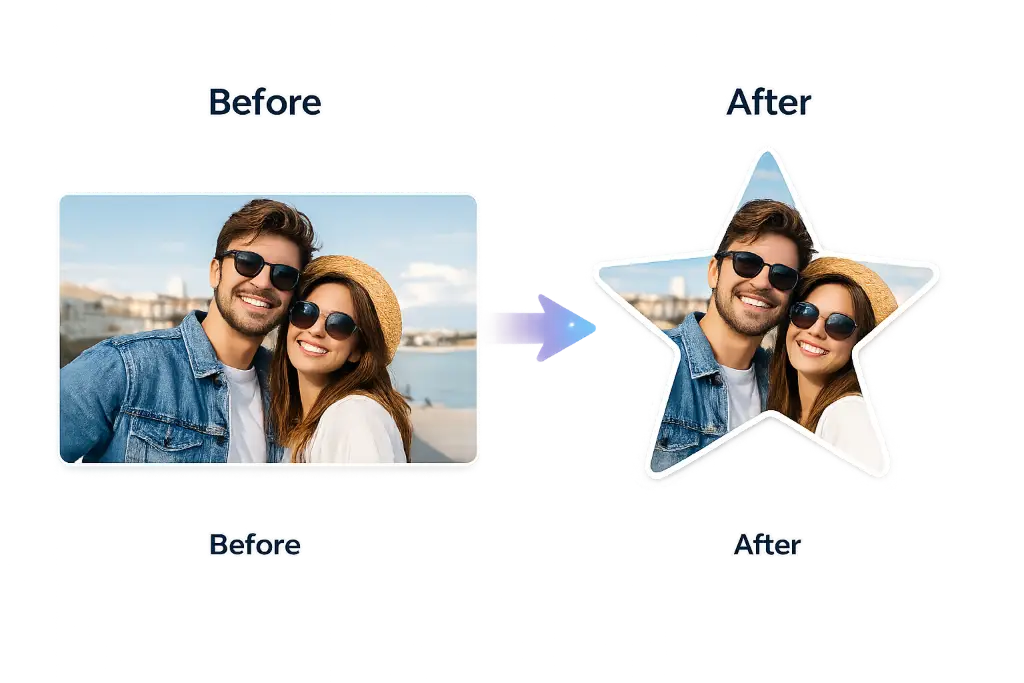
The beauty of this technique is that it instantly makes any photo feel more special, celebratory, and attention-grabbing. Whether you're working with a portrait, a product shot, or even a pet photo, that star shape adds an element of fun and professionalism that rectangular crops just can't match.
And here's the best part: you don't need expensive software like Photoshop or years of design experience. Modern online star crop tools have made this incredibly simple. Upload, adjust, download—that's it.
Why Do People Crop Photos into Star Shapes?
Great question! You might be wondering why someone would go through the trouble of creating a star-shaped image instead of just using a regular photo. Well, let me tell you—the reasons are endless, and once you start using star crops, you'll find yourself reaching for this technique again and again.
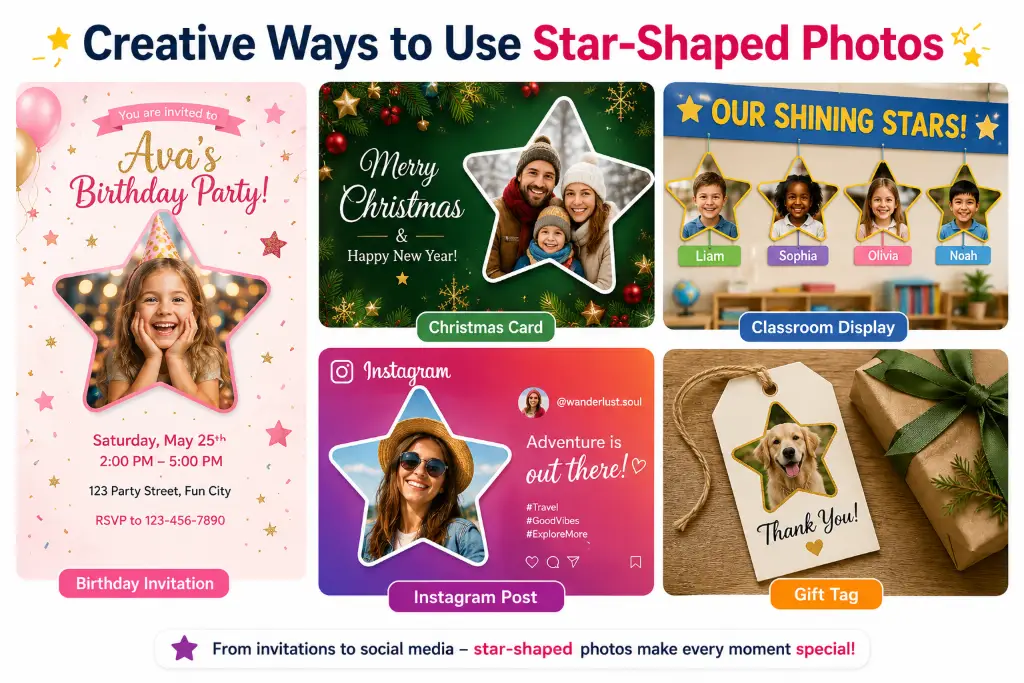
Birthday Invitations
Make birthday invites pop with star-shaped photos of the birthday person. It instantly screams "celebration" and gets people excited.
Christmas & Holiday Cards
Star shapes are perfect for holiday themes. Create festive family photos that stand out in everyone's holiday card stack.
School Projects
Teachers love creative assignments. Star-shaped photos for student of the month, achievement boards, or classroom decorations.
Certificates & Awards
Add star-shaped recipient photos to certificates for that extra touch of prestige and recognition.
Scrapbooking
Scrapbook enthusiasts know that unique shapes make pages more dynamic and visually interesting.
Photo Collages
Mix star shapes with circles and hearts for creative collages that tell a story.
Social Media Posts
Break the feed monotony with star-shaped images that stop the scroll and grab attention.
YouTube Thumbnails
Make your channel art and thumbnails stand out with unique star-shaped elements.
Product Stickers
E-commerce sellers use star shapes for product badges, "best seller" tags, and promotional materials.
Printable Decorations
Create star-shaped photo garlands, party decorations, or gift tags for special occasions.
The versatility is what makes star cropping so powerful. You're not limited to just one use case—once you learn how to crop image into star shape, you'll find creative applications everywhere.
Step-by-Step: How to Crop Image into Star Shape Online Free
Ready to create your first star-shaped masterpiece? Don't worry—it's way easier than you think. I'll walk you through every single step, so even if you've never edited a photo before, you'll be creating professional-looking star crops in no time.
Upload Your Image
Start by heading to your favorite online star crop tool. Click the upload button and select the photo you want to transform. Most tools accept JPG, PNG, and even WebP formats. The interface is usually drag-and-drop, so you can just drag your photo right into the browser window. Pro tip: Choose a high-resolution image for the best results—aim for at least 1000 pixels on the shortest side.
Select the Star Shape
Once your image loads, look for the shape options. You'll typically see circles, hearts, stars, and other shapes. Click on the star icon. Some tools let you choose between 5-point stars, 6-point stars, or even custom star configurations. For most purposes, the classic 5-point star works perfectly.
Resize and Position
This is where the magic happens. You'll see your image inside a star-shaped frame. Use the resize handles to make the star bigger or smaller. Drag the image around to position the most important part (like someone's face) right in the center of the star. Most tools also let you rotate the star if you want a specific angle.
Fine-Tune the Crop
Zoom in and check the edges. Make sure nothing important is getting cut off. If you're working with a portrait, ensure the face is well-centered with a little breathing room around it. This is also when you can adjust the star's points if the tool allows it—some let you make the points sharper or rounder.
Preview Your Creation
Most tools show you a real-time preview. Take a moment to really look at it. Does the composition work? Is the subject centered? Does the star shape enhance the photo or distract from it? If something feels off, now's the time to adjust.
Download as PNG
Here's a crucial step: always download your star-shaped image as a PNG file, not JPG. Why? Because PNG supports transparency. This means the area outside your star will be completely transparent, allowing you to place the star on any background without a white box around it. Click download, and you're done!
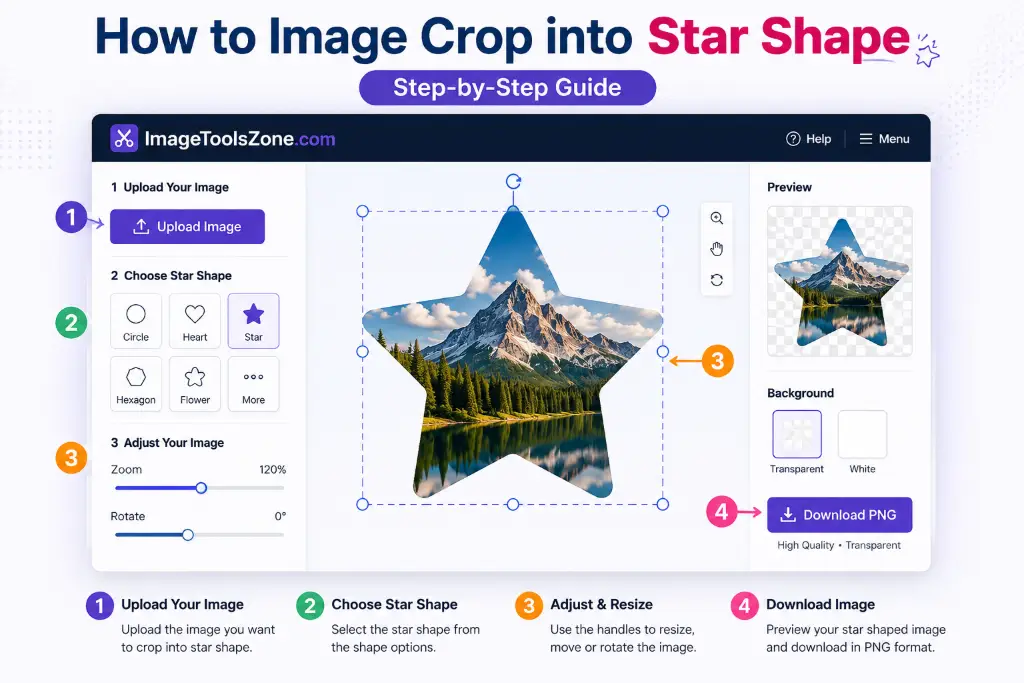
See? That wasn't so bad! The entire process usually takes less than a minute once you get the hang of it. And the best part? You can use the same free star photo editor online for unlimited photos without paying a dime or dealing with watermarks.
What Types of Photos Work Best for Star Cropping?
Not all photos are created equal when it comes to star cropping. Some images naturally lend themselves to this shape, while others might need a bit more thought. Let me break down which types of photos absolutely shine (pun intended) in star shape.
Portrait Photos
Headshots and portraits are perfect for star crops. The shape naturally draws attention to the face, making it ideal for profile pictures, team photos, or employee spotlights.
Kids' Photos
Children's photos in star shapes are absolutely adorable for birthday invitations, school projects, or family announcements. The playful shape matches their energy perfectly.
Pet Photos
Your furry friends look amazing in star shapes! Perfect for pet birthday posts, veterinary certificates, or just showing off your cute pup or kitty.
Logos & Brand Images
Businesses use star crops for logos, badges, and promotional materials. It adds a premium, award-winning feel to brand imagery.
Product Photography
E-commerce sellers love star-shaped product photos for "featured items," "best sellers," or seasonal promotions. It makes products pop off the page.
Flowers & Nature
Floral photography in star shapes creates beautiful decorative elements for invitations, greeting cards, or wall art.
Food Photography
Restaurant menus and food blogs use star crops to highlight signature dishes or special offerings.
Festival & Event Photos
Party photos, wedding pictures, and celebration shots look fantastic in star shapes for social media posts and photo albums.
💡 Pro Tip
Photos with a clear focal point work best. If your image has too much going on, the star shape might cut off important details. When in doubt, choose images where the main subject is centered and has some space around it.
Why Use an Online Star Crop Tool Instead of Photoshop?
Look, I get it—Photoshop is powerful. But do you really need to learn complex software just to crop a photo into a star? Absolutely not. Here's why online tools are the smarter choice for most people.
Completely Free
No subscriptions, no hidden fees, no trial periods that expire. Most online star crop tools are 100% free to use. Why pay hundreds of dollars for software when you can get the job done in your browser?
Lightning Fast
Upload, crop, download—done in under a minute. No installing software, no waiting for programs to load, no complicated menus to navigate.
Works on Any Device
Whether you're on a Windows PC, Mac, iPhone, or Android phone, online tools work perfectly. They're responsive and mobile-friendly, so you can create star crops on the go.
No Installation Needed
Your computer stays clean and clutter-free. No downloading suspicious software or filling up your hard drive with programs you'll barely use.
No Watermarks
Quality online tools don't slap ugly watermarks on your images. You get clean, professional results every single time.
Beginner-Friendly
No design degree required. The interfaces are intuitive and simple. If you can use social media, you can use these tools.
Secure & Private
Reputable tools process your images securely and often delete them automatically after processing. Your photos stay private.
High Quality Output
Modern online tools maintain the original quality of your images. You won't lose resolution or get pixelated results.
When you crop image into star shape without Photoshop, you're saving time, money, and frustration. It's the smart choice for students, small business owners, social media managers, and anyone who needs quick, professional results without the learning curve.
Creative Ideas: What Can You Make with Star-Shaped Photos?
Once you master how to crop a photo into a star shape online free, the creative possibilities are literally endless. Here are some ideas to spark your imagination:
Christmas Star Ornaments
Create personalized holiday ornaments by cropping family photos into stars and printing them on cardstock.
Reward Badges
Teachers and managers can create star-shaped achievement badges for students or employees.
Birthday Banners
Make custom birthday banners with star-shaped photos of the birthday person at different ages.
Classroom Decorations
Create "Student of the Month" displays or reading achievement boards with star photos.
Wedding Invitations
Add star-shaped engagement photos to save-the-dates or wedding programs.
WhatsApp Stickers
Create personalized sticker packs with your friends' faces in star shapes.
Instagram Stories
Break up your story feed with eye-catching star-shaped photo highlights.
Pinterest Graphics
Make your pins stand out with unique star-shaped featured images.
Etsy Product Listings
Sellers use star crops for product badges, shop announcements, and promotional graphics.
Printable Planners
Add star-shaped photos to custom planners, journals, or goal-setting worksheets.
Wall Art Collages
Create gallery walls mixing star, circle, and heart-shaped photos for dynamic displays.
Gift Tags
Make personalized gift tags with star-shaped photos of the recipient or pet.
Party Invitations
Design unique party invites with star-shaped photos for baby showers, graduations, or anniversaries.
Sports Team Rosters
Create star-shaped player photos for team posters, programs, or social media announcements.
Common Mistakes to Avoid When Cropping to Star Shape
Even though star cropping is simple, there are a few pitfalls that can turn your masterpiece into a mess. Learn from others' mistakes so you don't have to make them yourself!
Using Low-Resolution Images
Starting with a tiny, pixelated photo will only make it worse. Always use the highest resolution image you have. If you need to, use an image enhancer first to improve quality.
Cutting Off Important Details
The star's points can be sharp and unforgiving. Make sure faces aren't too close to the edges, and important elements aren't getting chopped off by the star points.
Downloading as JPG Instead of PNG
This is the most common mistake! JPG doesn't support transparency, so you'll end up with a white box around your star. Always choose PNG for star crops.
Poor Centering
Don't just slap the star on and call it done. Take time to position your subject perfectly in the center for the most professional look.
Forgetting to Rotate
Sometimes a slight rotation makes all the difference. Experiment with angling the star to find the most flattering position.
Wrong Size for Platform
Different social media platforms need different sizes. Don't use a tiny thumbnail-sized star for a Facebook post. Check the recommended sizes before you start.
PNG vs JPG: Which Format Should You Choose?
This is crucial, so pay attention! The file format you choose can make or break your star-shaped image. Let me explain the difference in simple terms.
| Feature | PNG | JPG |
|---|---|---|
| Transparency | ✅ Supports transparent backgrounds | ❌ Always has a solid background (usually white) |
| File Size | Larger file size | Smaller file size |
| Quality | Lossless (no quality loss) | Lossy (some quality compression) |
| Best For | Star crops, logos, graphics with transparency | Regular photos, web images where size matters |
| Editing | Can be edited multiple times without quality loss | Quality degrades with each save |
🎯 The Bottom Line
For star-shaped images, always choose PNG. You need that transparent background so your star can sit on any color or pattern without a white box around it. The slightly larger file size is worth it for the professional look.
If you need to convert between formats later, that's easy too. But for your initial star crop, PNG is non-negotiable.
Star Shape vs Other Popular Crop Shapes
Star shapes aren't the only game in town. Different shapes create different vibes and work better for different purposes. Here's how they compare:
| Shape | Best For | Vibe/Mood |
|---|---|---|
| ⭐ Star | Celebrations, awards, achievements, holidays | Exciting, special, festive |
| ❤️ Heart | Valentine's Day, weddings, love themes | Romantic, caring, emotional |
| ⭕ Circle | Profile pictures, professional headshots | Clean, modern, universal |
| ⬡ Hexagon | Tech brands, modern designs, portfolios | Geometric, contemporary, sleek |
| 💎 Diamond | Luxury brands, posters, announcements | Elegant, premium, sophisticated |
| ☁️ Cloud | Baby photos, kids' projects, dreamy themes | Soft, playful, whimsical |
| 🌸 Flower | Greeting cards, spring themes, feminine designs | Delicate, beautiful, natural |
| 🔷 Polygon | Creative graphics, abstract designs | Artistic, unique, bold |
Want to experiment with different shapes? Check out these tools: circle crop, heart crop, polygon crop, and custom shape crop.
Who Can Benefit from Star-Shaped Image Cropping?
Spoiler alert: pretty much everyone! But let's get specific about who gets the most value from this technique.
Students
Create eye-catching presentations, school projects, and yearbook photos that stand out from the crowd.
Teachers
Make classroom decorations, student recognition boards, and educational materials more engaging.
Graphic Designers
Speed up your workflow with quick shape crops for client projects, social media graphics, and marketing materials.
Bloggers & Content Creators
Create unique featured images, author photos, and social media content that increases engagement.
Etsy Sellers & Small Business Owners
Design product badges, promotional graphics, and shop announcements that convert browsers into buyers.
Social Media Managers
Break the monotony of feeds with creative star-shaped posts that stop the scroll and boost engagement.
Marketing Teams
Create award badges, employee spotlights, and campaign graphics quickly without designer dependency.
Event Planners
Design invitations, programs, and decorations for weddings, parties, and corporate events.
Frequently Asked Questions About Star Image Cropping
It's super simple! Just upload your photo to an online star crop tool, select the star shape from the options, adjust the size and position to frame your subject perfectly, and download as PNG. The whole process takes less than a minute. No software installation needed!
Absolutely! PNG files work perfectly for star cropping. In fact, PNG is the recommended format because it maintains quality and supports transparency. You can upload PNG, JPG, WebP, or most common image formats to crop into a star.
Yes! That's the whole point of using a star crop tool. When you download your image as PNG (not JPG), the area outside the star will be completely transparent. This allows you to place your star-shaped photo on any background without a white box around it.
Yes, many online tools are completely free with no hidden fees or watermarks. You can crop as many images as you want without paying a dime. Just make sure you're using a reputable tool that doesn't add watermarks or require payment for basic features.
Definitely! Online star crop tools work on any device with a web browser—iPhone, Android, tablet, or computer. The interfaces are mobile-friendly and touch-optimized, so you can create star-shaped photos right from your phone.
Not if you use a quality tool and download as PNG. Good online tools maintain the original resolution and quality of your image. Just start with a high-resolution photo, and your star crop will look crisp and professional.
Most free tools process one image at a time, but the process is so quick (usually under 30 seconds per photo) that you can easily crop multiple images in just a few minutes. Some premium tools offer batch processing if you need to crop dozens of photos.
Yes! You can print star-shaped photos for invitations, decorations, scrapbooks, or crafts. Just make sure to download as PNG with transparent background, and print on cardstock or photo paper for best results. You can also use online printing services that support custom shapes.
Most star crop tools allow you to rotate the star to any angle you want. This is helpful if you want a specific orientation or if rotating slightly makes the composition look better. Look for rotation handles or angle controls in your tool.
Yes! You can resize the star to be bigger or smaller, and you can also resize the entire image to specific dimensions. This is perfect for creating star crops that fit social media requirements or print specifications.
A 5-point star is the classic star shape (like on the American flag), while a 6-point star (also called Star of David) has six points. Most tools default to 5-point stars, which work best for most purposes. Choose based on your design needs and aesthetic preference.
Absolutely! Cropping logos into star shapes is popular for creating badges, awards, promotional materials, and social media graphics. Just make sure your logo has enough space around it so the star points don't cut off important elements.
Yes! Star-shaped profile pictures work great on platforms that allow custom images. However, note that some social media platforms (like Facebook and LinkedIn) automatically crop profile pictures to circles, so your star might get cut off. They work perfectly for posts, stories, and cover photos though!
Nope! Online star crop tools work directly in your web browser. No downloads, no installations, no updates. Just visit the website, upload your photo, and start creating. It works on Windows, Mac, Linux, iOS, and Android.
Reputable online tools process your images securely and automatically delete them after processing (usually within an hour). Your photos aren't stored permanently or shared with third parties. However, always use trusted tools and avoid uploading sensitive or private images to unknown websites.
Some advanced star crop tools offer border options where you can add colored outlines or strokes around your star. If your tool doesn't have this feature, you can add borders later using a photo editor or graphic design tool.
No worries! You can always start over. Just re-upload your original image and try again. The process is so quick that experimenting with different positions and sizes is easy. Some tools also have undo/redo buttons if you want to step back through your changes.
Yes, you can use star-shaped images for commercial purposes like marketing materials, product listings, or business promotions. However, make sure you have the rights to use the original photo. The cropping tool itself doesn't restrict commercial use of your final image.
This happens when you download as JPG instead of PNG. JPG format doesn't support transparency, so it fills the transparent areas with white. Always choose PNG format when downloading star-shaped images to maintain the transparent background.
Online tools require an internet connection. If you need offline star cropping, you'd need software like Photoshop, GIMP, or Canva desktop app. However, online tools are faster, easier, and don't require installation, so they're worth the internet connection for most users.
Explore More Image Editing Tools
Once you master star cropping, you might want to try other creative shapes and editing tools. Here are some related tools to expand your creative toolkit:
Perfect for profile pictures
Romantic and loving designs
Classic elegant shapes
Modern geometric designs
Design your own shapes
Soften image edges
Remove backgrounds instantly
Reduce file size easily
Exact dimensions control
Advanced editing tools
Ready to Create Stunning Star-Shaped Photos?
There you have it—everything you need to know about how to crop image into star shape like a pro! Whether you're creating birthday invitations, social media posts, classroom decorations, or marketing materials, star-shaped photos add that special touch that makes people stop and take notice.
Remember, you don't need expensive software or design skills. With free online star crop tools, you can create professional-looking star-shaped images in under a minute. Just upload, adjust, and download as PNG for that perfect transparent background.
The possibilities are endless—from holiday cards to business badges, from school projects to Instagram stories. Once you start experimenting with star crops, you'll wonder how you ever lived without them!
🌟 Your Next Step
Don't just read about it—try it now! Head over to our free star shape cropper and transform your first photo. It's free, fast, and fun. Your creative journey starts with a single star!
Recommended Sizes for Social Media Star Crops
Want your star-shaped photos to look crisp and professional on social media? Size matters! Here are the optimal dimensions for each platform:
Most star crop tools let you set custom dimensions, or you can resize after cropping to match these specifications perfectly.