Passport Size Photo Maker – Create a US Passport Photo Online Free
A passport size photo maker saves you from the most annoying part of any application: getting a normal selfie or portrait into the exact size a form asks for. Whether you need a 2 × 2 inch U.S. passport photo, a 35 × 45 mm visa photo or a small ID picture, you can crop, adjust and download it here in a couple of minutes, without a studio visit and without installing anything.
Your photo is processed inside your own browser, so the picture you choose stays on your device while you work on it.
📋 On This Page
- Passport Size Photo Maker Online
- How to Make a Passport Size Photo Online
- Features and Benefits
- Who Can Use This Tool
- Practical Uses
- Passport Photo Sizes by Country
- Digital vs. Printed Photos
- Printing Multiple Photos on One Sheet
- Photo Maker vs. Manual Editing
- Advantages and Limitations
- Common Mistakes to Avoid
- Frequently Asked Questions
Passport Size Photo Maker Online – Create Photos in the Right Size
Almost everyone has been there. You find a good portrait, open the application form, and discover it wants a square 2 × 2 inch picture, or exactly 35 × 45 mm, with the face centered and a plain background. Now you're guessing at pixel counts, cropping again and again, and hoping the upload portal doesn't bounce it.
This passport photo maker online removes the guesswork. Instead of calculating dimensions yourself, you pick a country or document type, and the tool sets the correct frame for that standard. Think of it as a passport photo creator and passport photo editor in one place: you upload a picture, drag it into position, tidy up the background and lighting, and download the result.
Two things make it easier to trust what you're about to download. The live preview shows the finished photo, along with its width, height, DPI and file size, while you edit. And the photo preparation check flags whether the dimensions, aspect ratio and resolution match the selected standard. It's a passport size photo maker online free to use, and it works on a phone as well as on a computer.
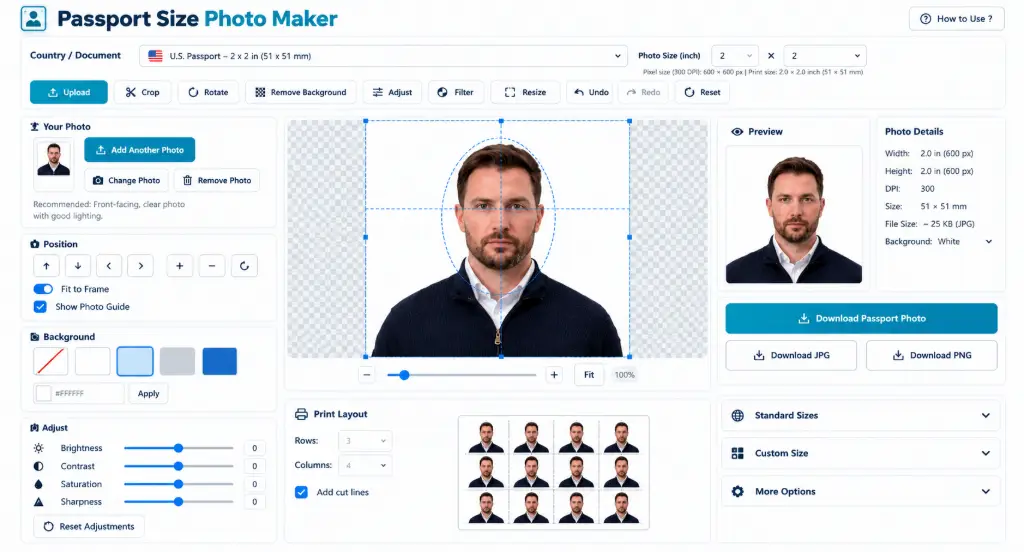
Passport Size Photo maker on line sawing Crop Frame, face Guide & Live Oreview
How to Make a Passport Size Photo Online
The tool follows the same order as the buttons across the top: Upload, Crop, Position, Background, Adjust, Size, Print Sheet and Download. Here's the full process to make a passport size photo online.
Select a country or document type
Open the Country / Document menu and choose a passport, visa, ID or custom standard. The selected size appears right below it, for example 2 × 2 in at 300 DPI.
Upload your photo
Add the portrait you want to use. You can add more than one photo and switch between them later.
Crop and position the face
Drag the picture inside the Crop & Zoom area and use the slider to scale it. The guide lines and head oval show where the face should sit. They're only a helper and never appear in your download.
Adjust the background
Choose a white, light or colored background, or type a custom HEX code, then tap Apply when it's needed.
Fine-tune the photo
Use the sliders for brightness, contrast, saturation, exposure, sharpness and grayscale. Small changes work best.
Check the final preview
Look at the preview on the right. Make sure the full head is visible and the photo preparation check shows green ticks.
Choose the output format and quality
Pick JPG or PNG, set the quality, and download the finished passport photo.
Create a printable photo sheet
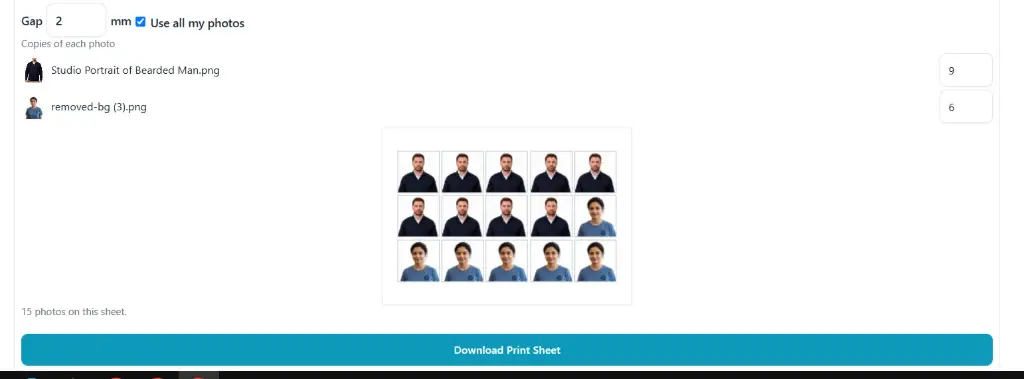
Choose paper size, orientation, number of copies, margin and gap, then download the print sheet.
If your source picture is much larger than the form allows, you can reduce it afterwards with the image compressor, and if you only need to trim a picture first, the free image cropper does that quickly.
Passport Photo Maker Features and Benefits
Here is what you actually get when you use this passport photo maker with country size presets and editing controls.
Country-specific standards
Presets for India, the U.S., UK, Canada, Australia, Schengen and more.
Exact photo dimensions
A passport photo maker with exact dimensions, shown in mm, inches and pixels.
Crop and zoom controls
Drag, zoom, rotate and flip until the framing looks right.
Face positioning guide
An optional overlay that helps you center the head. It isn't exported.
Background adjustment
A passport photo maker with background colors and custom HEX input.
Brightness and contrast
Lift a dull photo or soften a harsh one without leaving the page.
Saturation and exposure
Correct washed-out colors or a slightly dark upload.
Sharpness adjustment
Add a little crispness to a slightly soft picture.
Grayscale option
Switch to black and white where a document allows it.
Live final preview
See size, DPI and file size before you download.
Preparation checks
Quick checks for dimensions, aspect ratio and resolution.
JPG / PNG output
Choose the format and quality that suits the upload portal.
Printable photo sheet
Fit several copies on one page, ready to print.
Multiple-photo arrangement
Mix photos of different people on one sheet.
Download-ready results
Files get clear names that include the photo size.
Who Can Use This Passport Size Photo Maker?
If you've ever stood in a queue at a photo studio just for a small picture, you already know the main benefit: you can make a passport photo online from home, at any hour, using a photo you already have.
Students
Admission forms, student IDs, exam registrations and scholarship applications.
Job seekers
Resumes, application forms and joining documents.
Office workers
Company ID cards and official HR forms.
Travelers
A passport photo maker for visa and passport applications.
Photographers
Prepare correctly sized portraits for clients in minutes.
Parents
ID and school form photos for children, using one clear picture.
Small businesses
Employee, member or customer ID photos without outsourcing.
Online applicants
Digital photos for websites and application portals.
Practical Uses for Passport Size Photos
People search for this kind of tool in many different ways: passport size photo converter, passport size image maker, passport photo resize or passport photo cropper. Behind all of them is the same need, a small, clean portrait in a fixed size. Common uses include:
- Passport applications
- Visa applications
- Government forms
- Student ID cards
- Employee ID cards
- College applications
- Job applications
- Exam forms
- Membership cards
- Online application portals
- Travel documents
- Printable photo sheets
Need to turn a picture into a clean cutout first? The background remover can help before you bring the photo here, and a resize image to exact size tool is handy when a portal asks for particular pixel dimensions.
Passport Photo Sizes by Country
This is the table most people come looking for. The sizes below match the presets inside the tool, so you can see roughly what to expect before you pick one.
| Country / Document | Tool Preset Size | Aspect Ratio | Best Use |
|---|---|---|---|
| India Passport | 35 × 45 mm | 7:9 | Passport applications |
| U.S. Passport | 2 × 2 in (51 × 51 mm) | 1:1 | U.S. passport photo |
| UK Passport | 35 × 45 mm | 7:9 | UK passport photo |
| Canada Passport | 50 × 70 mm | 5:7 | Canadian passport photo |
| Australia Passport | 35 × 45 mm | 7:9 | Australian passport photo |
| Schengen Visa | 35 × 45 mm | 7:9 | Visa applications |
Important: passport and visa specifications can change, and different application systems can set their own digital requirements. Always confirm the latest details with the official government or consular instructions for your application.
Passport photo size for India
The preset uses a 35 × 45 mm frame. Confirm the face-to-frame ratio and background rules for your specific application type.
U.S. passport photo size
A square 2 × 2 inch frame. At 300 DPI that equals 600 × 600 pixels, which is what the tool selects for this preset.
UK passport photo size
A 35 × 45 mm preset. Check separately whether you're applying online or on paper.
Canada passport photo size
Canadian photos use a taller 50 × 70 mm frame, so don't reuse a 35 × 45 mm crop.
Australia passport photo size
The preset uses 35 × 45 mm. Review the current guidance on lighting and expression before you submit.
Schengen visa photo size
Usually 35 × 45 mm, but individual embassies and visa centers can add their own rules.
Digital Passport Photo vs. Printed Passport Photo
These two get mixed up a lot, and it causes real rejections. Same face, same crop, but two different sets of rules.
Digital photo
Used for online applications. Portals usually care about pixel dimensions, file format and a maximum file size. Here, you check the pixel size and file size in the live preview, then export as JPG or PNG. If a portal needs a different format, the image format converter can switch it.
Printed photo
Needs the correct physical size, such as 35 × 45 mm, plus a good print layout and quality. For sharp prints, a 300 DPI file is a safe starting point, and the image DPI changer can help if your file's resolution setting is off.
The Printable Sheet feature bridges the two. You build the single photo first, then place copies on a page so the physical size stays accurate when you print.
How Many Passport Photos Can You Print on One Sheet?
There isn't a single answer, because the number depends on a few simple things. Once you know them, passport photo print planning is easy.
Photo dimensions
A small 35 × 45 mm photo fits more times than a large 50 × 70 mm one.
Paper size
A4 and other common paper sizes are available in the sheet settings.
Orientation
Portrait or landscape can change how many rows and columns fit.
Margins
Wider margins keep prints safe from printer edges but reduce space.
Spacing / gap
A small gap makes cutting easier. A smaller one fits more photos.
Number of copies
Set how many you need. The tool tells you how many actually fit.
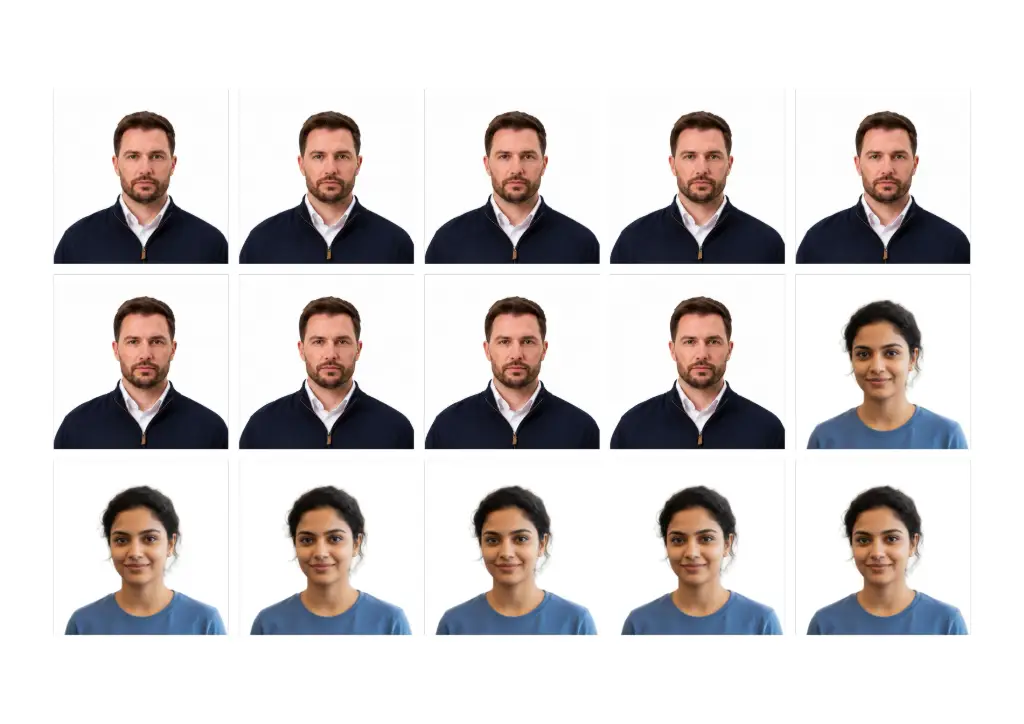
In the example from the tool, an A4 portrait sheet with a small margin and a 2 mm gap fits 15 photos, and a note appears if you ask for more than will fit. If you ticked Use all my photos, you can give each photo its own number of copies, which is great for a family set. Prefer to keep the sheet as a document? You can turn the downloaded image into a file with convert images to PDF.
Passport Size Photo Maker vs. Manual Editing
| Manual Editing | Passport Size Photo Maker |
|---|---|
| Calculate dimensions manually | Select the required standard |
| Crop by trial and error | Guided crop and positioning |
| Check proportions by eye | Shows the selected dimensions |
| Adjust the image in separate software | Adjustments available in one workflow |
| Create copies by hand | Printable photo sheet |
| Repeated checking | Final preview before download |
Note: This tool doesn't guarantee official acceptance. It helps you prepare photos according to the selected standard, while you should verify the latest requirements of the relevant authority.
If you want full control for bigger edits, such as retouching or layers, a professional image editor is the better choice. For a standard-size portrait, though, the guided route is quicker.
Advantages and Limitations
✅ Advantages
- Faster than manual resizing and cropping
- No need to calculate dimensions yourself
- Guided positioning
- Preview before downloading
- Image adjustments in one place
- Useful for digital and printable preparation
- Multiple copies on one print sheet
⚠️ Limitations
- No editor can guarantee that an agency will accept a photograph.
- Country and document requirements can change.
- The quality of the original photo affects the result.
- Enlarging a low-resolution image doesn't bring back missing facial detail.
- Rules can cover expression, lighting, clothing or biometric standards, not only size.
- Background adjustment may not satisfy every authority's exact rules.
- Verify current requirements before you submit an official photo.
Common Passport Photo Mistakes to Avoid
Most rejections come from small, avoidable slips. Run through this list before you download.
Wrong dimensions
Using a size from another country or form.
Wrong standard
Picking the wrong country or document in the menu.
Wrong aspect ratio
Stretching a picture instead of cropping it.
Face too high or low
Leaving too much empty space above or below.
Too close or too far
The head should fill the frame as the guidelines describe.
Unsuitable background
Patterns, objects or colored walls behind you.
Poor lighting
Strong shadows across the face or one side lit.
Blurry source image
A low-resolution photo gets worse when enlarged.
Heavy editing
Pushing brightness or contrast too far.
Beauty filters
Filters that change how you naturally look.
Cropped head
Cutting off hair, chin or part of the face.
Outdated rules
Uploading a photo that doesn't meet the latest requirements.
Wrong print size
Printing at "fit to page" so the physical size changes.
Skipping the preview
Not checking the final preview before downloading.
Assuming size is enough
A correctly sized photo can still fail on other rules.
If you're stuck with a dull or noisy source photo, the image enhancer can improve it before you start cropping.
Frequently Asked Questions
What is a passport size photo?
It's a small portrait photo, taken from the front, used for passports, visas, IDs and forms. The exact size depends on the country and document. Common sizes are 35 × 45 mm and 2 × 2 inches.
How do I make a passport size photo online?
Choose a country or document, upload your photo, position your face using the guide, adjust the background and lighting, check the preview, and download the file. The steps above walk through each stage.
What size should a passport photo be?
It varies. The tool's presets include 2 × 2 in for the U.S., 35 × 45 mm for India, the UK, Australia and Schengen visas, and 50 × 70 mm for Canada. Always confirm with the issuing authority.
Can I make passport photos from my phone?
Yes. The layout adapts to small screens, so you can upload or take a picture, crop it with your fingers and download the result straight to your phone.
How can I resize a photo to passport size?
Select the standard you need and the frame is set to that size automatically. Then drag and zoom the image inside it. This works as a passport photo resize and crop in one step.
Can I print multiple passport photos on one sheet?
Yes. Open the Printable Sheet section, choose paper size, orientation, copies, margin and gap, then download the print sheet. The tool tells you how many photos fit.
Can I change the passport photo background?
You can choose from the available background colors or enter a custom HEX code. Some authorities have strict background rules, so check yours.
Can I crop my existing photo to passport size?
Yes. Upload the photo you already have, and crop it to the selected standard. For the best result, pick a clear, front-facing picture with good lighting.
Can I adjust brightness and contrast?
Yes, along with saturation, exposure, sharpness and grayscale. A reset button returns everything to normal if you overdo it.
Can I download my passport photo as JPG or PNG?
Yes. You can download in either format, and for JPG you can choose the quality level.
Is a passport size photo maker accepted for official applications?
The tool helps you prepare a photo to the selected standard, but acceptance is always decided by the authority reviewing your application. It can't guarantee approval.
What should I check before submitting a passport photo?
Confirm the latest size and file requirements, the background, your expression, lighting and framing, and that the whole head is visible. Then view the final preview once more.
Create Your Passport Size Photo
Pick your standard, upload a clear portrait and download a ready photo in minutes. It's free, and it runs right in your browser.
Open the Passport Size Photo Maker