
Crop Image into Floral Shape Online – Free Flower Shape Photo Cropper
Want to crop image into floral shape online without installing heavy software, creating an account, or handing your photos over to some random server? You're in the right place. A floral crop turns an ordinary rectangle into a soft, petal-edged keepsake — the kind of shape you see on wedding invitations, birthday cards, and beautifully styled Instagram grids. And here's the good part: you don't need Photoshop, a design degree, or even a patient mood to pull it off.
The free floral star photo cropper we use for this runs entirely in your browser. You drop in a picture, nudge a few sliders — points, point length, rounded corners, concave/convex depth — and watch the shape morph from a classic star into a full-blown flower in real time. When it looks right, you download a clean PNG or JPG. No watermark, no signup, no "go premium" surprise at the last step.
In this guide, I'll walk you through what a floral shape actually is, how it differs from star, heart, circle, and oval crops, the exact slider settings that produce the prettiest petals, and seven genuinely useful ways to put floral-shaped photos to work this weekend. Let's grow something pretty. 🌸
🌸 Create Your Floral-Shaped Photo Free
Upload your image, customize the shape, and download your floral photo in seconds.
Crop Image into Floral Shape →What Is a Floral Shape Image Crop?
A floral shape is a decorative, flower-like crop created by adjusting the points and inner curves of a star-style shape. That sentence is the whole secret, so let me say it again more slowly: under the hood, a flower crop is a star crop that has been softened. Every star has outer points and inner curves. When you shorten the points, round off the tips, and push those inner curves outward, the star relaxes — first into a rounded badge, then into something that unmistakably reads as a flower.
That's why the floral look lives inside a star-style cropper instead of being a separate tool. The same sliders that make a sharp five-point star can, pushed toward softness, make a daisy, a lotus, or a playful ten-petal blossom. You're not choosing between two tools; you're sliding along one spectrum, from "sharp and celebratory" to "soft and botanical."
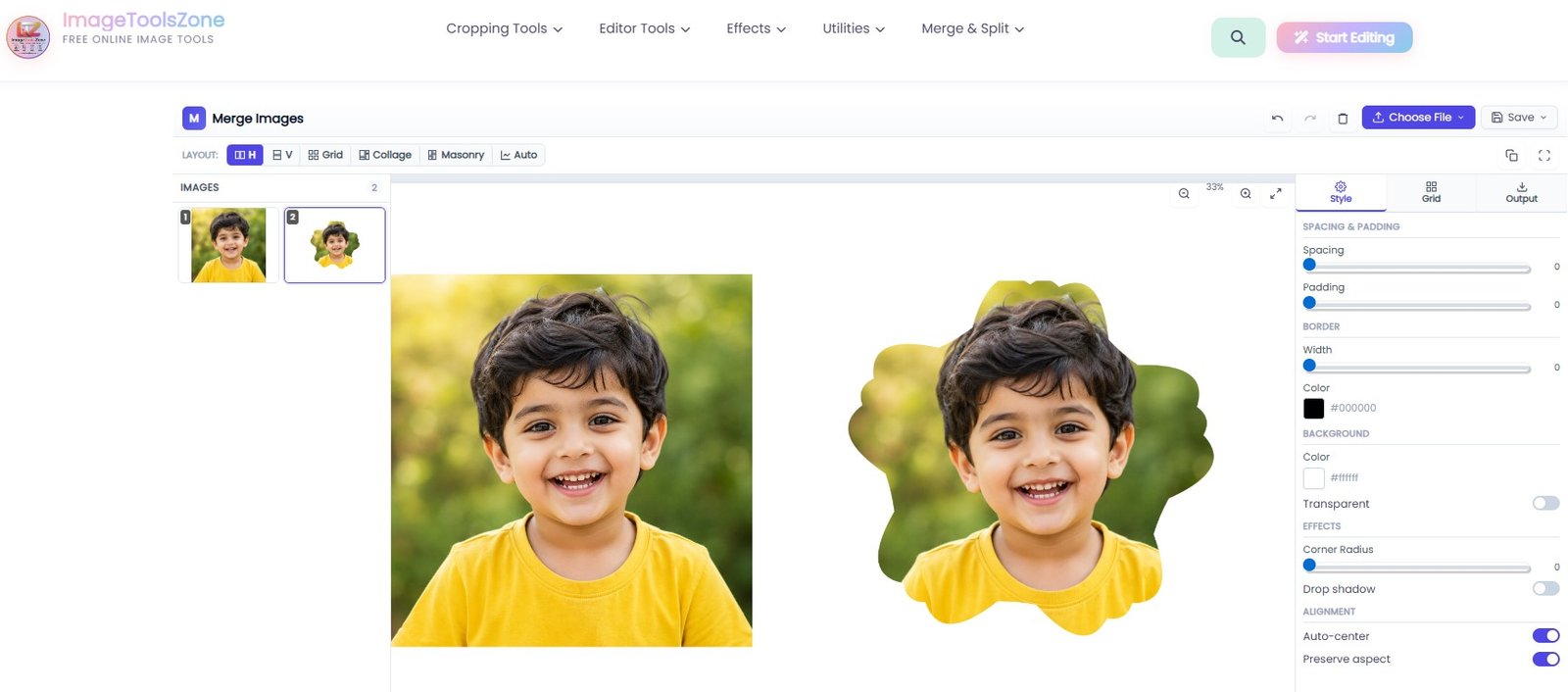
A rectangular portrait turned into an five-petal floral crop — soft, friendly, and instantly more personal.
It helps to compare the floral crop with the shapes you already know, because the differences explain when you should reach for it:
Normal Rectangular Crop
The default everywhere — blogs, documents, ID photos. It's invisible by design. A floral crop is the opposite move: here the outline itself is part of the message.
Circle Crop
Smooth, neutral, and the undisputed king of profile pictures. A floral keeps that softness but adds petal detail and personality a plain circle can't carry.
Star Crop
Sharp points, high energy — awards, badges, celebrations. A floral borrows the star's skeleton but swaps the punch for charm. Same bones, different mood.
Heart Crop
The romance specialist, and it does that one job beautifully. A floral is more flexible: depending on the photo it can read romantic, playful, or botanical.
Custom Shape Crop
Total freedom when you need your own silhouette. But when you simply want "decorative and pretty, right now," the floral is the fastest ready-made option in the family — try a custom shape crop tool when you outgrow it.
What a Decorative Shape Image Cropper Actually Does
A proper decorative shape image cropper doesn't just stamp a fixed flower onto your photo. It rebuilds the outline mathematically, right in your browser, from a handful of controls: the number of points, how long those points stretch, how rounded the tips are, and whether the inner curves pinch inward (concave) or bulge outward (convex). Add rotation, zoom, and a background picker, and one shape engine can produce hundreds of looks — which is exactly why the "floral vs star" question has no wrong answer. They're two settings on the same dial.
How to Crop Image into Floral Shape Online in 7 Simple Steps
This is the whole workflow, start to finish. The first time through takes about a minute; after that you'll be doing it in seconds. If you've used our star shape cropper before, you'll recognize the control panel immediately — the floral look uses the same sliders, just pushed further toward softness.
Click upload or drag and drop. JPG, JPEG, PNG, WEBP, and BMP files all work. Processing happens on your device, so even big originals open quickly and never leave your machine.
Pick the star-style base from the shape menu. You're not locking in a final look here — you're choosing the skeleton that the sliders will reshape.
Think of points as petals-in-waiting. Six to nine points reads as a natural flower; five reads as a classic star; ten or more gives a busy, daisy-like bloom.
Long points shout "star." Slide the length down and the shape relaxes into a bud. I usually start mid-range and slide left until the silhouette feels petal-like.
This is the single biggest flower-maker. Sharp tips melt into soft petal edges, and the whole shape instantly feels friendlier — the same trick behind rounded-corner images, just applied to a shape.
Concave pinches the inner curves inward — very star-like. Convex fills them out, giving each petal that plump, daisy-like belly. This one control does the most "floral" work of all.
Adjust zoom and rotation so the best part of your photo sits inside the bloom, choose a background — transparent for layering, solid or gradient for standalone use — then export. PNG keeps transparency; JPG gives smaller files.
🌸 Your Photo, In Full Bloom
Seven steps, about sixty seconds, zero watermarks. Try it on one photo and you'll crop three more.
Open the Free Floral Cropper →From Sharp Points to Soft Petals: Crop Photo into Floral Star Shape
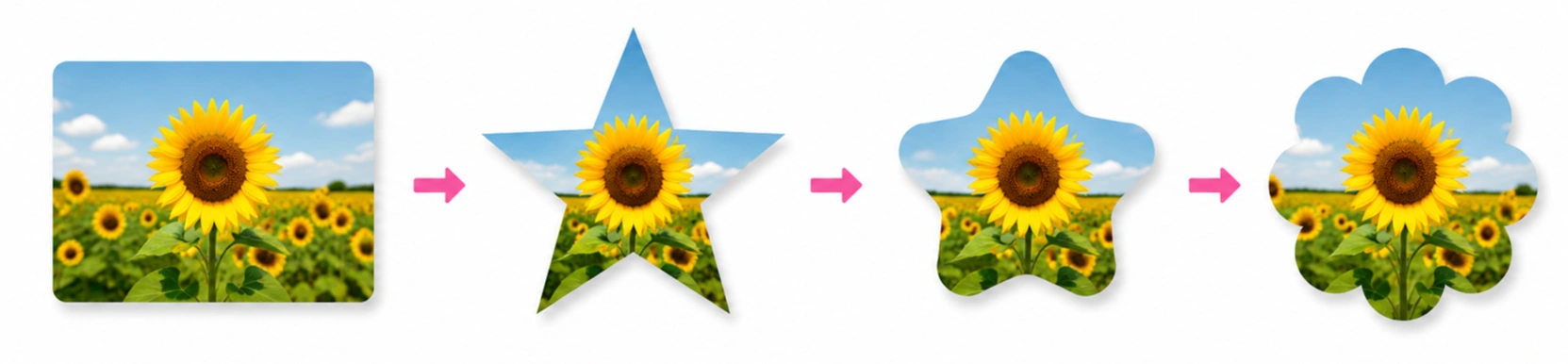
Seeing the transformation once makes every slider make sense. Here's the exact progression you'll watch on screen as you move from a plain photo to a finished floral crop:
Normal Photo
Any rectangle you own: a portrait, a pet, a plate of food, a landscape. Nothing special yet — that's the point.
5-Point Star
The starting skeleton. Sharp tips, long points, deep concave valleys. Recognizable, energetic — and not floral at all.
Rounded / Convex Star
Round the tips, shorten the points, ease toward convex. The star softens into a friendly badge or sparkle.
Floral-Looking Shape
Push the same three controls further — more rounding, shorter points, fuller convex — and the shape blooms.
The Two Recipes: Flower vs. Star
Once you understand the relationship between the controls, you can dial in either look on purpose instead of by accident:
🌸 The Floral Recipe
More rounded corners + shorter points + convex adjustment = a softer, fuller, flower-like appearance. Petals plump out, tips melt away, and the silhouette feels hand-drawn and warm.
⭐ The Classic Star Recipe
Sharp points + longer points + concave adjustment = the traditional star appearance. Crisp tips, deep valleys, high energy — perfect for awards, badges, and celebration graphics.
Everything in between is fair game too. A rounded star with slightly long points makes a lovely "sparkle" shape for sale graphics; a floral with slightly concave valleys makes a cherry-blossom look. Because the star crop tool exposes every one of these controls — including rounded, sparkle, and other star variations — you can park the slider anywhere on the spectrum and call it yours.
Crop Picture into Flower Shape on Your Phone — Same Result
Yes, this works on mobile, and no, you don't need an app. The cropper runs in your phone's browser, the sliders respond to touch, and the export options are identical. Honestly, floral crops are one of those edits people do more on phones than on desktops, because the photo you want to prettify is usually already in your camera roll. If you can drag a slider, you can crop picture into flower shape on the couch, on the train, or in a school pickup line.
Best Settings When You Crop Image into Floral Shape Online
Every tool with real controls has a "sweet spot" zone, and after a few hundred test crops a pattern shows up. Use this table as your starting point, then tweak to taste:
| Setting | What It Changes | Sweet Spot for Florals |
|---|---|---|
| Star / shape points | Number of petals or points on the outline | 6–9 for natural flowers; 5 for a star-floral hybrid |
| Point length | How far the tips stick out — sharper vs. softer | Short to medium; long always pulls back toward "star" |
| Rounded corners | Softness of each tip — this creates the petals | High; the single strongest flower-maker |
| Concave / convex | Inner curves pinch in vs. bulge out | Convex for plump petals; concave for classic stars |
| Rotation | Orientation of the whole shape | Tilt until one petal points straight up for symmetry |
| Zoom | How much of the photo appears inside the shape | Frame the face or focal point with a little breathing room |
| Background | What sits behind the crop | Transparent PNG for design work; soft solid for standalone |
Three Recipes That Always Look Good
🌼 Soft Daisy
8 points · short length · maximum rounding · strong convex. The crowd-pleaser. Works on portraits, pets, and product shots alike.
🪷 Romantic Lotus
6 points · medium length · high rounding · gentle convex. Wider, calmer petals — perfect for wedding pieces and elegant invitations.
🌺 Playful Blossom
10 points · short length · medium rounding · medium convex. Busy and cheerful; a natural fit for kids' birthday cards and stickers.
7 Creative Ways to Use Floral-Shaped Photos
A shape is only as good as what you do with it. Here are seven uses that consistently look great — most of them take under ten minutes from upload to finished piece.
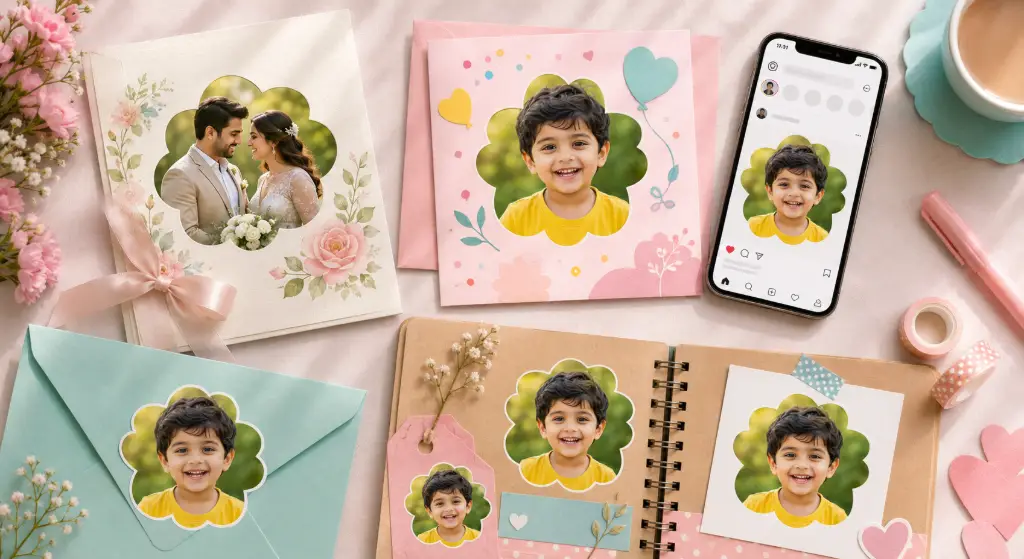
Wedding Invitations
A floral-cropped couple photo on the invitation or save-the-date makes the whole suite feel botanical without hiring an illustrator. Export a transparent PNG and drop it over any paper texture or watercolor background.
Birthday Cards
Kids' photos inside a playful blossom beat a plain rectangle every time. Print it, or paste it into a free card template and add hand-lettered-style text beside the bloom.
Social Media Posts
Floral crops make gorgeous grid accents on Instagram and lovely header images elsewhere. Alternate floral and regular photos for a feed that feels curated instead of random.
Pinterest Graphics
Tall pins with a flower-shaped photo near the top stop the scroll better than stock-style rectangles. Add your headline below the bloom and keep the background soft and uncluttered.
Scrapbooking
Print floral crops at sticker size and you've got custom embellishments no craft store sells. Digital scrapbookers can layer the transparent PNG straight into their templates.
School Projects
Posters, yearbook superlatives, classroom displays, graduation boards — a "Most Likely to Brighten Your Day" photo inside a blossom lands better than any bullet list.
Product & Promo Graphics
Boutiques, florists, bakers, and beauty brands: a floral frame echoes your product's personality. Place a transparent floral crop over seasonal sale banners for instant charm.
Floral Shape vs Star Shape vs Heart Shape vs Circle — Which Should You Choose?
This is the question people actually type into search, so here's the honest, no-fluff answer. Every shape has a job it does best:
| Shape | Best For | The Vibe |
|---|---|---|
| 🌸 Floral | Decorative designs, invitations, botanical branding | Soft, warm, handcrafted |
| ⭐ Star | Awards, badges, celebrations, sale graphics | Bold, energetic, proud |
| ❤️ Heart | Weddings, Valentine's, romantic photos | Loving, personal |
| ⭕ Circle | Profile photos, avatars, team pages | Clean, neutral, professional |
| 🥚 Oval | Portraits and elegant, classic designs | Timeless, formal |
| 🔷 Custom | Unique creative projects with your own silhouette | Whatever you decide it is |
When you know which shape family you need, the right tool follows naturally: the circle crop for avatars, the oval crop for classic portraits, the heart shape crop for the romantics, the polygon crop for geometric designs, and the custom shape crop tool when nothing off the shelf fits. And when you want more control over star points, sparkle styles, and decorative star variations than any quick tool offers, the Star Image Crop tool is the full playground — the floral shape in this article is one of its many faces.
Turn a Photo into a Floral Photo Frame
Here's a slightly different angle that's worth its own minute: a floral crop isn't just a cropped photo — it's also a frame. Crop tightly enough that the shape's edge becomes part of the composition, and your photo behaves like a decorative element you can place anywhere, on anything.
The workflow is short: upload → floral crop → choose a transparent background → export as PNG → drop it onto an invitation, banner, or canvas in whatever editor you like. The transparency is what makes it a "frame" instead of a sticker with a white box clinging to it. If your source photo has a busy background bleeding into the petals, clean it first with a free background remover, and if you'd rather browse ready-made decorative borders, the custom photo frame generator pairs beautifully with floral crops.
A 5-Minute Flower Photo Frame Maker Workflow
Frame the subject so petals touch the important edges — faces centered, eyes in the upper third.
Transparency turns the crop into a layer you can place over textures, colors, or patterns.
Drop it onto your invitation or post design, add a soft drop shadow if you like depth, and export the final piece.
Is It Safe to Crop Image into Floral Shape Online?
Fair question — and the reason most "free online editor" experiences feel creepy is that your photos really do travel to someone else's server. This tool takes the opposite approach, and it's worth understanding why that matters:
Client-Side Processing
Every edit happens in your browser. Your images stay on your device — they are never uploaded to a server.
No Account, No Signup
Nothing to register, no email to hand over, no password to leak. Open the page, crop, download, done.
No Watermark
Your floral photo comes out clean. It's your picture; a stranger's logo doesn't belong on it.
Think about what you'll actually crop with a floral tool: wedding portraits, kids' birthday photos, pictures of your home for a listing. Those are precisely the images you don't want sitting on an unknown server. Client-side processing isn't a technical footnote here — it's the whole reason you can use this tool for personal photos without a second thought.
Crop a Photo into a Floral Shape Without Photoshop
Let's be honest about the Photoshop route for a second. To cut a flower shape by hand you'd reach for the pen tool, click a point every few degrees, wrestle with bezier handles to keep the petals symmetrical, convert the path to a selection, mask the layer, and export with transparency. That's twenty minutes if you're experienced, and a frustrating evening if you're not — behind a subscription that costs more than most people spend on photo editing all year.
You don't need any of that just to make a flower-shaped photo. A browser-based cropper gives you the same mathematical outline — points, curves, rounding, convexity — as live sliders, so the shape stays perfectly symmetrical no matter what you do. The pen tool can't promise that.
🌸 Skip the Pen Tool Forever
Upload your image, customize the shape, and download your floral photo in seconds — free, in the browser, no watermark.
Crop Image into Floral Shape →Formats In, Formats Out
On the practical side: uploads accept JPG, JPEG, PNG, WEBP, and BMP, and exports come out as PNG, JPG, or WEBP — with PNG carrying transparency for layering work. If you need a file in a different format afterward, convert the image format without quality loss; if the export is heavier than your upload form allows, run it through an image compressor; and if a template demands exact pixel dimensions, resize the image to the exact size before placing it.
Keep Going: More Free Image Tools From the Same Workshop
Every tool below works the same way as the floral cropper — free, in-browser, no watermark, no upload required:
Frequently Asked Questions
Can I crop an image into a flower shape online for free?
Yes. The floral star photo cropper is completely free — no account, no trial period, no watermark. You upload a photo, soften a star-style shape into a flower with the sliders, and download the result.
How do I crop a photo into a floral shape?
Upload your photo, choose the star/floral base shape, set 6–9 points, shorten the point length, raise the rounded corners, and push the concave/convex slider toward convex. That combination turns the star skeleton into soft flower petals. Download as PNG or JPG.
Can I make a flower-shaped photo without Photoshop?
Absolutely — and it's faster than the Photoshop pen-tool route by about nineteen minutes. The browser cropper builds a perfectly symmetrical floral outline from sliders, so no bezier-handle wrestling is required.
Is the floral image cropper really free?
Yes, with no hidden tier. The export is clean and watermark-free, and there's no "premium" button waiting at the download step.
Can I crop a photo into a flower shape on mobile?
Yes. The tool runs in your phone's browser with touch-friendly sliders, and nothing needs to be installed. iPhone and Android both work fine.
Can I create a transparent floral PNG?
Yes. Choose the transparent background option and export as PNG. The area outside the petals stays transparent, which is exactly what you need for layering the bloom over invitations, banners, or other designs.
Can I use a floral-shaped photo for an invitation?
That's one of its best uses. Export a transparent PNG and place it over your invitation background in Canva, Word, or any design tool. The Romantic Lotus recipe (6 points, high rounding, gentle convex) looks especially elegant on wedding stationery.
What image formats can I use?
Uploads accept JPG, JPEG, PNG, WEBP, and BMP. Exports are available as PNG (with transparency), JPG, or WEBP — so you can match whatever your printer, website, or upload form requires.
What's the difference between a floral shape and a star shape?
A floral shape is a star-style shape that has been softened: shorter points, rounded tips, and convex (outward-bulging) inner curves. A star keeps long, sharp points with concave valleys. Same engine, opposite ends of the slider range.
How many petals can my floral shape have?
The points control sets the petal count. Six to nine produces the most natural flowers, five gives a star-floral hybrid, and ten or more creates busy daisy-like blooms. Adjust until the silhouette matches your photo.
Will my photo be uploaded to a server?
No. Processing happens client-side, in your browser. Your images stay on your device the entire time, which makes the tool safe for personal photos like weddings and kids' pictures.
Do I need an account, and will a watermark be added?
No account, no signup, and no watermark. Open the page, crop, download. That's the entire flow.
Which shape is best for a profile picture?
Circle and oval crops remain the safest choices for avatars because platforms display them round anyway. Use a floral crop for creative profiles — portfolios, boutique brands, Pinterest — where personality matters more than convention.
Can I crop several photos into floral shapes one after another?
Yes. There's no session limit. Crop one, download, upload the next. Many people batch-crop a whole family set for invitations or a yearbook page in one sitting.
Does cropping into a floral shape reduce image quality?
Cropping removes pixels outside the shape but doesn't degrade what remains. Export as PNG for lossless results, and avoid re-saving the same JPG many times. If file size matters more than perfection, compress once, deliberately, with an image compressor.
Can I use floral-shaped images commercially?
Yes — the shape is applied to your own photo, so the output is yours to use in client work, product graphics, and marketing materials. Just make sure you own or have permission for the underlying photograph itself.
PNG or JPG — which should I download for printing?
For printing on top of colored or textured paper designs, use transparent PNG so only the bloom prints. For a standalone photo print on white, JPG is fine and produces smaller files.
My shape looks like a blob, not a flower. What went wrong?
Usually too few points with maximum rounding. Add one or two points, or dial the rounding back slightly. Judge the silhouette at thumbnail size — if it reads as a flower when tiny, it will look great when big.
Where can I find more decorative shapes like stars and hearts?
The same workshop hosts a star shape crop, a heart crop, a polygon crop, and a custom shape crop tool — all free, all in-browser, all watermark-free.
Final Thoughts
A floral crop is one of those tiny upgrades that punches far above its weight. It costs nothing, takes about a minute, and turns a photo that would have sat forgotten in a camera roll into something worth printing, posting, or pinning to an invitation. Remember the core idea: a flower is just a star that chose softness — shorten the points, round the tips, push toward convex, and watch your photo bloom.
When you're ready, the cropper is one click away. Try one photo. Then, like everyone else, try three more.
🌸 Create Your Floral-Shaped Photo Free
Upload your image, customize the shape, and download your floral photo in seconds.
Crop Image into Floral Shape →