
How to Rotate Image to Exact Angle Without Losing Quality
Rotate image to exact angle online free – that's exactly what you need when your photos, documents, or graphics aren't sitting quite right. We've all been there: you snap a photo, scan a document, or download an image, and suddenly realize it's tilted at an awkward angle. Maybe it's 3 degrees off, maybe 15, or perhaps you need that perfect 90-degree flip. Whatever the case, you need precision without the hassle of downloading bulky software or losing image quality in the process.
Here's the thing – traditional image editors make you jump through hoops. You download software, install it, figure out complicated menus, and by the time you're done, you've wasted half an hour just to rotate a single image. And don't get me started on those online tools that compress your images to oblivion or slap watermarks all over your work. Frustrating, right?
That's where our free online image rotation tool comes in. Whether you need to rotate an image by exactly 1 degree to straighten a crooked horizon, or you're looking to flip it 45 degrees for that perfect Instagram aesthetic, we've got you covered. No registration, no watermarks, no quality loss – just pure, precise rotation that works exactly how you need it to.
Try Our Free Rotation Tool Now
Rotate your images to any exact angle instantly. No upload required, no quality loss, completely free.
Rotate Image to Exact Angle →✓ Works on all devices ✓ No software needed ✓ Instant results
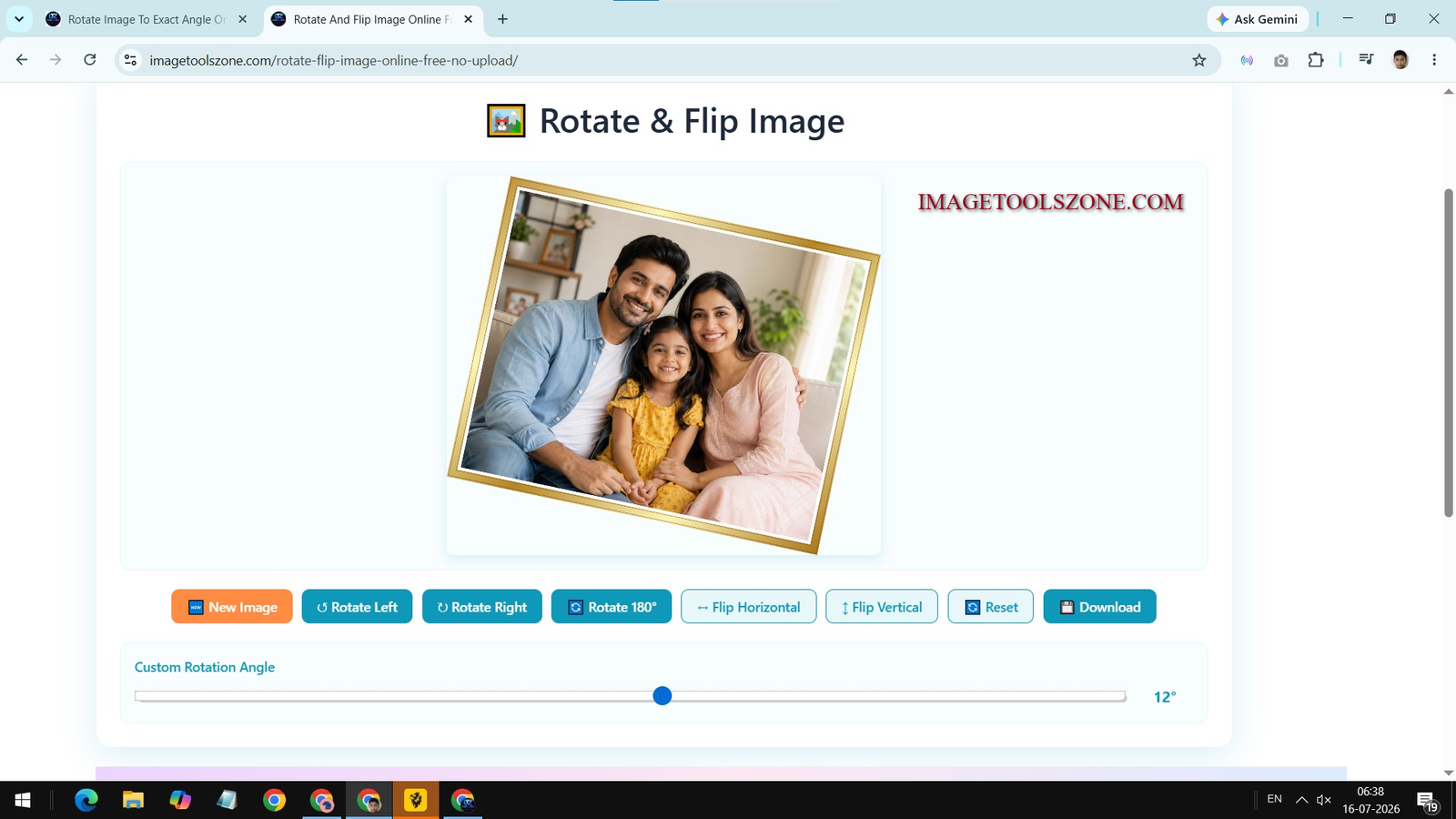
What Does 'Rotate Image to Exact Angle' Mean?
Let's break this down because understanding what you're actually doing makes the whole process so much easier. When we talk about rotating an image to an exact angle, we're referring to the precise degree of rotation you apply to your image – not just the standard 90-degree turns that most basic tools offer.
Think of it this way: standard rotation tools give you four positions – 0°, 90°, 180°, and 270°. That's great if your image just needs a quarter-turn. But what if your scanned document is tilted at 7 degrees? Or your sunset photo has a horizon that's off by 3.5 degrees? That's where exact angle rotation becomes essential.
With exact angle rotation, you have complete control. You can input any number – whether that's 1°, 15°, 45°, 90°, or even something specific like 23.7°. The tool rotates your image to that precise specification without approximating or rounding to the nearest standard angle. This level of precision is crucial for professional work, document scanning, architectural photos, and any situation where alignment matters.
💡 Quick Tip:
The difference between rotating to 89° versus 90° might seem small, but in professional photography or document preparation, that 1-degree difference can be the line between amateur and polished work.
Rotate Image to Exact Angle Online Free – No Software Needed
Remember the good old days when you needed Photoshop or GIMP just to rotate an image? Yeah, those days are officially over. Today, you can achieve professional-grade image rotation directly from your browser without installing a single piece of software. And the best part? You don't sacrifice quality or features in the process.
Our online rotation tool runs entirely in your browser using advanced JavaScript technology. This means your images never actually leave your device – they're processed locally, which is faster and more secure than traditional upload-based tools. No waiting for uploads, no privacy concerns, no mysterious servers storing your photos.
🚀 Instant Processing
No upload delays, no queue times. Your image rotates in milliseconds, right there in your browser. Whether you're rotating one photo or a batch of documents, you get instant results every single time.
🔒 Privacy First
Your images never leave your device. We process everything locally in your browser, which means your photos, documents, and graphics stay completely private. No servers, no storage, no data collection.
💎 Zero Quality Loss
Unlike many online tools that compress your images to save bandwidth, our rotation tool maintains 100% of your original image quality. What you upload is exactly what you download – just rotated to perfection.
But here's what really sets browser-based tools apart: accessibility. Whether you're on a work computer where you can't install software, using a borrowed laptop, or just don't want to clutter your device with apps you'll use once a month, online tools are your answer. All you need is a modern web browser and an internet connection.
And let's talk about cross-platform compatibility. Our tool works identically whether you're on Windows, macOS, Linux, Chrome OS, or even mobile operating systems. The interface adapts to your screen size, the features remain consistent, and the results are identical. That's the beauty of web-based tools – they just work, everywhere.

How to Rotate Image to Exact Angle on Mobile (Android/iPhone)
Mobile photography has completely transformed how we capture and share images. With smartphone cameras getting better every year, it's no surprise that most of our photos start life on a phone. But here's the challenge: rotating images to exact angles on mobile devices isn't always straightforward.
Native phone galleries and basic photo apps typically only offer 90-degree rotations. Sure, some have a "straighten" feature, but they often lack the precision you need for that perfect angle. You might find yourself rotating back and forth, trying to get that horizon just right, only to end up frustrated and settling for "close enough."
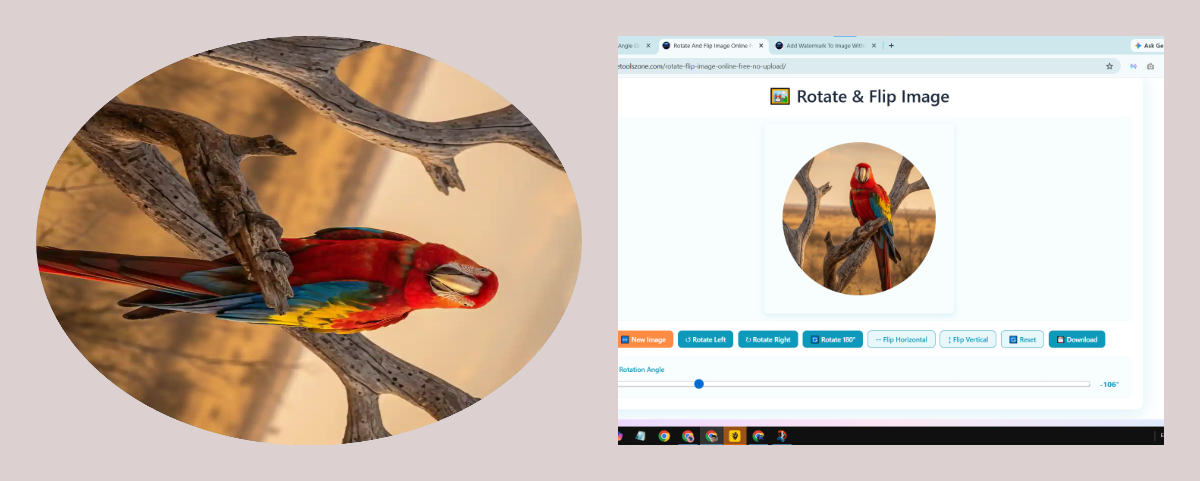
That's where mobile-optimized online tools shine. Our rotation tool works flawlessly on both Android and iPhone, giving you the same precision you'd get on a desktop computer. Here's how to make it work for you:
Open Your Mobile Browser
Whether you're using Chrome on Android or Safari on iPhone, simply navigate to our rotation tool page. The interface automatically adjusts to fit your screen perfectly.
Upload Your Image
Tap the upload button and select the photo from your camera roll. The tool accepts all common formats – JPEG, PNG, WebP, you name it. Large files? No problem. The tool handles high-resolution mobile photos with ease.
Set Your Exact Angle
Here's where the magic happens. Use the angle slider for quick adjustments, or tap the number field to type in your exact degree. Need 23 degrees? Type it in. Want to fine-tune by 0.5 degrees? You can do that too. The preview updates in real-time so you see exactly what you're getting.
Download & Share
Once you're happy with the rotation, hit download. The image saves directly to your phone's gallery, ready to share on Instagram, WhatsApp, or wherever else you need it. The whole process takes less than a minute.
One thing mobile users particularly love: touch controls. You can drag the rotation slider with your finger for smooth, intuitive adjustments. Pinch to zoom on the preview to check details. It's designed specifically for how people actually use their phones – with thumbs and quick gestures.
And don't worry about data usage. Since the processing happens locally on your device, you're not uploading massive files to servers and downloading them back. You only use data for loading the tool itself and downloading your final rotated image. It's efficient, fast, and mobile-friendly.
Rotate Image by Custom Angle (1°, 2°, 45°) Online Free
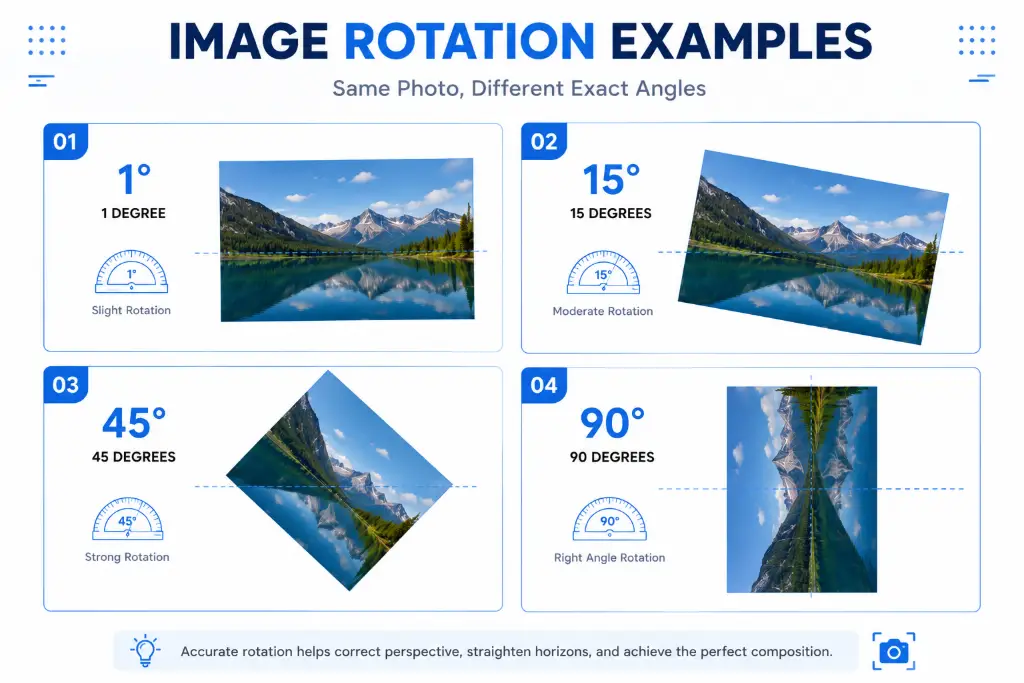
Let's talk about precision, because that's what custom angle rotation is all about. When we say you can rotate by any angle, we mean it. Whether you need the subtle adjustment of 1 or 2 degrees to straighten a slightly crooked photo, or you're going for that artistic 45-degree diagonal composition, you have complete control.
Why would you need such specific angles? Let me give you some real-world examples:
📐 1-2 Degrees
Perfect for fixing slightly tilted horizons in landscape photos, or correcting the minor skew that happens when scanning documents by hand. These tiny adjustments make a huge difference in perceived quality.
🎨 15-30 Degrees
Ideal for creative compositions, product photography at dynamic angles, or preparing images for specific layout requirements. Great for social media posts that need to stand out.
⚡ 45 Degrees
The classic diagonal angle. Perfect for creating diamond-shaped compositions, preparing images for certain print layouts, or achieving that modern, dynamic look in your graphics.
🔄 Any Custom Angle
Need 37 degrees for a specific design requirement? Or 83 degrees to match another element in your layout? Type it in and get it exactly right. No approximations, no compromises.
The beauty of custom angle rotation is that it works both ways. You can rotate clockwise or counterclockwise by entering positive or negative numbers. Enter 45 for a 45-degree clockwise rotation, or -45 for counterclockwise. The tool handles it all seamlessly.
And here's a pro tip: if you're working on a series of images that all need the same rotation angle, you can simply type the same number for each one. No need to remember or manually adjust each time. Consistency made simple.
Rotate Scanned Documents to Exact Angle Online Free
If you've ever scanned a document with your phone or a flatbed scanner, you know the struggle. No matter how carefully you position the paper, it always ends up slightly crooked. That 3-degree tilt might not seem like much, but when you're submitting official documents, creating professional presentations, or archiving important papers, it looks sloppy and unprofessional.
Traditional document scanners often have auto-straighten features, but they're not always accurate. They might overcorrect or undercorrect, leaving you with a document that's still not quite right. And if you're scanning with your phone using a generic scanning app, you're often stuck with whatever angle you managed to capture.
That's where precise rotation comes in. With our tool, you can:
- Correct minor scanning errors (1-5 degrees)
- Straighten documents photographed at angles
- Align multi-page scans to match perfectly
- Prepare documents for OCR (Optical Character Recognition)
- Create professional-looking PDFs and presentations
Here's a scenario: you're applying for a job and need to submit scanned copies of your certificates. You scan them quickly with your phone, but they all came out at slightly different angles. Instead of rescanning everything (which takes time and might not solve the problem), you simply upload each one to our rotation tool, adjust by the exact degree needed, and download perfectly aligned documents. Professional, fast, and hassle-free.
For businesses handling大量 documents, this precision is even more critical. Invoices, contracts, forms – they all need to look professional and be easily readable. A crooked document suggests carelessness, even if the content is perfect. Exact angle rotation ensures every document in your archive looks polished and professional.
Document Scanning Best Practice:
When scanning documents, it's better to slightly under-rotate than over-rotate. If you're unsure whether you need 3 or 4 degrees, start with 3. You can always adjust again, but over-rotation can crop important content from the edges.
Rotate Image to Perfect Angle for Instagram & WhatsApp
Social media is all about presentation. Whether you're posting on Instagram, sharing on WhatsApp, or updating your Facebook cover photo, the angle of your image can make or break its impact. And let's be honest – we've all scrolled past posts that looked great content-wise but were ruined by a crooked horizon or awkward tilt.
Instagram, in particular, has specific aspect ratios and display requirements. While the platform does offer basic rotation tools, they're limited to 90-degree increments. If your photo needs that perfect 7-degree adjustment to straighten a building or align with the rule of thirds, Instagram's built-in tools won't cut it.
Here's what social media creators and influencers know: the difference between a good post and a great post often comes down to the details. A perfectly straight horizon in your beach sunset photo. A product shot rotated to exactly 15 degrees for that dynamic e-commerce look. A portrait aligned just right to frame your subject perfectly. These aren't just aesthetic choices – they're engagement drivers.
📱 Instagram Feed Posts
Rotate your photos to exact angles before uploading. Whether you're going for that perfectly aligned grid aesthetic or just want your individual posts to look professional, precise rotation is key.
🎬 Instagram Stories
Stories have a 9:16 aspect ratio, but that doesn't mean your content has to be straight. Rotate images to create dynamic, eye-catching stories that stand out from the typical vertical posts.
💬 WhatsApp Status & Shares
Sharing memes, documents, or photos on WhatsApp? Make sure they're perfectly oriented. Nothing kills a joke like a sideways meme or makes a document harder to read than a crooked scan.
🖼️ Facebook & Twitter
Each platform has different display requirements. Rotate your images to exact angles optimized for each platform's unique cropping and display behavior.
And here's something most people don't think about: consistency. If you're a content creator posting regularly, having a consistent rotation style can become part of your brand. Maybe you always rotate product shots 12 degrees to the right. Maybe your landscape photos are always perfectly level. These small details add up to a cohesive, professional feed that followers recognize and trust.
For WhatsApp specifically, document sharing is huge. Whether you're sending a scanned contract, a boarding pass, or a receipt, making sure it's perfectly straight shows attention to detail and makes it easier for the recipient to read. It's a small touch that makes a big difference in professional communication.
How to Rotate Your Image: Step-by-Step Guide
Ready to get started? Here's exactly how to rotate your image to the perfect angle using our free online tool. I'll walk you through every step so you can get professional results in under a minute.
Step 1: Access the Tool
Head over to our rotate and flip image tool. No registration required, no login needed. The tool loads instantly in your browser, whether you're on desktop or mobile.
Step 2: Upload Your Image
Click the "Choose File" button or simply drag and drop your image into the upload area. The tool supports all major image formats including JPEG, PNG, WebP, BMP, and TIFF. There's no file size limit that would affect normal photos or documents.
Step 3: Choose Your Rotation Method
You have three options here:
- Quick Rotate: Use the preset buttons for 90°, 180°, or 270° rotations
- Slider: Drag the rotation slider for visual adjustments between -180° and 180°
- Exact Input: Type in your precise angle (like 23.5°) for pixel-perfect rotation
Step 4: Preview and Adjust
Watch your image rotate in real-time as you make adjustments. Use the zoom function to check details and ensure everything is aligned perfectly. If you need to fine-tune, just adjust the angle slightly until it's exactly right.
Step 5: Download Your Rotated Image
Once you're satisfied, click the download button. Your image saves instantly with the exact rotation you specified. The file maintains its original quality and format, or you can choose to convert it if needed.
That's it! Five simple steps to perfectly rotated images. No complicated menus, no confusing options, no watermarks. Just straightforward, professional image rotation that works exactly how you need it to.
Key Features of Exact Angle Rotation
Precision Control
Rotate to any degree with 0.1° accuracy
Zero Quality Loss
Maintain 100% original image quality
Instant Processing
Results in milliseconds, not minutes
Privacy Protected
No uploads, local browser processing
Let's dive deeper into what makes exact angle rotation so powerful:
🎯 Precision That Matters
When we say "exact angle," we mean it down to the decimal point. Most free tools round to the nearest whole number, but professional work often requires more precision. Our tool allows rotations to one decimal place, giving you the control you need for critical alignments.
🔄 Bidirectional Rotation
Rotate clockwise or counterclockwise – your choice. Positive numbers rotate clockwise, negative numbers rotate counterclockwise. This flexibility is essential when you're working with images that need to align with other elements in a specific direction.
Visual Guides and Grids
Our tool includes optional overlay grids that help you align your image perfectly. Enable the rule of thirds grid, golden ratio guides, or simple alignment lines to ensure your rotation achieves exactly what you're aiming for.
💾 Format Flexibility
Upload in one format, download in another if you wish. Rotate a PNG and download as JPEG, or keep the original format – it's your choice. The tool preserves transparency in PNGs and maintains color profiles across formats.
Real-World Use Cases
Still wondering when you'd actually need exact angle rotation? Let me share some scenarios where this tool becomes indispensable:
📸 Photography Correction
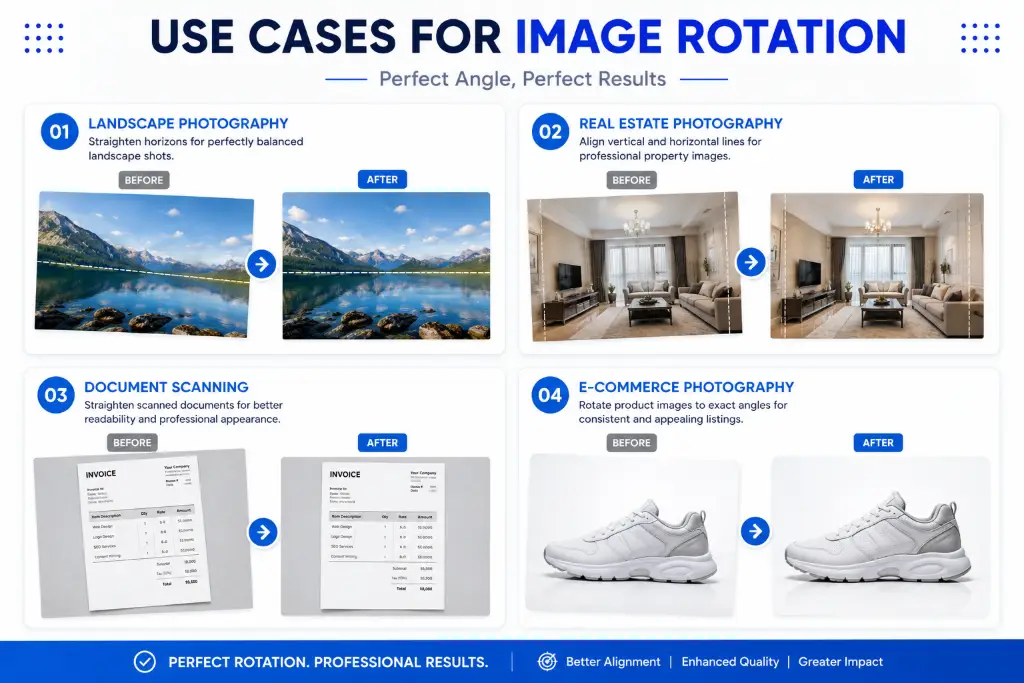
Straighten horizons in landscape photos, correct perspective in architectural shots, or align portraits perfectly. Professional photographers use exact rotation to ensure every shot meets their quality standards before delivery.
Real Estate Listings
Property photos need to look perfect. Slightly rotated images make rooms look unprofessional and can even affect sale prices. Exact angle rotation ensures every listing photo is perfectly aligned and appealing.
🎓 Academic Papers
Scanning research papers, theses, or historical documents? They need to be perfectly straight for readability and professional presentation. Even a 2-degree tilt can make dense text harder to read.
🛍️ E-commerce Product Photos
Online stores require consistent, professional product images. Rotating products to exact angles ensures uniformity across your catalog and makes your store look polished and trustworthy.
🎨 Graphic Design Projects
Designers often need to rotate elements to specific angles to match brand guidelines, create dynamic layouts, or align with other design elements. Exact rotation is essential for professional design work.
📋 Legal Documents
Contracts, affidavits, and legal forms must be presented professionally. Crooked scans look careless and can even raise questions about document authenticity. Perfect rotation shows attention to detail.
Related Tools You'll Love
Once you've perfected your image rotation, you might need other adjustments. We've built a complete suite of free image tools that work seamlessly together:
🛠️ Essential Image Tools
Each tool is designed with the same principles: free to use, no registration required, privacy-focused, and professional results. Mix and match them to create the perfect workflow for your image editing needs.
For example, you might:
- Rotate your image to the exact angle
- Crop it to remove unwanted edges
- Compress it for web use
- Convert it to the optimal format
All in your browser, all free, all without losing quality. That's the power of having the right tools at your fingertips.
Frequently Asked Questions
Rotating an image to an exact angle means you can specify the precise degree of rotation you want, rather than being limited to standard 90-degree increments. For example, instead of just rotating 90° or 180°, you can rotate your image by exactly 23.5°, 7°, or any other specific angle you need. This level of precision is essential for straightening slightly crooked photos, aligning documents perfectly, or achieving specific creative effects.
Yes, absolutely! Our rotate image to exact angle online free tool is completely free to use with no hidden charges, no subscription fees, and no premium tiers. You can rotate as many images as you need without paying a cent. We believe professional image editing tools should be accessible to everyone, whether you're a student, professional, or just someone who needs to fix a crooked photo.
No, not at all. Our tool maintains 100% of your original image quality. Unlike some online tools that compress images to save bandwidth, we process your images locally in your browser without any quality loss. The rotated image will have the same resolution, clarity, and detail as your original – just at a different angle. You can rotate and re-rotate as many times as needed without degradation.
Great question! Rotating an image turns it around a central point by a specific angle (like 45° or 90°), while flipping creates a mirror image. When you rotate, the image spins but maintains its orientation. When you flip, you create a reflection – either horizontally (like looking in a mirror) or vertically (like a reflection in water). Our tool offers both rotation and flip options, so you can choose whichever transformation you need.
Absolutely! Our tool is fully responsive and works perfectly on all mobile devices, including Android phones, iPhones, iPads, and tablets. The interface automatically adjusts to fit your screen size, and touch controls make it easy to adjust angles with your finger. Whether you're on a 6-inch phone or a 12-inch tablet, you'll get the same professional results.
Nope! That's the beauty of our online tool – it runs entirely in your web browser. No downloads, no installations, no software updates. Just open your browser, visit our tool, and start rotating images immediately. This also means you can use it on any computer, even ones where you don't have permission to install software, like work or school computers.
We support all major image formats including JPEG/JPG, PNG, WebP, BMP, TIFF, and GIF. You can upload in one format and download in another if you wish. The tool also preserves transparency in PNG files and maintains color profiles across different formats. If you have a less common format, try uploading it – we likely support it!
Yes, your privacy is our priority. Our tool processes images locally in your browser using JavaScript, which means your images never actually leave your device. We don't upload your files to servers, we don't store them, and we don't have access to them. Everything happens on your computer or phone, making it both faster and more secure than traditional upload-based tools.
Yes! Our tool allows rotation precision up to one decimal place, so you can rotate by 0.1°, 0.5°, or any increment you need. This level of precision is perfect for fine-tuning alignments, especially in professional photography or when working with architectural images where even tiny angle adjustments matter.
To straighten a crooked horizon, upload your image and use the rotation slider while watching the preview. Look for a clear horizontal line in your image (like the horizon, a building edge, or a table top) and adjust the angle until it's perfectly level. You can also enable our grid overlay to help with alignment. For most horizon corrections, you'll need between -5° and +5° of rotation.
Our tool can handle very large files – typically up to 25MB or more, depending on your browser and device. This is more than enough for high-resolution photos from modern cameras and smartphones. If you have an exceptionally large file (like a professional RAW conversion), you might want to compress it slightly first using our image compressor tool, then rotate it.
Currently, our tool processes one image at a time to ensure the best quality and performance. However, the process is so fast (usually just a few seconds per image) that rotating multiple images is still quick and easy. Simply upload, rotate, download, and repeat. We're working on a batch processing feature for future updates!
When you rotate an image by an angle that's not a multiple of 90°, the corners will extend beyond the original rectangular frame. Our tool automatically fills these areas with a background color (usually white or transparent, depending on your format). If you want to remove these corners, you can use our crop tool after rotating to create a clean rectangular image again.
Since our tool processes images in real-time, you can adjust the angle as many times as you want before downloading. Just change the rotation value and the preview updates instantly. Once you download the rotated image, you can always upload it again and rotate it back by entering the negative of your original angle (for example, if you rotated +45°, rotate by -45° to return to the original orientation).
Our tool requires an internet connection to load initially, but once loaded, some browsers allow it to function offline using cached resources. However, for the best experience and to ensure you have the latest version, we recommend using it with an active internet connection. The good news is that even with an internet connection, your images are processed locally and never uploaded.
Our tool works on all modern web browsers including Google Chrome, Mozilla Firefox, Safari, Microsoft Edge, and Opera. We recommend using the latest version of your browser for the best performance and compatibility. The tool is optimized for Chrome and Firefox but should work well on any browser updated within the last few years.
Yes! You can use our free rotation tool for both personal and commercial projects. Whether you're editing photos for your business, preparing documents for clients, or creating content for social media marketing, you're welcome to use our tool. There are no restrictions on commercial use, and you retain full rights to your rotated images.
Ready to Perfect Your Images?
Join thousands of satisfied users who trust our free tools for professional image editing. No registration, no watermarks, no quality loss – just perfect results every time.
Start Rotating Images Free →✓ 100% Free ✓ No Signup ✓ Instant Results ✓ Privacy Protected