
Home › Image Tools Blog › Crop Image into a Rounded Star Shape
Free Online Tool Guide · Updated August 2026Crop Image into a Rounded Star Shape Online – Free Star Photo Cropper
If you searched for a way to crop an image into a rounded star shape online, chances are you have a photo that deserves better than a plain rectangle. Maybe it's a birthday card for your niece, a Pinterest pin you've been planning, or a profile picture that should feel a little more you. A rounded star — a classic five-point star with every tip and inner corner softly curved — instantly makes any photo feel playful, warm, and intentionally designed.
And here's the good news: you don't need design software, an app store download, or even an account. This guide puts our free rounded star cropper right at the top (because you probably want to do this, not read an essay first), then walks you through a two-minute tutorial, honest comparisons, real use cases, and the exact tips we use when we design star-shaped graphics for invitations, social posts, and product pages.

Crop Your Image into a Rounded Star — Free Tool, No Signup
Upload your photo, pick the rounded star frame, drag it into place, and download a clean PNG. The whole thing takes under a minute. This is our free star shape crop tool — the same engine powers the rounded-star option, so one upload gets you both styles.
⭐ Open the Rounded Star Cropper Try Custom ShapesPrefer softer geometry? Also handy: circle image cropper · oval crop tool
What Is a Rounded Star Image Crop?
A rounded star crop masks your photo inside a five-point star whose tips and inner angles are curved instead of needle-sharp. Think of the stars you see on kids' app icons, emoji, and modern badge designs — chunky, soft, and approachable. The shape still reads as a "star" at a glance, but the softened geometry removes the aggressive, pointy feel of a traditional star.
It helps to see it next to the crops you already know. A rectangular crop is the default — safe but invisible. A circle crop is the social-media standard, great for avatars but extremely common. A standard star crop grabs attention, yet its razor-sharp points can visually "cut" faces and clash with soft designs. The rounded star crop sits in a sweet spot: unusual enough to stop the scroll, soft enough to feel warm.
Rectangular Crop
The default everywhere. Perfect for documents and thumbnails, but it adds zero personality to creative projects.
Circle Crop
The avatar standard. Friendly and familiar — which is exactly why it no longer stands out in a crowded feed.
Standard Star Crop
Bold and decorative, but sharp tips can slice through faces and details, and thin points print poorly.
Rounded Star Crop
Same iconic silhouette with soft, curved points. Modern, playful, and far more forgiving on portraits.
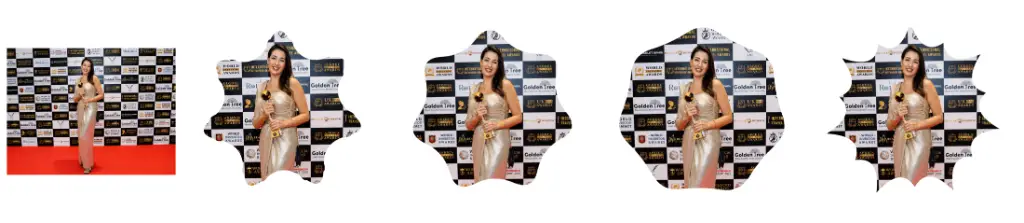
How Does Star Image Cropping Actually Work?
Technically, the rounded star is just a mask — a vector outline laid over your photo, with everything outside the outline made transparent. Your original pixels inside the star stay untouched, which is why cropping never "damages" the part you keep. That mask approach also explains why the export format matters: a PNG keeps the corners transparent, while a JPG would fill them with solid white. A good online cropper handles that decision for you automatically, so the file you download drops cleanly onto any background.
How to Crop an Image into a Rounded Star Shape Online
Here's the whole process, start to finish. If this is your first time using an online star shape image cropper, expect it to take about 60 seconds after your first upload — and every star after that gets faster.
Upload your image
Open the rounded star cropper and drop in a JPG, PNG, or WebP. Portraits and product shots with a clear central subject work best.
Select the rounded star shape
Choose the star option and switch to the rounded variant. You'll see the soft-point mask appear over your photo immediately — no drawing, no pen tool.
Adjust the crop area
Drag to reposition and pinch or slide to zoom. Keep eyes, faces, or the product's hero detail inside the star's central body — more on that in the tips below.
Apply the crop
Hit apply and the tool masks everything outside the star, leaving transparent corners ready for any background color, template, or slide.
Download your rounded-star image
Save the result as a PNG. Done — you now have a star shaped photo ready for invitations, posts, stickers, or presentations.
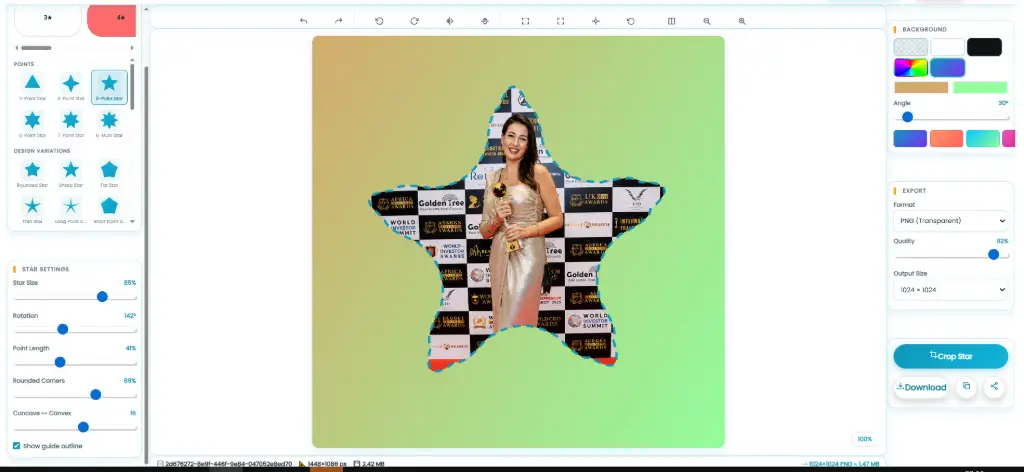 Let's Try Your Favourite Image to Rounded Star
Why Use a Rounded Star Image?
Shape is one of the fastest ways to change how a photo feels, and the rounded star pulls off a trick the sharp star can't: it's eye-catching and warm at the same time. Here's what that softness actually buys you in real projects.
Softer, Friendlier Feel
Curved points read as playful and safe — perfect for kids' brands, classrooms, and family events.
Stops the Scroll
In a feed of rectangles and circles, a star shape is genuinely unusual. Rounded corners keep it stylish, not gimmicky.
Plays Well with Color
The soft silhouette pairs beautifully with pastel palettes, confetti graphics, and hand-drawn design elements.
Prints Cleanly
Sharp star tips can chip or blur in print. Rounded edges hold their shape on stickers, cards, and posters.
Flattering on Faces
No spike will ever slice through someone's forehead again. The wider soft frame keeps faces fully intact.
Transparent by Default
Exported as PNG, your star drops cleanly onto any colored background, invitation template, or slide deck.
Head to HeadRounded Star vs Regular Star Crop
Both crops come from the same family, but they suit different moods. Use this table as a quick decision filter before you commit to a design.
| Feature | Rounded Star | Regular Star |
|---|---|---|
| Appearance | Soft, rounded points | Sharp points |
| Design style | Modern / friendly | Bold / decorative |
| Social media | Excellent | Excellent |
| Invitations | Excellent | Good |
| Kids' designs | Excellent | Good |
| Logos / graphics | Good | Excellent |
Our rule of thumb: choose the rounded star whenever people are in the photo or the mood is celebratory — birthdays, weddings, school events, community posts. Choose the regular star for high-contrast branding, sale badges, and anything that needs a bold graphic punch. And remember, you can generate both from the same upload in a few clicks, then compare them side by side on your actual design before deciding.
Real-World UsesWhere Can You Use Rounded Star-Shaped Images?
Once you have a transparent star PNG, it slots into almost any visual project. These are the uses we see most often from our own users — and yes, one uploaded photo can serve several of them at once.
Pinterest Graphics
Star-framed photos stand out in a sea of vertical rectangles and boost repin-worthy appeal.
Instagram Posts
Break the square-grid monotony with a star-shaped photo on a colored background.
Profile Graphics
A rounded star avatar feels personal and fun for creators, teachers, and coaches.
YouTube Thumbnails
Use a star-cropped face or product as a focal element that survives small-screen viewing.
Blog Featured Images
Star crops add instant personality to listicles, roundups, and celebration posts.
Invitations
Baby showers, graduations, and sleepover parties all love the soft-star look.
Birthday Cards
Put the birthday star's face inside an actual star — the pun designs itself.
Wedding Designs
Paired with gold or blush palettes, rounded stars feel like subtle sparkle motifs.
School Projects
Teachers use star crops for "student of the week" boards and classroom displays.
Presentations
Swap boring rectangular headshots for stars to keep slide decks lively.
Posters & Flyers
Event posters benefit from a star-framed headline image that reads from a distance.
Stickers
Rounded edges die-cut beautifully — no fragile sharp tips to peel or tear.
Logos & Branding
Soft stars suit playful brands: bakeries, toy shops, party planners, kids' apps.
Product Graphics
Highlight a bestseller inside a star for "featured product" badges that convert.

How to Make a Rounded Star Profile Picture
Most platforms force your avatar into a circle, but plenty don't — Discord, Pinterest, blogs, forums, and portfolio sites all display whatever shape you upload, transparent corners included. A rounded star profile picture is a tiny change that makes you instantly recognizable in comment sections and community boards.
- Start with a head-and-shoulders photo where your face fills the center third.
- Crop with the rounded star, then zoom until your face sits in the star's central pentagon — not in the points.
- Export as PNG so the corners stay transparent, then upload on a platform that preserves transparency.
- Test it at tiny size: if it still reads as a star at 40 pixels wide, you nailed it.
Rounded Star Cropper App vs. Browser Tool: Which Should You Use?
People often search for a rounded star cropper app, assuming a mobile app is the only way to do this on a phone. Honestly? You don't need one. A browser-based cropper works on any phone or tablet, skips the download-and-permissions ritual, and never nags you with a premium upgrade mid-crop. Apps shine if you batch-edit hundreds of images weekly; for everyday star crops, the browser route is faster from tap to download. If you do edit on a phone, our star photo cropper is fully touch-friendly — drag with a finger, pinch to zoom, done.
How to Crop a Photo into a Star Shape Without Photoshop
The traditional route to a star-shaped photo is genuinely painful: draw a star with the pen tool, wrestle with anchor points, convert the path to a selection, mask the layer, export as PNG. Even experienced designers sigh at that list. Beginners face an even steeper wall — subscription costs, huge downloads, and a weekend of tutorials before the first decent crop.
An online photo shape editor flips that equation. The star path is already drawn for you, the mask is applied in one click, and the transparent PNG export is automatic. What used to be a 20-minute desktop task becomes a 60-second browser task on any device you own.
Why a Browser-Based Photo Shape Editor Wins for This Job
🖥️ The Old Desktop Route
Expensive software, large installs, pen-tool skills required, and a different interface on every device you own.
🌐 The Browser Route
Open a tab, upload, pick "rounded star," download. Identical experience on laptop, phone, or a friend's computer.
And if you ever need shapes beyond stars — hearts for Valentine's cards, polygons for techy designs — the same family of tools covers you: try the heart shape crop or the polygon crop tool, or go fully freeform with the custom shape crop tool.
Tips for Getting the Best Rounded Star Crop
The tool does the hard part, but these six habits separate an okay star crop from a great one. They take seconds each and save you from the most common complaints we hear about shaped crops.
Start with a high-resolution image
Cropping throws away pixels, so begin big. A 2000px-wide photo gives you a crisp star even after the mask removes the corners.
Keep the subject inside the star's body
The central area is your "safe zone." Faces, products, and text should sit there — the five points are for background, not for eyebrows.
Leave breathing room around the subject
Zoom out slightly more than feels natural. A little empty space inside the star makes the shape read clearly at small sizes.
Use a contrasting background
When you place the transparent PNG later, pick a backdrop that contrasts with your photo's edges so the star silhouette pops.
Choose the right output format
PNG for transparent corners (almost always). JPG only when you're placing the star on a fixed solid color and need a smaller file.
Finish with a resize or compression pass
After downloading, resize to the exact size your platform needs, then run it through an image compressor so pages load fast.
Rounded Star Image Examples
Not sure what to try first? These five styles cover most real projects, and each one takes the same 60-second workflow — only the source photo changes.
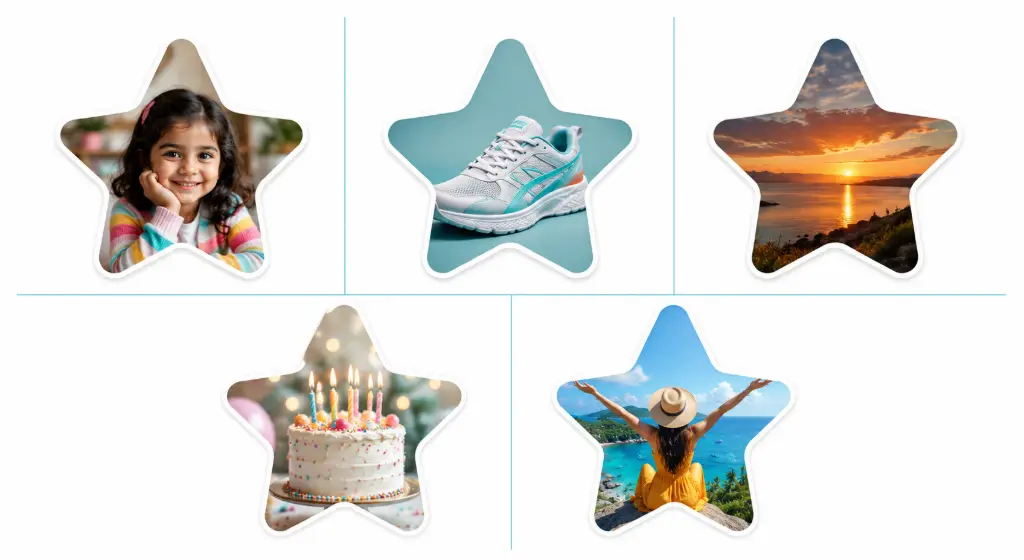
- Portrait: a child's face centered in the star's body — the go-to for birthday cards and classroom boards.
- Product: a sneaker shot angled through the star, perfect for "featured product" badges on shop pages.
- Landscape: a sunset placed so the horizon crosses the star's middle, great for blog headers and travel pins.
- Birthday design: a cake close-up that turns any invitation into a celebration in one glance.
- Social graphic: a beach photo on a bright background — instant scroll-stopper for feeds and stories.
Rounded Star Cropper PNG: Why Transparent Exports Matter
Search for a rounded star cropper PNG and you'll quickly see why format is the whole ballgame. PNG preserves the transparent corners around your star, which means one single file works on a white invitation, a teal Instagram background, or a dark slide — no white boxes haunting the edges. If a collaborator ever sends you a star with white corners, you can rescue it with a free background remover, but exporting PNG from the start is cleaner and faster.
Star Crop Image Workflows: Pair Your Star with Smart Next Steps
A star crop image is rarely the final step — it's the first ingredient in a design. Here are the three follow-up moves we recommend most, all free and browser-based.
Resize for the Platform
Every platform wants different dimensions. Use a resize-to-exact-size tool so your star lands pixel-perfect on Pinterest, Etsy, or your LMS.
Compress Before Publishing
Transparent PNGs can be heavy. An image compressor trims file size while keeping edges crisp — your page speed will thank you.
Convert When Needed
Need WebP for a fast site or JPG for an old print template? Convert the format without quality loss in one click.
Two more pairings worth bookmarking: clean up busy backdrops behind your star with the free image cropper for a quick pre-trim, and if you run a shop, run product photos through the auto crop object tool for ecommerce before starring them. And if soft geometry is your thing, you'll also love our guide on how to make image corners round online for matching rectangular photos to your star's friendly vibe.
Frequently Asked Questions
Can I crop an image into a rounded star online for free?
What's the difference between a star and a rounded star crop?
Does the tool export a transparent PNG?
Can I crop JPG and PNG images into a star?
Can I crop an image into a classic 5-point star too?
Will cropping into a star reduce my image quality?
Can I use a rounded star crop for social media?
Do I need to install software or create an account?
What image size should I upload for the sharpest star?
Can I reposition or zoom the photo inside the star before applying?
Is it safe to upload personal photos?
Can I use rounded star images commercially?
Rounded star vs heart shape crop — which should I pick?
Does the rounded star cropper work on phones?
What if my subject gets cut off at the star's points?
Can I add a border or outline around my rounded star?
How many star crops can I make in one session?
Conclusion: Make Your Star in Sixty Seconds
A rounded star crop is one of those small design moves that pays for itself everywhere you use it — friendlier than a sharp star, more memorable than a circle, and far more approachable than a plain rectangle. You now know what the shape is, when to choose it over a regular star, where it shines in real projects, and the six habits that keep every crop looking professional.
Ready when you are: upload your image and create a rounded star crop in seconds with the free rounded star image cropper. No signup, no watermark, no Photoshop — just a softer, friendlier star.
Turn One Photo into a Whole Set of Shapes
Start with the star, then explore the rest of the shape family — every tool below is free and browser-based.
⭐ Crop a Rounded Star Now Circle Oval Custom ShapeMore Free Image Tools from ImageToolsZone
Circle Crop
Create clean circular avatars in one click.
Oval Crop
Softer than a circle, great for portraits.
Heart Shape Crop
Perfect for love-themed designs and cards.
Polygon Crop
Geometric edges for modern, techy looks.
Free Image Cropper
The everyday cropper for quick trims.
Background Remover
Erase backdrops before shaping your photo.
Round Corners
Soften rectangular photos to match your star.
Photo Frame Generator
Add custom frames for finished, gift-ready looks.