
HEX Color Code Generator: Find, Create & Copy HEX Colors Online
Your all-in-one tool to generate, convert, and master HEX color codes for web design, branding, and digital projects
📋 On This Page
- HEX Color Code Generator Tool
- What Is a HEX Color Code?
- What Is a HEX Color Code Generator?
- How to Use the Generator
- How HEX Color Codes Work
- HEX Color Code Examples
- HEX vs RGB vs HSL
- Convert HEX to RGB
- Find HEX from Image
- Using HEX in CSS
- Create Color Palettes
- Choosing Colors for Websites
- HEX & Accessibility
- Common Uses
- Generator vs Color Picker
- FAQs
HEX Color Code Generator
Generate perfect HEX codes instantly. Pick colors visually, convert formats, and copy with one click.
🎨 Interactive Color Picker
Click to select any color and get instant HEX, RGB, and HSL values
Launch HEX Color Code GeneratorPick & Copy
Choose any color visually and copy the HEX code instantly with one click
🔄 Convert Formats
Switch between HEX, RGB, HSL, and other color formats seamlessly
Extract from Image
Upload any image and grab exact color codes from pixels
What Is a HEX Color Code?
Ever wondered how websites display that perfect shade of blue or the exact brand color you're obsessed with? That's where HEX color codes come into play.
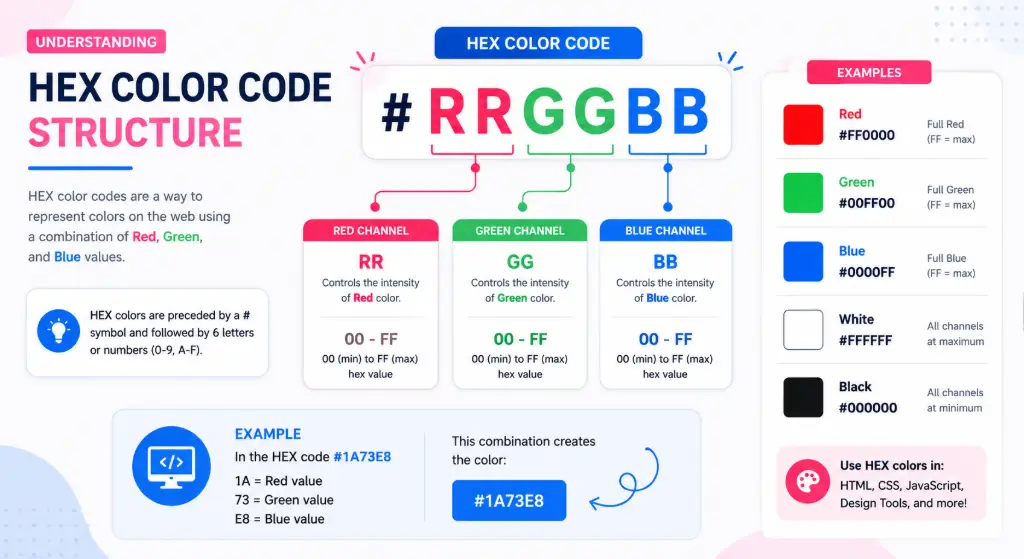
A HEX color code is a six-digit combination of numbers and letters that defines colors in web design and digital graphics. Think of it as a universal language that computers understand when it comes to displaying colors on your screen.
#FF5733Here's what makes it tick:
- First two digits (FF): Control the red channel
- Middle two digits (57): Control the green channel
- Last two digits (33): Control the blue channel
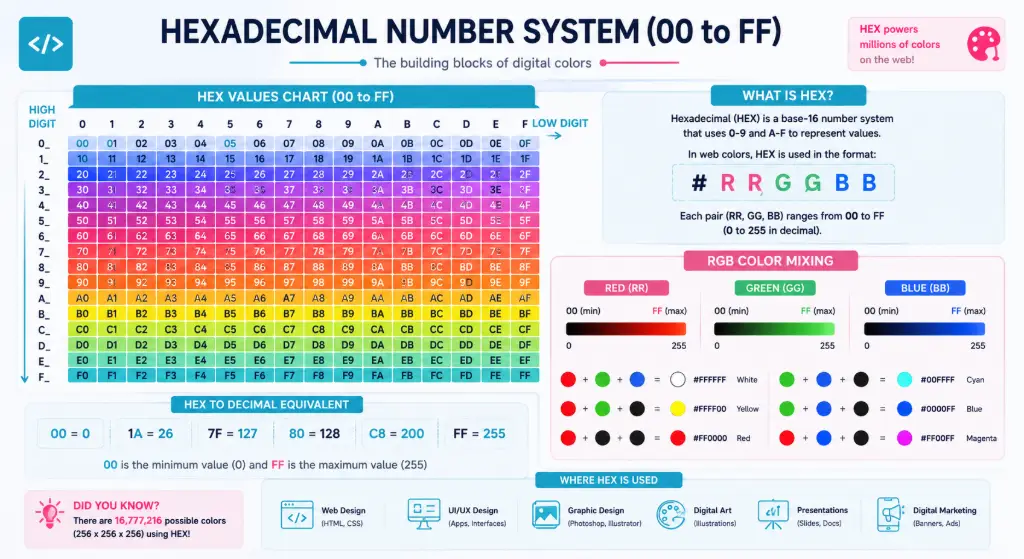
Each pair ranges from 00 to FF in hexadecimal notation (that's 0 to 255 in regular numbers). When you mix these three color channels together in different amounts, you can create over 16 million unique colors!
Visual diagram showing #RRGGBB breakdown with color spectrum
What Is a HEX Color Code Generator?
A HEX color code generator is your digital color assistant. Instead of guessing or memorizing color values, this tool lets you visually pick colors and instantly generates the exact code you need.
But here's where it gets interesting—there's a subtle difference between tools you might encounter:
HEX Color Code Generator
Creates new colors from scratch. You adjust sliders, pick from a spectrum, or input values to generate fresh color codes.
HEX Color Picker Online
Identifies existing colors. Upload an image or point to any pixel on screen to extract its exact HEX value.
Whether you're a web designer matching brand colors, a developer tweaking CSS, or a marketer creating social media graphics, a HEX color code finder saves you from the headache of manual color matching.
How to Use a HEX Color Code Generator
Getting the perfect color code doesn't have to be complicated. Here's your step-by-step guide:
Choose Your Color
Click anywhere on the color spectrum or use sliders to adjust hue, saturation, and brightness
Fine-Tune
Drag the selector or input specific RGB/HSL values for precision
Copy Code
Grab the generated HEX code with one click—ready to paste anywhere
Explore Values
Check RGB, HSL, and CMYK equivalents if you need alternative formats
Apply & Create
Use your color in CSS, HTML, Figma, Canva, Photoshop, or any design tool
How HEX Color Codes Work
Let's decode the magic behind these six-character codes. Understanding the hexadecimal system makes choosing colors way less intimidating.
The Hexadecimal System Explained
Unlike the decimal system (0-9) we use daily, hexadecimal uses 16 symbols: 0-9 and A-F. Here's the conversion:
| Hex Value | Decimal | What It Means |
|---|---|---|
| 00 | 0 | No color intensity (darkest) |
| 7F | 127 | Medium intensity |
| FF | 255 | Full intensity (brightest) |
Breaking Down #3B82F6
Let's dissect a popular blue shade:
3B(Red): 59 out of 255 — Low red content82(Green): 130 out of 255 — Medium greenF6(Blue): 246 out of 255 — Almost full blue
Result? A vibrant, professional blue perfect for buttons and links.
Hexadecimal number system visualization with color mixing
HEX Color Code Examples
Sometimes seeing is believing. Here's a HEX color chart of commonly used colors to spark your creativity:
White
Black
Red
Green
Blue
Yellow
Purple
Orange
Pink
Gold
Gray
Cyan Blue
Popular Color Categories
Blue HEX Codes
#3B82F6 - Bright Blue
#1E40AF - Deep Blue
#60A5FA - Sky Blue
#1E3A8A - Navy
Green HEX Codes
#10B981 - Emerald
#059669 - Forest Green
#34D399 - Mint
#065F46 - Dark Green
Red & Pink Codes
#EF4444 - Bright Red
#DC2626 - Crimson
#F472B6 - Hot Pink
#EC4899 - Rose
Neutral Tones
#F9FAFB - Off White
#6B7280 - Medium Gray
#374151 - Charcoal
#111827 - Near Black
HEX vs RGB vs HSL
Color codes come in different flavors, and each has its superpower. Let's break down when to use which format:
| Format | Example | Best For | Pros |
|---|---|---|---|
| HEX | #3B82F6 | CSS, web design, HTML | Compact, universal support |
| RGB | rgb(59,130,246) | Programming, digital screens | Intuitive, easy to adjust |
| HSL | hsl(217,91%,60%) | Color adjustments, themes | Human-friendly, logical |
When to Choose Each Format
Stick with HEX when: You're writing CSS, need compact code, or working with standard web colors. It's the industry standard for a reason.
Use RGB when: You need transparency (RGBA), working with canvas elements, or prefer thinking in 0-255 ranges.
Try HSL when: You want to create color variations. Need a darker shade? Just lower the lightness. Want more vibrant? Crank up the saturation. It's incredibly intuitive.
How to Convert HEX to RGB (and Back)
Sometimes you'll encounter a color in one format but need it in another. Here's your quick conversion guide:
HEX to RGB Conversion
Take #FF5733 as an example:
- Split into pairs: FF | 57 | 33
- Convert each from hex to decimal:
- FF = 255 (Red)
- 57 = 87 (Green)
- 33 = 51 (Blue)
- Result:
rgb(255, 87, 51)
RGB to HEX Conversion
Going the other way with rgb(120, 80, 200):
- Take each number: 120 | 80 | 200
- Convert to hexadecimal:
- 120 = 78
- 80 = 50
- 200 = C8
- Result:
#7850C8
Skip the Math
Why do manual calculations when you can use our built-in RGB to HEX converter? Just input your values and get instant conversions plus a visual preview.
Try the ConverterHow to Find a HEX Color Code From an Image
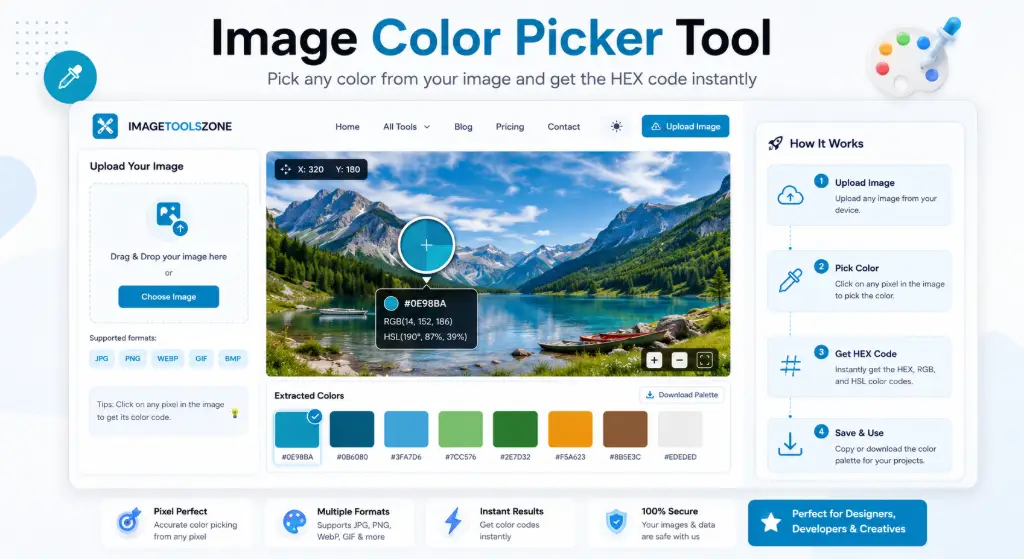
This is where things get really powerful. See a color you love in a photo, logo, or screenshot? Here's how to grab its exact code:
Step 1: Upload
Drag and drop your image into the HEX color code finder tool
Step 2: Click
Hover over any part of the image and click the exact pixel color you want
Step 3: Copy
Instantly get the HEX code plus RGB and HSL values—copy with one click
Real-World Use Cases
- Brand matching: Extract exact colors from a company logo
- Design inspiration: Pull colors from photography for your palette
- Competitor analysis: Identify colors used in competitor websites
- Print to digital: Match colors from physical materials to web
Screenshot showing color extraction from image workflow
Pro designers use this technique constantly. Found the perfect sunset gradient in a travel photo? Extract those warm oranges and pinks for your next project in seconds.
How to Use HEX Colors in CSS
Ready to put those color codes to work? Here's your crash course on using HEX values in web development:
Basic CSS Applications
/* Background color */
body {
    background-color: #F9FAFB;
}

/* Text color */
h1 {
    color: #1E3A8A;
}

/* Button styling */
.button {
    background-color: #0e98ba;
    color: #FFFFFF;
    border: none;
    padding: 12px 24px;
}

/* Border color */
.card {
    border: 2px solid #E5E7EB;
}

/* Hover effects */
.button:hover {
    background-color: #0C7A99;
}
Advanced Techniques
/* Gradient backgrounds */
.hero {
    background: linear-gradient(135deg, #667eea 0%, #764ba2 100%);
}

/* Box shadow with color */
.card {
    box-shadow: 0 4px 6px rgba(59, 130, 246, 0.3);
}

/* Multiple borders */
.element {
    border-top: 3px solid #FF6B9D;
    border-bottom: 3px solid #0e98ba;
}#3B82F680 (8 digits) for 50% opacity blue.Create a Color Palette From One HEX Code
Great design rarely uses just one color. Starting with a single HEX code, you can build an entire HEX color platter that works harmoniously:
Starting with #3B82F6 (Blue)
Monochromatic
Varying shades of the same hue:
#DBEAFE (Lightest)
#93C5FD (Light)
#3B82F6 (Base)
#1E40AF (Dark)
#1E3A8A (Darkest)
Complementary
Opposite on the color wheel:
#3B82F6 (Blue)
#F6A23B (Orange)
Analogous
Adjacent colors:
#3B82F6 (Blue)
#3BF6E2 (Teal)
#823BF6 (Purple)
Triadic
Three evenly spaced:
#3B82F6 (Blue)
#F63B82 (Pink)
#82F63B (Green)
Our HEX color code generator can automatically create these palettes for you—just input your base color and explore endless combinations.
How to Choose the Right HEX Color for a Website
Picking colors isn't just about what looks pretty. Strategic color choices impact user behavior, brand perception, and accessibility. Here's your framework:
Define Brand Personality
Trustworthy? Use blues. Energetic? Try oranges. Luxurious? Go with purples or blacks.
Choose Primary Color
This is your brand's signature—use it for logos, main buttons, and key elements.
Select Secondary Colors
Pick 2-3 supporting colors for variety without overwhelming visitors.
Set CTA Colors
Make action buttons stand out with contrasting colors that draw attention.
Plan Backgrounds
Use neutrals (white, gray, beige) for readability and clean aesthetics.
Test Contrast
Ensure text is readable against backgrounds—accessibility matters!
Industry-Specific Color Psychology
- Tech/SaaS: Blues (#0e98ba, #3B82F6) convey trust and innovation
- Health/Wellness: Greens (#10B981) suggest growth and vitality
- Food/Restaurant: Reds and oranges (#EF4444, #FFA500) stimulate appetite
- Luxury/Fashion: Blacks, golds, deep purples (#111827, #FFD700)
- Eco/Sustainable: Earth tones and greens (#059669, #92400E)
HEX Color Codes and Accessibility
Beautiful colors mean nothing if people can't read your content. Accessibility isn't optional—it's essential.
WCAG Contrast Requirements
The Web Content Accessibility Guidelines (WCAG) set minimum contrast ratios:
- Normal text: 4.5:1 ratio minimum (AA standard)
- Large text: 3:1 ratio minimum
- Enhanced (AAA): 7:1 for normal, 4.5:1 for large
✅ Good Contrast
White text (#FFFFFF) on dark blue (#1E3A8A)
Ratio: 8.2:1 ✓
❌ Poor Contrast
Light blue on lighter blue
Ratio: 1.8:1 ✗
Tools for Testing
Always check your color combinations using contrast checkers. Many HEX color code generators now include built-in accessibility scores, showing you instantly if your choices meet WCAG standards.
Common Uses of HEX Color Codes
HEX codes are everywhere in digital design. Here's where you'll use them most:
🌐 Website Design
CSS styling, HTML elements, themes
UI/UX Design
App interfaces, buttons, icons
Branding
Logos, brand guidelines, identity
📊 Presentations
PowerPoint, Google Slides, Keynote
📧 Email Design
HTML emails, newsletters
📱 Social Media
Graphics, stories, ads
🖼️ Graphic Design
Photoshop, Illustrator, Canva
🎮 Game Design
UI elements, character colors
HEX Color Code Generator vs Color Picker
Confused about which tool you need? Let's clear that up:
| Feature | HEX Generator | Color Picker |
|---|---|---|
| Choose color visually | ✅ Yes | ✅ Yes |
| Generate new colors | ✅ Primary function | ⚠️ Limited |
| Extract from images | ⚠️ Sometimes | ✅ Primary function |
| Copy HEX code | ✅ Yes | ✅ Yes |
| RGB/HSL values | ✅ Usually included | ✅ Usually included |
| Create palettes | ✅ Often included | ❌ Rarely |
| Convert formats | ✅ Built-in | ⚠️ Sometimes |
The bottom line: Modern tools like our HEX color picker online free combine both functions, giving you the best of both worlds in one place.
Professional designer using color tools workflow
Frequently Asked Questions
A HEX color code is a six-digit hexadecimal number (preceded by #) that represents colors in web design and digital graphics. The format is #RRGGBB, where RR = red, GG = green, and BB = blue. Each pair ranges from 00 to FF (0-255 in decimal), allowing for over 16 million color combinations.
A HEX color code generator is an online tool that helps you create, find, and copy HEX color values. You can visually select colors from a spectrum, adjust hue/saturation/brightness, and instantly get the corresponding code along with RGB, HSL, and other format equivalents.
Simply open a HEX color code generator, click anywhere on the color picker to choose your desired shade, and the tool will automatically generate the code. You can fine-tune using sliders or input specific values, then copy the code with one click for use in your projects.
If you see a color you want to identify, use a HEX color code finder or color picker tool. Many browsers have developer tools where you can inspect elements and see their color values. Alternatively, upload a screenshot to an image-based color picker to extract the exact code.
Use an image color picker tool: upload your image, hover over the specific area with the color you want, click to select it, and the tool will display the exact HEX code. This is perfect for matching colors from logos, photos, or any visual reference.
#RRGGBB is the standard format for HEX color codes. The # symbol indicates it's a hexadecimal color. RR represents the red component, GG is green, and BB is blue. Each pair uses values 00-FF (hexadecimal) to determine intensity, with 00 being none and FF being full intensity.
Both represent the same colors but in different formats. HEX uses hexadecimal notation (#3B82F6) while RGB uses decimal values (rgb(59,130,246)). HEX is more compact and commonly used in web design, while RGB is more intuitive for adjustments and supports alpha transparency (RGBA).
Split the HEX code into three pairs (e.g., #FF5733 → FF, 57, 33), then convert each from hexadecimal to decimal: FF=255, 57=87, 33=51. The result is rgb(255,87,51). Or use our automatic converter that does this instantly!
Absolutely! HEX colors are the standard for CSS. Use them like this: color: #3B82F6; or background-color: #FF5733;. They work in all modern browsers and are supported across all web development platforms.
HEX codes can represent 16,777,216 unique colors (256 × 256 × 256). This comes from each of the three color channels (red, green, blue) having 256 possible values (00-FF in hex, or 0-255 in decimal).
A 3-digit HEX code is shorthand where each digit is doubled. #FFF equals #FFFFFF (white), and #F00 equals #FF0000 (red). This only works when both digits in each pair are identical. It's a convenient shortcut but limited to specific colors.
Yes! HEX color codes are completely free to use. They're an open standard in web design and digital graphics. No licensing, no restrictions—use any color code in any project, commercial or personal.
8-digit HEX codes include an alpha (transparency) channel. The format is #RRGGBBAA, where AA controls opacity from 00 (completely transparent) to FF (completely opaque). For example, #3B82F680 is 50% transparent blue.
Yes! Starting with one base color, you can generate monochromatic (lighter/darker shades), complementary (opposite colors), analogous (adjacent colors), and triadic (three-color) palettes. Many generators automate this process for perfect color harmony.
Pure white is #FFFFFF (or #FFF in shorthand). This means maximum intensity (FF) for all three color channels—red, green, and blue—creating the brightest possible white on digital screens.
Ready to Create Perfect Colors?
Stop guessing and start creating with precision. Our free HEX Color Code Generator gives you everything you need to master color in your designs.
Pick Any Color
Visual picker with real-time preview
Convert Instantly
HEX, RGB, HSL, CMYK formats
Extract from Images
Grab colors from any photo
100% free • No registration required • Works on all devices
Explore More Free Design Tools
Once you've got your perfect colors, enhance your images with our suite of professional tools:
Free Image Cropper
Crop images to exact dimensions, custom shapes, or social media sizes
🗜️ Image Compressor
Reduce file size without losing quality—perfect for web optimization
⭕ Circle Crop Tool
Create perfect circular images for profiles and badges
✂️ Background Remover
Remove backgrounds automatically in seconds
🎨 Image Palette Generator
Extract complete color palettes from any image
✨ Professional Editor
Advanced editing without watermarks or limitations