
Instagram Reel Cover Maker: Create Eye-Catching Reel Covers Online
Transform your Instagram Reels with professional covers that grab attention and boost engagement. Learn how to create stunning Reel thumbnails that look perfect on both your feed and profile grid.
On This Page
- What Is an Instagram Reel Cover Maker?
- Why Your Instagram Reel Cover Matters
- Instagram Reel Cover Size Guide
- Instagram Reel Cover Safe Zone
- How to Make an Instagram Reel Cover
- Make Covers Without Design Skills
- Custom Cover vs Random Video Frame
- Design Covers That Get Attention
- Reel Cover Ideas for Different Creators
- Instagram Reel Cover Design Tips
- Mistakes to Avoid
- Reel Cover Maker vs Canva vs Photoshop
- How to Choose the Best Image
- Create a Consistent Instagram Feed
- Why Use an Online Tool?
- Who Should Use This Tool?
- Frequently Asked Questions
Let's face it – you've spent hours crafting the perfect Instagram Reel. The lighting is flawless, your transitions are smooth, and the content is gold. But then you hit publish, and that amazing Reel gets lost in the sea of content because your cover looks... well, underwhelming.
That's where an Instagram Reel Cover Maker becomes your secret weapon. Whether you're a content creator, small business owner, or social media manager, creating eye-catching Reel covers can be the difference between someone scrolling past your content or stopping to watch.
Ready to Create Stunning Reel Covers?
Stop letting random video frames represent your hard work. Design professional Instagram Reel covers in minutes.
Create Your Instagram Reel Cover → Try the Free Tool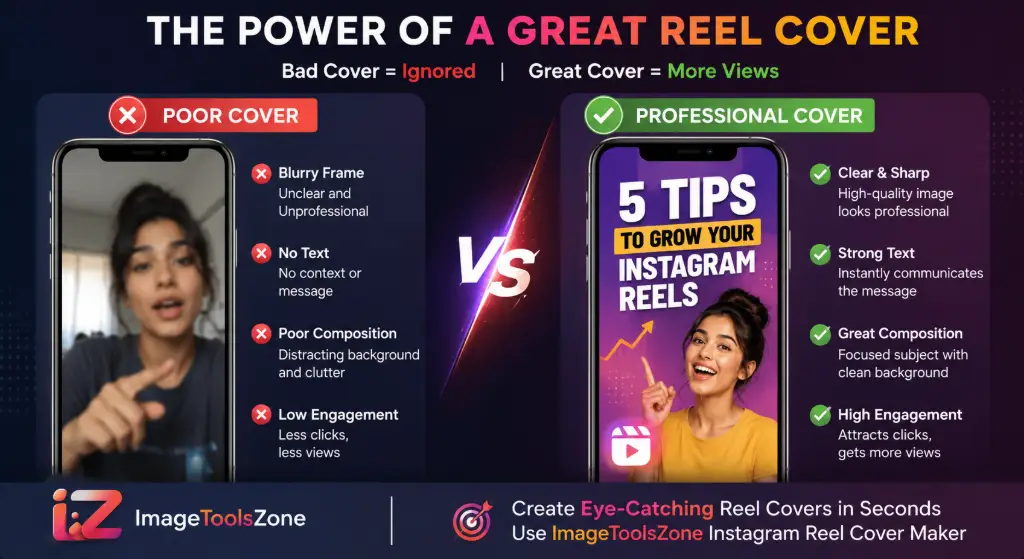
What Is an Instagram Reel Cover Maker?
Think of your Instagram Reel cover as the book cover for your video content. It's the first thing people see when your Reel appears in their feed, on the Explore page, or on your profile grid. An Instagram Reel cover (also called an Instagram Reel thumbnail) is a static image that represents your video content.
Here's the thing – when you upload a Reel, Instagram automatically selects a frame from your video to use as the cover. But that random frame might be blurry, poorly composed, or show an awkward moment that doesn't represent your content well. That's exactly why creators use an Instagram Reel cover maker online to take control of their first impression.
Profile Grid View
Your Reel cover appears as a square crop on your profile, making it crucial for maintaining a cohesive feed aesthetic.
Feed & Explore
In the main feed and Explore page, your cover competes with thousands of other posts for attention.
First Impression
Users decide in less than a second whether to watch your Reel based on the cover image.
A professional Instagram Reel cover creator or Instagram Reel cover generator allows you to upload a custom image, add text overlays, and ensure your Reel looks polished and intentional. This is especially important if you want your profile to look organized and professional.
Using tools like the Instagram Reel Thumbnail Maker, you can create covers that communicate your Reel's topic before someone even hits play. This pre-communication is powerful – it sets expectations and attracts the right audience.
Why Your Instagram Reel Cover Matters
Let's talk about a real problem that almost every Instagram creator faces: you post an amazing Reel, but it gets zero engagement. You check your analytics, and the reach is terrible. What went wrong?
Chances are, your Reel cover image is the culprit.
The Hard Truth: Instagram's algorithm tests your Reel with a small audience first. If those initial viewers don't stop scrolling and watch, Instagram assumes your content isn't engaging and stops showing it to more people. Your cover image is what determines whether someone stops or scrolls.
Common Reel Cover Problems:
- Poorly chosen video frames – That mid-blink moment or awkward hand gesture doesn't represent your brand well
- Blurry Reel covers – Low-quality frames make your content look unprofessional
- Text getting cut off – Important information disappears in the profile grid crop
- Faces being cropped – Your main subject gets sliced in half on the profile
- Inconsistent profile appearance – Random covers make your feed look chaotic
- Difficult-to-read titles – Viewers can't tell what your Reel is about at a glance
- Covers that don't communicate – No clear message or value proposition
When you use a dedicated free Instagram Reel cover maker, you solve all these problems. You get to choose or create the perfect image, position text strategically, and ensure your Reel looks great everywhere it appears.
Transform Your Reel Covers Today
Don't let a bad first impression kill your reach. Create professional covers in seconds.
Create a Better Reel Cover in SecondsInstagram Reel Cover Size: What Size Should You Use?
Getting the Instagram Reel cover size right is crucial. Use the wrong dimensions, and your image will look stretched, pixelated, or awkwardly cropped. Let's break down exactly what you need.
1080 × 1920 pixels
The ideal Instagram Reel cover size
Key Specifications:
- Dimensions: 1080 pixels wide by 1920 pixels tall
- Aspect Ratio: 9:16 (vertical format)
- File Format: JPG or PNG (PNG for higher quality)
- File Size: Keep it under 30MB for best results
- Quality: High-resolution for crisp display on all devices
These Instagram Reel cover dimensions match the full-screen vertical format that Reels use. When you create your cover at 1080×1920 pixels, you ensure it looks sharp on everything from older phones to the latest high-resolution displays.
Pro Tip: Always work at the full 1080×1920 size, even if you're just creating a simple cover. This gives you maximum flexibility and ensures your Instagram Reel thumbnail size is perfect for all viewing contexts.
If you need to adjust your image to these exact dimensions, tools like the Resize Image to Exact Size tool can help you get the perfect Instagram Reel size without distortion.
Instagram Reel Cover Safe Zone: Avoid Getting Your Text Cut Off
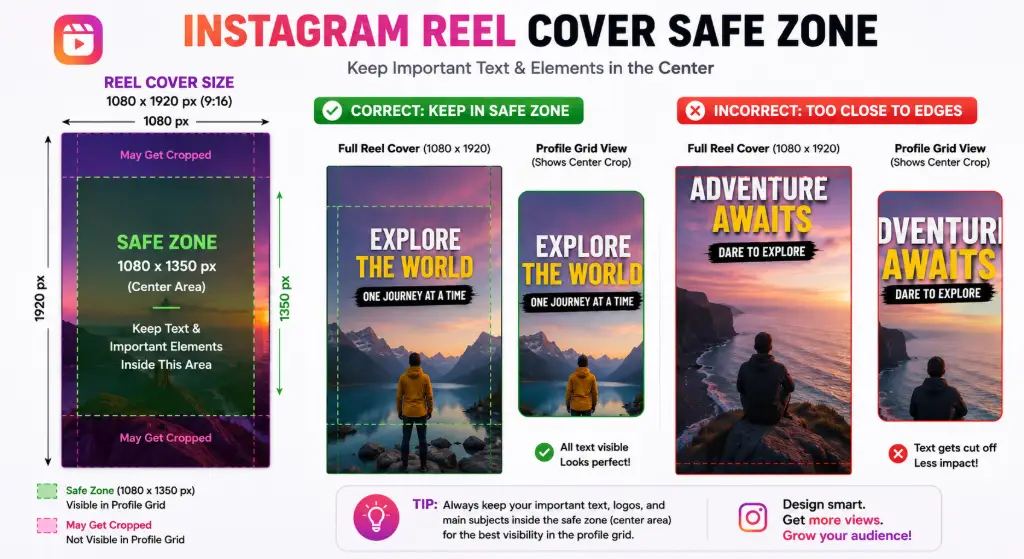
This is where most creators make a critical mistake. Your Reel cover looks perfect when you're designing it at 1080×1920, but when someone views your profile, Instagram crops it to a square. That beautiful headline you centered? It's now sliced in half.
Understanding the Instagram Reel cover safe zone is essential for creating covers that work everywhere.
The Two Views:
Full Reel View (9:16)
When someone watches your Reel in their feed or on the Explore page, they see the full 1080×1920 vertical image. This is your canvas.
Profile Grid Crop (1:1)
On your profile page, Instagram displays your Reel cover as a square, cropping from the center. Only the middle portion is visible.
How to Use the Safe Zone:
- Keep important elements centered – Place your headline, face, or product in the middle 1080×1350 area
- Avoid edge placement – Don't put critical text or subjects near the top or bottom 20% of the image
- Test the crop – Preview how your Instagram Reel cover cropped version will look before publishing
- Use the Instagram Reel thumbnail safe zone – This is the area that remains visible in all viewing contexts
The Instagram Reel cover text safe area is roughly the center 60-70% of your image. Anything outside this zone risks getting cut off when viewed on your profile grid. This is why understanding the Instagram Reel cover crop behavior is so important.
When you use the Instagram Reel Thumbnail Maker, you can position your elements with the safe zone in mind, ensuring your Instagram Reel cover looks great whether someone sees it full-screen or on your profile.
Create Covers with Perfect Safe Zone Placement
Design 1080×1920 Reel covers that look amazing everywhere.
Create a 1080×1920 Reel CoverHow to Make an Instagram Reel Cover
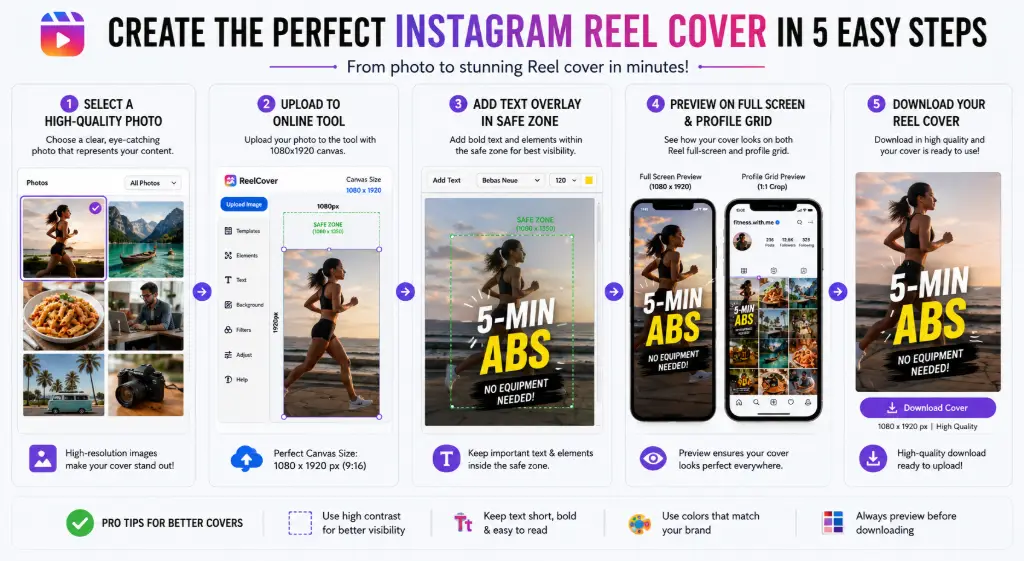
Creating a professional Instagram Reel cover doesn't require a design degree or expensive software. Here's a simple 5-step process that anyone can follow:
Choose Your Reel Image
Select a strong image or frame that represents your Reel's content. This could be a screenshot from your video, a custom photo, or a graphic you create.
Upload Your Image
Use the Instagram Reel Thumbnail Maker or your preferred Instagram Reel cover maker online. Upload your chosen image at 1080×1920 pixels.
Adjust the Crop
Position your main subject correctly. Use tools like the Free Image Cropper if you need to reframe your image.
Keep Text in the Safe Area
Add your headline or text overlay, but keep it within the center safe zone. Avoid placing important information near the edges where it might get cut off.
Download Your Reel Cover
Export your finished image as a high-quality JPG or PNG. Then upload it as your Reel cover when you publish.
If your image needs enhancement before using it as a cover, consider using the Image Enhancer to improve quality or the Background Remover to isolate your subject.
Ready to Create Your Cover?
Follow these steps and have a professional Reel cover ready in minutes.
Make Your Reel Cover OnlineHow to Make an Instagram Reel Cover Without Design Skills
Not everyone is a graphic designer, and that's perfectly okay. The beauty of using an Instagram Reel cover creator is that you don't need professional design experience to create stunning covers.
Why You Don't Need Complicated Software:
- No Photoshop required – Online tools handle the technical stuff
- No Canva subscription needed – Free Instagram Reel cover maker free tools work just fine
- Simple workflow – Upload, adjust, download. That's it.
- Use existing photos – You can create a cover from a single photo or video frame
- Quick results – Create a professional cover in under 5 minutes
The key is finding an Instagram Reel cover maker online that's intuitive and doesn't overwhelm you with options. Tools like the Instagram Reel Thumbnail Maker are designed for creators who want results without a learning curve.
Simply upload your image, use basic cropping tools like the Crop Image to Oval Shape if you want creative framing, or stick with standard rectangles. Add text if needed, and you're done.
You can even overlay images to create more dynamic covers without any design expertise.
Instagram Reel Cover Maker vs. Using a Random Video Frame
Let's settle this once and for all: should you just let Instagram pick a frame from your video, or should you create a custom cover? Here's a straightforward comparison:
| Random Video Frame | Custom Reel Cover |
|---|---|
| May be blurry or low quality | Clear, high-resolution image |
| Poor composition – awkward moments | Controlled, intentional composition |
| Text may be missing or unclear | Add clear visual message and headlines |
| Subject may be cropped poorly | Position subject perfectly in safe zone |
| Inconsistent profile appearance | Consistent branding across all Reels |
| No control over first impression | Strategic design to maximize engagement |
The choice is clear. When you use an Instagram Reel cover generator, you're taking control of your content's presentation. You're telling viewers exactly what to expect and making your profile look professional and cohesive.
Stop Settling for Random Frames
Create custom covers that represent your brand and boost engagement.
Create a Custom Reel CoverHow to Design an Instagram Reel Cover That Gets Attention
Creating a cover that stops the scroll requires more than just slapping text on an image. Here are proven strategies to make your Instagram Reel thumbnail irresistible:
Design Principles That Work:
✅ Use a Clear Headline
Keep it short and punchy. 3-5 words maximum. Your headline should communicate the value or topic instantly.
✅ One Main Subject
Don't clutter your cover. Focus on one person, one product, or one key visual element.
✅ Strong Contrast
Make text easy to read by using contrasting colors. Dark text on light backgrounds or vice versa.
✅ Consistent Branding
Use the same fonts, colors, and style across all your Reels. This builds recognition.
✅ Show the Benefit
Viewers should understand what they'll get from watching your Reel within 2 seconds.
✅ Avoid Overloading
Too much text reduces readability. White space is your friend.
If you need to enhance your cover image, try the Black and White Converter for a dramatic look, or use the Hex Color Picker to match your brand colors perfectly.
Instagram Reel Cover Ideas for Different Creators
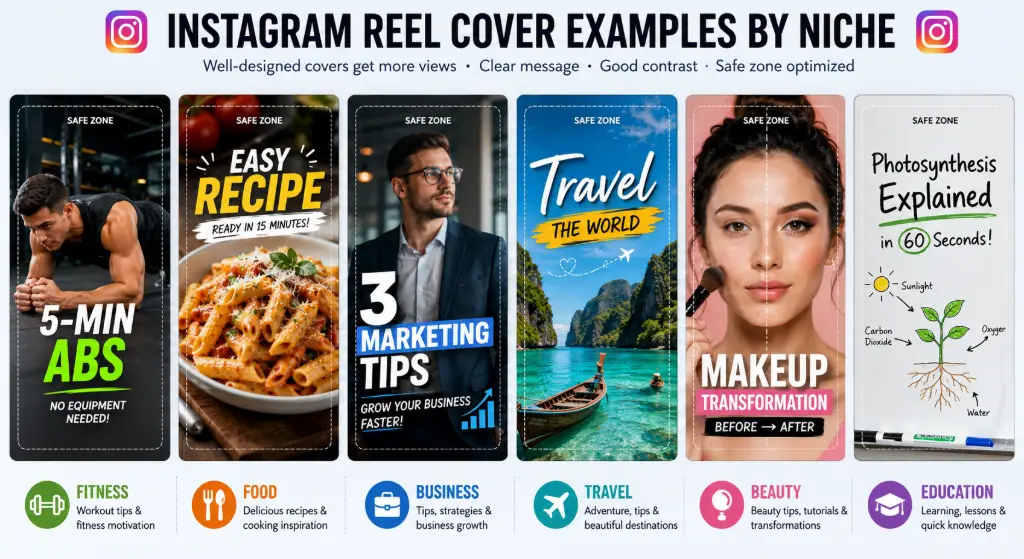
Your Reel covers should reflect your niche and audience. Here are tailored ideas for different types of creators:
Fitness Creators:
- Show mid-workout action shots
- Use bold text like "5-Minute Abs Workout"
- Include before/after transformations
- Highlight the benefit: "Burn 300 Calories"
Food Creators:
- Use your most appetizing final dish photo
- Text like "Easy Pasta Recipe in 15 Min"
- Show the finished product, not the cooking process
- Include difficulty level or time
Small Businesses:
- Feature your product clearly
- Use text like "3 Marketing Mistakes to Avoid"
- Show customer results or testimonials
- Include your logo for brand recognition
Travel Creators:
- Use stunning destination photos
- Text like "Hidden Gems in Bali"
- Show the most Instagrammable spot
- Include location tags
Beauty Creators:
- Before/after split images
- Text like "10-Min Makeup Routine"
- Show the final look clearly
- Use consistent color schemes
Educational Creators:
- Use clean, text-focused designs
- Text like "Learn Spanish in 30 Days"
- Include key takeaway or statistic
- Maintain professional appearance
For online stores, consider using the Auto Crop Object for Ecommerce tool to isolate your products perfectly. Real estate creators can use the Custom Photo Frame Generator to add professional borders to property photos.
Instagram Reel Cover Design Tips Checklist
Use this quick checklist every time you create a new Reel cover:
✅ Use a high-quality image (no pixelation)
✅ Keep the main subject centered
✅ Keep important text inside the safe area
✅ Use short, punchy headlines (3-5 words)
✅ Use readable fonts (avoid overly decorative scripts)
✅ Maintain consistent branding across Reels
✅ Avoid unnecessary clutter and white space
✅ Check the profile-grid appearance before publishing
✅ Use the correct 1080×1920 vertical format
✅ Preview on mobile before finalizing
Following these tips ensures your Instagram Reel cover performs well across all viewing contexts and maintains a professional appearance.
Instagram Reel Cover Mistakes to Avoid
Even experienced creators make these common mistakes. Here's what to watch out for:
Mistake #1: Putting Text Too Close to the Edge
Remember the safe zone! Text near the top or bottom gets cut off on your profile grid.
Mistake #2: Using a Blurry Frame
Low-quality covers make your entire Reel look unprofessional. Always use high-resolution images.
Mistake #3: Too Much Text
Viewers scroll fast. If they can't read your cover in 2 seconds, they'll keep scrolling.
Mistake #4: Poor Contrast
Light gray text on a white background? Nobody can read that. Ensure strong contrast.
Mistake #5: Ignoring the Profile-Grid Crop
Always preview how your Instagram Reel cover cropped version looks on your profile.
Mistake #6: Using Inconsistent Designs
Every Reel looking completely different makes your profile look chaotic. Maintain some consistency.
Mistake #7: Making Every Cover Identical
While consistency is good, total uniformity is boring. Vary your covers within your brand guidelines.
Mistake #8: Choosing a Frame That Doesn't Explain the Reel
Your cover should communicate the topic. Don't make viewers guess what your Reel is about.
Instagram Reel Cover Maker vs. Canva vs. Photoshop
You have options when creating Reel covers. Here's how different methods compare:
| Method | Best For | Pros | Cons |
|---|---|---|---|
| Instagram Built-in | Quick, basic covers | Fast, no extra tools needed | Limited control, random frames |
| Canva | Template-based designs | Many templates, easy to use | Subscription for best features, can be slow |
| Photoshop | Advanced designers | Complete control, professional results | Expensive, steep learning curve |
| ImageToolsZone | Quick, image-based covers | Free, fast, no signup, simple | Fewer design templates |
Need a simple Reel cover without complicated editing software? Try ImageToolsZone. It's perfect for creators who want to create professional covers quickly without learning complex design tools.
If you need to convert image formats or add watermarks to protect your covers, ImageToolsZone has those tools too.
How to Choose the Best Image for Your Reel Cover
The image you choose sets the foundation for your entire cover. Here's what to look for:
Represents the Reel Clearly
Choose an image that instantly communicates what your Reel is about. If it's a cooking tutorial, show the finished dish.
Strong Focal Point
Your image should have one clear subject that draws the eye immediately.
Works Vertically
Horizontal images need cropping. Choose or shoot images that work in 9:16 format.
Space for Text
Leave empty areas where you can add headlines without covering important elements.
Recognizable When Cropped
Test how your image looks as a square. The main subject should still be clear.
Looks Good Small
Your cover appears tiny on mobile feeds. Make sure it's still impactful at small sizes.
If your image needs adjustments, use the Professional Image Editor or the Advanced Photo Editor to make quick edits before creating your cover.
How to Create a Consistent Instagram Reel Feed
Your Reel covers don't exist in isolation – they're part of your overall Instagram aesthetic. Here's how to maintain consistency:
Elements of a Cohesive Feed:
- Same font family – Pick 1-2 fonts and use them consistently
- Consistent colors – Use your brand color palette for all covers
- Similar headline placement – Keep text in the same position (top, center, or bottom)
- Consistent image style – All photos or all illustrations, not a mix
- Repeating visual elements – Use the same icons, borders, or graphics
- Similar composition – Maintain a consistent layout structure
Creating consistency is easier when you use the same tool for all your covers. The Instagram Reel Thumbnail Maker allows you to develop a repeatable process that ensures every cover fits your brand aesthetic.
You can also use the Image Palette Generator to extract colors from your brand assets and ensure your covers match perfectly.
Free Instagram Reel Cover Maker: Why Use an Online Tool?
Online tools have revolutionized content creation. Here's why using a free Instagram Reel cover maker makes sense:
No Complicated Software
Everything runs in your browser. No downloads, no installations, no updates.
Fast Workflow
Create a cover in minutes, not hours. Perfect for busy creators.
Easy Cropping
Tools like the Free Image Cropper make adjustments simple.
Browser-Based
Work from any device – phone, tablet, or computer.
Beginner-Friendly
No design experience needed. Intuitive interfaces guide you.
Instant Download
Create from your images and download immediately to use.
Online tools like ImageToolsZone give you professional results without the complexity. You can resize images for Instagram, rotate and flip images, or even merge multiple images – all from your browser.
Who Should Use an Instagram Reel Cover Maker?
Almost anyone creating content on Instagram can benefit from professional Reel covers. Here's who should definitely use an Instagram Reel cover creator:
📹 Content Creators
Build your personal brand with consistent, professional covers.
🌟 Influencers
Stand out in a crowded market with eye-catching thumbnails.
Small Businesses
Present your products and services professionally.
📱 Social Media Managers
Create covers quickly for multiple clients.
✍️ Bloggers
Drive traffic to your content with compelling covers.
🎓 Coaches & Educators
Make your educational content look polished.
📸 Photographers
Showcase your work with beautiful cover images.
🛒 Online Sellers
Create product-focused covers that convert.
🎨 Personal Brands
Build recognition through consistent visual branding.
No matter your niche, using an Instagram Reel cover maker online helps you present your best self to your audience.
Frequently Asked Questions
An Instagram Reel Cover Maker is an online tool that allows you to create custom cover images for your Instagram Reels. Instead of using a random frame from your video, you can design a professional-looking thumbnail that represents your content and attracts viewers. These tools typically let you upload images, add text, and ensure your cover looks great both in full-screen view and on your profile grid.
The ideal Instagram Reel cover size is 1080 pixels wide by 1920 pixels tall, with a 9:16 aspect ratio. This matches the full-screen vertical format that Instagram Reels use. Always create your covers at this size to ensure they look sharp on all devices and maintain quality when Instagram displays them.
While your cover should be 1080×1920 pixels, remember that Instagram crops it to a square (1:1 ratio) on your profile grid. The important elements – like text and faces – should be in the center safe zone (approximately the middle 1080×1350 pixels) to ensure they're visible when cropped.
Yes! There are several free Instagram Reel cover makers available online, including ImageToolsZone's Instagram Reel Thumbnail Maker. These free tools allow you to create professional covers without paying for expensive design software or subscriptions. You can upload your images, add text, and download your covers at no cost.
To make an Instagram Reel cover: 1) Choose or create a high-quality image that represents your Reel, 2) Upload it to an Instagram Reel cover maker at 1080×1920 pixels, 3) Adjust the crop and position your main subject in the center safe zone, 4) Add text if needed, keeping it within the safe area, 5) Download your cover and upload it when publishing your Reel on Instagram.
Absolutely! In fact, using a custom image is highly recommended over letting Instagram auto-select a frame from your video. Custom images give you complete control over the quality, composition, and message of your Reel cover. You can use photos, graphics, or screenshots – whatever best represents your content.
Your Instagram Reel cover looks cropped on your profile because Instagram displays Reels as squares in the profile grid, even though the actual cover is 9:16 vertical. Instagram crops from the center, so anything outside the middle square area gets cut off. This is why it's crucial to keep important elements in the safe zone.
Place text in the center safe zone of your Reel cover – roughly the middle 60-70% of the image. Avoid putting text near the top or bottom edges, as it will be cut off when viewed on your profile grid. Keep headlines short (3-5 words) and ensure strong contrast with the background for readability.
Yes, an Instagram Reel cover and an Instagram Reel thumbnail refer to the same thing – the static image that represents your Reel before someone plays it. Different platforms and creators use these terms interchangeably. Whether you call it a cover or thumbnail, it serves the same purpose: attracting viewers and representing your content.
Definitely! You don't need Canva to create Instagram Reel covers. There are many simpler, free tools like ImageToolsZone's Instagram Reel Thumbnail Maker that are specifically designed for this purpose. These tools are often faster and easier to use for creating Reel covers specifically, without the complexity of a full design platform.
A good Instagram Reel cover has: high-quality resolution, a clear focal point, readable text in the safe zone, strong contrast, consistent branding with your other content, and communicates the Reel's topic instantly. It should look great both full-screen and when cropped to a square on your profile.
To create a professional Reel cover: use high-resolution images (1080×1920), maintain consistent branding across all covers, keep text minimal and readable, position important elements in the safe zone, use strong contrast, avoid clutter, and preview how it looks on both full-screen and profile grid before publishing. Tools like the Instagram Reel Thumbnail Maker make this process simple.
While you should maintain consistency in fonts, colors, and overall branding, you don't need to make every cover identical. Vary your covers within your brand guidelines to keep your feed interesting while still looking cohesive. Consistency builds recognition, but variety prevents boredom.
Unfortunately, Instagram doesn't allow you to change the Reel cover after you've published it. This is why it's so important to create and preview your cover carefully before posting. If you need to change it, you'd have to delete and re-upload the entire Reel, which means losing all engagement and insights.
Use JPG or PNG format for your Instagram Reel covers. PNG is better for images with text or graphics as it maintains higher quality and supports transparency. JPG works well for photos and has smaller file sizes. Keep your file size under 30MB for best results.
Make your Reel covers stand out by using bold colors that contrast with Instagram's interface, creating curiosity with intriguing headlines, showing faces or emotions, using high-quality images, maintaining consistency so people recognize your brand, and testing different styles to see what resonates with your audience.
Ready to Create Your Reel Cover?
Stop letting random frames represent your amazing content. Create professional, eye-catching Instagram Reel covers that boost engagement and make your profile look polished.
Try ImageToolsZone Free →No signup required • Free to use • Professional results